


Updated June 24, 2026
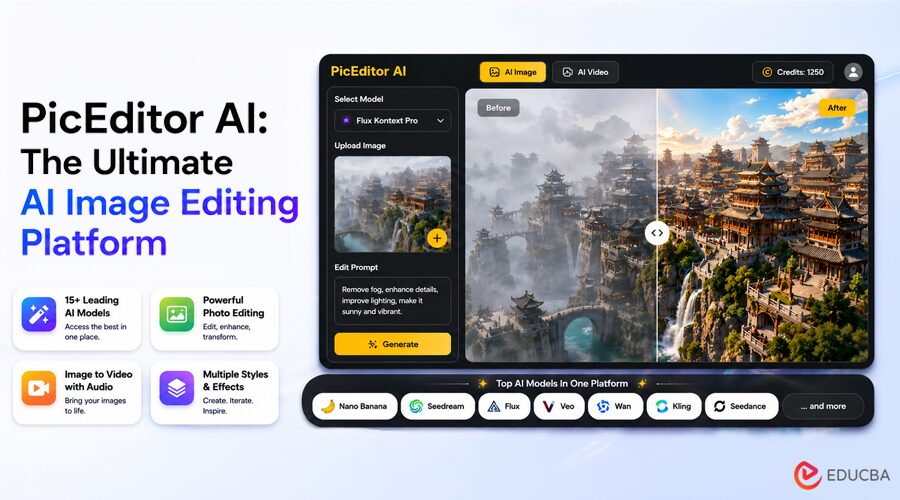
The AI image editing space has fractured badly. Designers toggle between four browser tabs: one for background removal, another for upscaling, a third for style transfer, and a fourth for animation. Each platform runs a different model, charges a different credit cost, and has a different learning curve. That fragmentation is exactly the problem PicEditor AI, an all-in-one AI Photo Editor, was built to eliminate.
After spending time testing PicEditor AI’s AI image editing platform, it becomes clear that the aggregation model here is more than a convenience pitch. It genuinely changes the pace and texture of creative work, particularly for users who switch tasks constantly and need professional output without the overhead of professional software. The question is not whether it works. The question is where it works best and where it still asks for patience from the user.
What Does the PicEditor AI Image Editing Platform Look Like at First Use?
Landing on the site, the first thing that registers is the model roster on the homepage: Nano Banana, Nano Banana 2, Flux Kontext Pro, Flux Kontext Max, Seedream 4.0, Seedream 5.0 Lite, GPT-4o, Qwen, Veo 3, Veo 3.1 series, Kling 2.x, Seedance, Wan 2.5, Runway Gen 4, Grok. These are not placeholder names. These are the production models that practitioners in AI-generated content communities argue about weekly.
As an AI image editing platform, PicEditor AI immediately differentiates itself by offering a breadth of models under a single login. Seeing these models behind one account rather than spread across multiple subscriptions is the platform’s clearest value proposition.
The interface does not front-load friction. There is no lengthy onboarding tutorial, no forced walkthrough. The homepage presents tool categories directly: AI Image, AI Video, Background Remover, Object Eraser, Face Swap, Photo to Cartoon, Style Transfer, Collage Maker, Upscaler, and Glare Removal. From the creator’s perspective, this is the rare case where a wide feature set does not also mean a cluttered experience.
How Does the PicEditor AI Image Editing Platform Take You From Upload to Edited Output?
Step 1: Choose an Editing Tool from the Toolbar
The site organizes entry points by task rather than by model. A user who wants to erase an object goes to Object Eraser. A user who wants a painting effect opens Photo and selects Painting. This task-first structure means the platform decides which underlying models are appropriate for each job; the user does not need to know which engine handles which operation.
Step 2: Upload the Image and Describe the Edit
Once inside a tool, the workflow follows a consistent pattern: upload an image, then describe the edit in natural language. The platform’s FAQ states it plainly: upload the image, select a modification tool, describe your edit, and the system applies professional-grade enhancements.
For tools like Nano Banana that support up to four reference images, users can also upload reference visuals to guide style or character consistency rather than relying solely on text descriptions.
Step 3: Generate and Iterate
One underexplored capability of the PicEditor AI image editing platform is the ability to run the same image through multiple models and compare results. For example, users can edit the same portrait with both Flux Kontext Pro and Nano Banana and compare which result looks better.
The comparison happens within the same platform rather than across separate subscriptions. For iterative creative work, this represents a meaningful time reduction. That said, the result will vary depending on prompt specificity. Vague instructions tend to produce generic outputs across all models, and that is a platform-agnostic limitation rather than a product flaw.
Three Scenarios Where PicEditor AI Earns Its Place
1. E-Commerce Product Photography
For sellers who need clean product visuals, the PicEditor AI image editing platform combines background removal, object erasing, and advanced model-driven editing into a single workflow.
The Flux Kontext engines, described by the platform as offering context-aware editing with object-level precision and accurate text-in-image rendering, appear particularly suited to product imagery, where label text needs to survive edits without distortion. From a practical perspective, text rendering quality should still be verified before large-scale production use.
2. Social Media and Content Creation
The photo-to-cartoon, photo-to-painting, and style transfer tools available within the PicEditor AI image editing platform map directly to formats that perform well across social media channels.
Rather than exporting to a separate application to apply artistic effects, users can complete the transformation within the same environment. The style transfer feature uses reference images to apply a consistent artistic look to photos, making it useful for creators who want the same visual style across multiple projects.
3. Multimedia Creators Who Need Motion
The Veo 3 integration is arguably the most differentiating feature of the PicEditor AI image editing platform for multimedia creators.
After standard photo editing, the same interface lets users animate still images using native audio generation. The workflow is remarkably streamlined: no exporting, no uploading to another service, and no switching accounts. The practical caveat is that video generation naturally involves more variables than image editing, and complex scenes may require additional generation attempts to achieve the intended result.
Honest Limitations Worth Knowing
Like most modern AI tools, the PicEditor AI image editing platform does not hide its dependency on prompt quality.
Weak or ambiguous descriptions yield weaker results, and this holds across all supported models. Users unfamiliar with prompt engineering will likely need several iterations to achieve consistent output quality. The sample prompts available on the homepage provide a useful starting point.
Character consistency and the preservation of complex scenes remain model-dependent. Nano Banana’s four-reference-image support helps significantly, but results can vary depending on subject matter, facial complexity, and clothing details. Production users should expect some iteration rather than assuming first-generation perfection.
The credit-based pricing structure also means that heavy users of compute-intensive models like Veo 3 will consume credits faster than users focused primarily on image editing. The Unlimited plan is clearly designed for this audience.
Platform Comparison at a Glance
| Dimension | Single-Model Editors | Multi-Tool Suites | PicEditor AI |
| Model Variety | One engine per platform | Limited selection | 15+ production models |
| Task Switching | Requires new platform | Within platform | Within platform |
| Image-to-video | Rarely included | Occasional add-on | Veo 3 + Kling + Seedance native |
| Reference Image Support | Varies | Rare | Up to 4 images (Nano Banana) |
| Text-in-image Editing | Often weak | Varies | Flux Kontext dedicated feature |
| Learning Curve | Tool-specific | Moderate | Task-first, low initial friction |
| Commercial Rights | Plan-dependent | Varies | Included on all paid plans |
Who Gets the Most Value From PicEditor AI?
PicEditor AI is not optimized for users who perform a single narrow task at extremely high volume. A dedicated upscaling pipeline or a bulk background-removal operation may still benefit from a specialized solution.
Where PicEditor AI stands out is for creators who move across multiple task types in a single session: editing a photo, applying a style, generating alternative versions, animating the result, and comparing outputs across different AI models. That workflow pattern traditionally required several separate subscriptions and applications.
Final Thoughts
PicEditor AI is not merely another AI image editing platform. Its biggest advantage comes from consolidating leading AI models, image editing tools, style-transfer capabilities, and video-generation workflows into a single environment.
The consolidation is genuine, and the model roster is up to date rather than outdated. For content creators, marketing teams, and small e-commerce businesses without dedicated design resources, the platform significantly reduces the friction of moving between multiple AI tools while maintaining access to some of the industry’s most advanced generative models.
The platform’s value ultimately depends on how often users switch between creative tasks.
For professionals who frequently move between image editing, style transfer, and video generation, PicEditor AI delivers a workflow efficiency that would otherwise require juggling multiple subscriptions and interfaces.
Recommended Articles
We hope this review of the AI image editing platform helps you streamline your creative workflow, compare leading AI models more effectively, and create high-quality visual content with greater efficiency. Explore our recommended articles below to learn more about AI image generation, photo editing tools, content creation strategies, and emerging creative technologies.


