
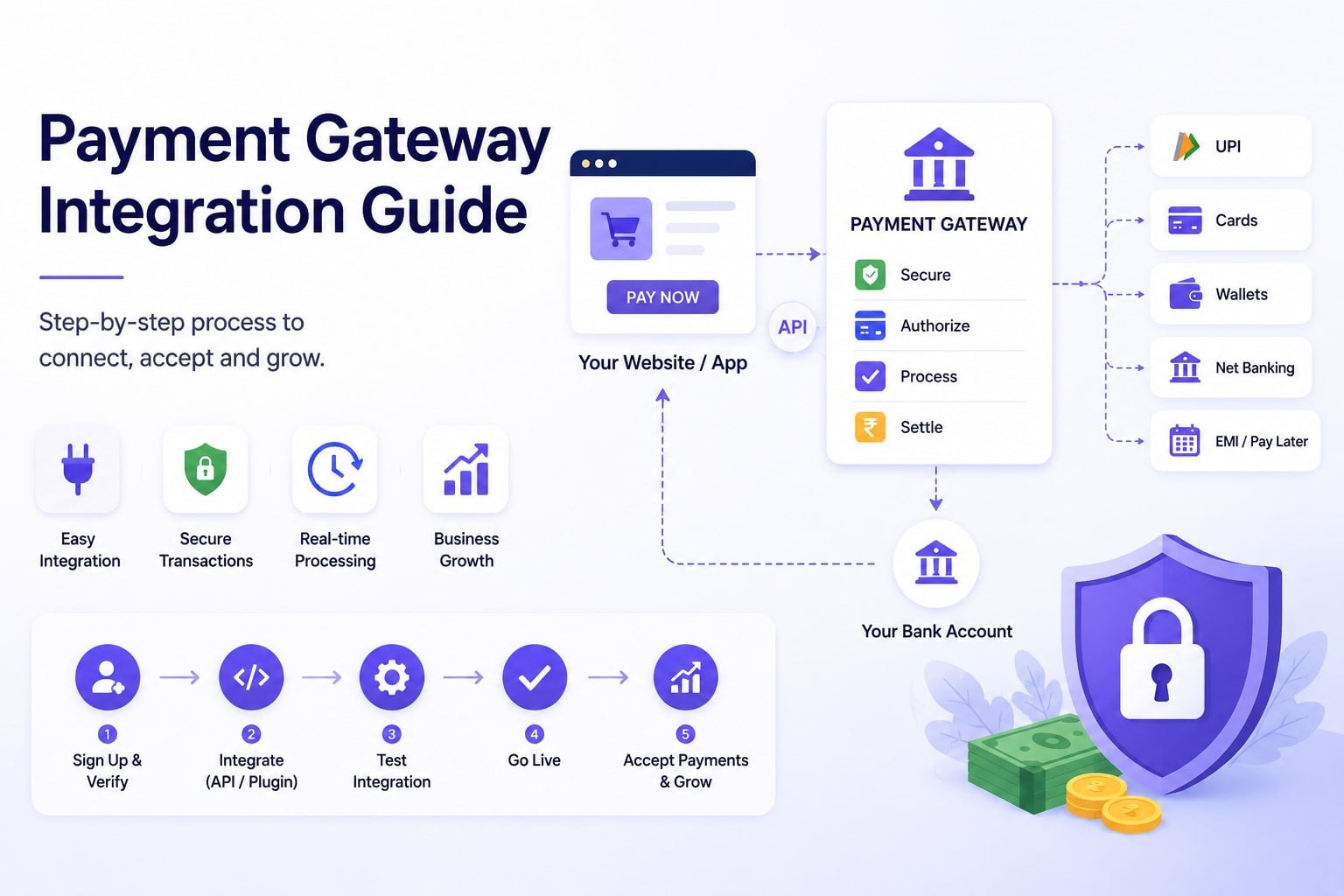
Accepting digital payments is no longer optional for small businesses in India. Whether you run an online store, a consulting business, a subscription service, or a social commerce brand, customers expect a fast and secure checkout experience. A payment gateway serves as the intermediary between a customer and a business’s bank account. When integrated correctly, it allows businesses to accept UPI, cards, net banking, wallets, and other payment methods while ensuring secure transaction processing. The good news is that payment gateway integration is much simpler today than it was a few years ago.
Most small businesses can start accepting payments within a day or two, even without a dedicated technical team. This guide explains how payment gateways work, the required documents, available integration options, and best practices for launching a successful online payment experience.
Key Takeaways
- A payment gateway securely processes online payments and transfers funds to your business account.
- Small businesses can accept UPI, cards, net banking, wallets, and recurring payments through a single integration.
- Most providers require basic KYC documents for onboarding.
- Businesses can integrate using plugins, payment links, hosted checkout pages, or APIs.
- Testing payments and webhook notifications before launch is essential.
- Choosing the right gateway can improve conversion rates and reduce payment failures.
What is a Payment Gateway?
A payment gateway is a technology framework that enables companies to safely accept online payments. When a customer makes a payment, the gateway:
- Collects payment information.
- Encrypts sensitive data.
- Sends the payment request to the relevant bank or payment network.
- Receives approval or decline status.
- Returns the response to the merchant’s website or application.
The entire process usually takes only a few seconds. Modern payment gateways also provide:
- Fraud detection tools
- Transaction monitoring
- Refund management
- Payment reconciliation
- Recurring payment support
- Compliance and security controls
For small businesses, this means access to enterprise-grade payment infrastructure without having to build it internally.
Why Payment Gateway Integration is Important for Small Businesses?
A payment gateway does more than process transactions.
- Improve Customer Experience: Consumers can quickly and easily complete purchases by choosing their preferred payment method.
- Increase Conversion Rates: A smooth checkout experience reduces cart abandonment and improves sales.
- Accept Multiple Payment Methods: Businesses can offer UPI, net banking, debit cards, credit cards, Buy Now Pay Later (BNPL), EMI options, and mobile wallets.
- Enhance Security: Payment gateways use encryption, tokenization, and fraud monitoring to protect customer information.
- Simplify Operations: Features like automated settlements, reporting, and reconciliation reduce administrative effort.
Documents Required to Integrate a Payment Gateway
Before activation, businesses must complete Know Your Customer (KYC) verification. The required documents vary depending on the business structure.
1. Sole Proprietorship
Typically requires:
- PAN card
- Bank account details
- Address proof
- Business proof (if applicable)
For smaller businesses, GST registration may not always be mandatory.
2. Private Limited Company or LLP
Common requirements include:
- Company PAN
- Certificate of Incorporation
- GST registration
- Bank account details
- Director KYC documents
3. Partnership Firm
Usually requires:
- Partnership deed
- Firm PAN
- GST registration (where applicable)
- Partner KYC documents
- Bank account details
4. Regulated Industries
Businesses operating in categories such as financial services, healthcare, pharmaceuticals, gaming, or travel may be asked to provide additional documentation. Preparing digital copies of all documents in advance can significantly speed up the onboarding process.
Step-by-Step Guide to Payment Gateway Integration
Here is a simple step-by-step breakdown of the payment gateway integration process.
Step 1: Choose the Right Payment Gateway
Not all payment gateways offer the same features.
When evaluating providers, consider:
- Setup fees
- Transaction fees
- Supported payment methods
- Settlement speed
- Success rates
- Security features
- Customer support
- Integration flexibility
The ideal gateway should support your current needs while remaining scalable as your business grows.
Step 2: Complete KYC Verification
After creating an account, upload the required business and banking documents.
Verification timelines vary by provider and business category. Once approved, you receive access to the merchant dashboard and integration credentials.
Step 3: Select an Integration Method
Businesses can choose from multiple integration options depending on technical requirements. The most common methods include:
- Website plugins
- Payment links
- Hosted checkout pages
- APIs and SDKs
Step 4: Configure API Keys and Webhooks
Most payment gateways provide:
- Test API keys
- Live API keys
- Webhook support
A webhook allows the gateway to notify your system automatically whenever a payment succeeds, fails, or is refunded. This ensures accurate order management without relying solely on customer redirects.
Step 5: Test Transactions in Sandbox Mode
Before accepting real payments, conduct comprehensive testing. Test scenarios should include:
- Successful payments
- Failed payments
- Pending transactions
- Refund processing
- Webhook notifications
Testing helps identify issues before customers encounter them.
Step 6: Go Live
Once testing is complete:
- Switch to production credentials
- Process a small live transaction
- Verify settlement timelines
- Confirm reconciliation reports
This ensures your payment flow works correctly before handling larger transaction volumes.
Choosing the Right Payment Gateway Integration Method
The best integration approach depends on your business model and technical resources.
1. Website Plugins
Many payment gateways offer ready-made plugins for popular e-commerce platforms.
Common integrations include:
- Shopify
- WooCommerce
- Magento
- Wix
- OpenCart
Benefits
- Fast setup
- No coding required
- Easy maintenance
Best For
- Small online stores
- E-commerce businesses
- Entrepreneurs with limited technical resources
2. Payment Links
Payment links allow businesses to collect payments without building a website.
The process is simple:
- Generate a payment link.
- Share it through WhatsApp, SMS, email, or social media.
- Customer completes payment.
- Business receives confirmation.
Best For
- Freelancers
- Consultants
- Service providers
- Social commerce sellers
3. Hosted Checkout Pages
Hosted checkout pages redirect customers to a secure payment page managed by the gateway provider.
Benefits
- Faster implementation
- Reduced compliance burden
- Strong security controls
Best For
- Small and medium businesses
- Startups
- Businesses launching quickly
4. APIs and SDKs
Businesses with custom websites or mobile applications often use APIs and software development kits (SDKs).
Benefits
- Full customization
- Better control over user experience
- Flexible payment flows
Best For
- SaaS companies
- Mobile apps
- Large e-commerce platforms
- Technology-driven businesses
Essential Checks Before Launch
Before going live, verify the following:
- Mobile Checkout Experience: Most Indian consumers complete transactions on mobile devices. Ensure UPI apps open correctly, checkout pages load quickly, and mobile navigation is smooth.
- Refund Functionality: Test the refund process to ensure customer issues can be resolved efficiently.
- Webhook Reliability: Confirm that payment status updates are received correctly in your system. This prevents issues such as duplicate orders, incorrect order status, and fulfillment errors.
- Settlement and Reconciliation: Review your first few settlements carefully. Match orders received, payments collected, and settlements credited.
Early reconciliation helps identify configuration issues before they affect operations.
Common Mistakes to Avoid
Avoid these issues:
- Choosing Based Only on Transaction Fees: A lower fee does not always mean better value. Consider success rates, support quality, and reliability.
- Ignoring Mobile Users: A poor mobile checkout experience can significantly impact conversion rates.
- Skipping Sandbox Testing: Testing helps prevent customer-facing issues and payment failures.
- Not Setting Up Webhooks: Without webhook notifications, payment tracking can become unreliable.
- Offering Limited Payment Options: Customers have different payment preferences. Supporting multiple methods improves conversion rates.
Final Thoughts
Integrating a payment gateway is one of the most important steps in building a successful digital business. A reliable payment experience can improve customer trust, increase conversions, and simplify financial operations. Whether you use a no-code payment link, an e-commerce plugin, a hosted checkout page, or a custom API integration, the right setup can help your business start accepting payments quickly and securely. By focusing on payment reliability, mobile optimization, security, and customer convenience, small businesses can create a checkout experience that supports long-term growth.
Frequently Asked Questions (FAQs)
Q1. Can a sole proprietor integrate a payment gateway?
Answer: Yes. Sole proprietors and individual business owners can onboard with several payment providers by providing simple KYC papers, including PAN, bank account information, and proof of address.
Q2. How long does payment gateway integration take?
Answer: Website plugins and payment links can often be activated within a day. Depending on the technological complexity, custom API integrations could take a few days.
Q3. Do I need a website to accept payments?
Answer: No. Many payment gateways offer payment links and hosted payment pages, allowing businesses to collect payments without a dedicated website.
Q4. What is a webhook?
Answer: A webhook is an automated notification sent by the payment gateway to inform your system when a payment status changes.
Q5. Are payment gateways secure?
Answer: Yes. Reputable payment gateways use encryption, tokenization, fraud monitoring, and industry-standard compliance frameworks to protect payment data.
Recommended Articles
We hope this guide on payment gateway integration helps you streamline your online payment process. Check out these recommended articles for more insights and strategies to grow your business.

