

Updated May 17, 2023

Introduction to MySQL DML
DML stands for Data Manipulation Language which basically deals with the modification of data in the database. DML statements include structured query statements like select, insert, update, delete, etc. Data manipulation follows operations like storing, modifying, retrieving, deleting, and updating data in a database.
It manages and modifies the data in the database.
- Select: Select keyword in MySQL is used to retrieve data from a table.
- Insert: Insert or add data into a table.
- Update: Update the existing data in a table.
- Delete: Delete all records from a database table.
- Merge: It is a kind of insert or update operation.
- Call: Call statement calls a PL/SQL or any subprogram.
- Explain plan: Interpretation of the data access path.
- lock table: Concurrency Control
Example to Demonstrate DML Statements
Here are some examples:
1. INSERT
It inserts or adds new rows or records in the existing table.
Syntax:
Insert into <table_name>values(<value1>,<value2>,<value3>…….,<valuen>);Where,
- table name: The name of the table In which the data needs to be inserted.
- values: values for each column of the table.
To insert values in the table, we first need to create a table that is a DDL(Data definition language) statement. Here, in the examples below, we have created a table named students. We will show a demonstration of the DML statement in this table only. So, let’s start with creating the student’s table.
Below is the query for creating a statement:
create table students (roll_no int,student_name varchar(150),course varchar(150));Once the table is created, we can now insert values into it.
Below is the query for the insert statement:
insert into students values(1,'ashish','java');
Insert into students values(2,'rahul','C++');
select * from students;
Output:
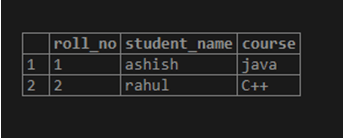
We have inserted two rows in the table. We use a select statement with an asterisk (*) to view the entire table with records. Again, I added a third row to the table.
insert into students values(3,'divya','Arch');
select * from students;
Output:
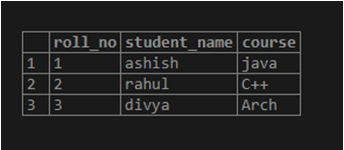
We can also populate one table using another table with the help of a select statement. The only condition is that the table must have the same sets of attributes.
Syntax to populate the table:
Insert into table_no_first [(column1, column 2…column n)] select column1, column 2…column n from table_no_two [where condition];2. SELECT
It is used to display the contents of the tables. It is also used to select data from the database. Below is the syntax to select specified columns and records from the table.
Select column1,column2,…..column n from table_table;Where column 1, column 2….column n are the attributes of the table
Example to demonstrate the above syntax:
select student_name from students;Output:
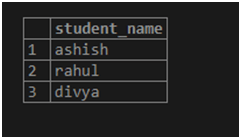
Below is the query for selecting all records and columns from the table:
Select a statement with a where clause:
Syntax:
select column 1,column 2,….column n from table_name where [condition]Where the condition is the specified condition on which data will be fetched, we can select logical operators like >,<,=, LIKE, NOT, etc.
Example to demonstrate select statement with where clause
select roll_no, student_name, course from students where roll_no=3;Output:
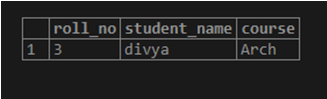
3. Update
It is used to change the existing values of the column, i.e., changing the student’s name or the course of any student.
Syntax of update statement:
Update<table_name> set <column_name>=value where <condition>;- Table_name: The table name in which the value is to be changed.
- condition: condition to get the specified row
Below is the query of the update statement:
update students set roll_no=roll_no+10 where student_name='ashish';Output:
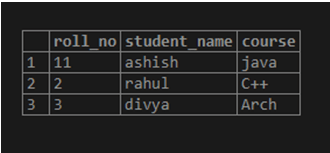
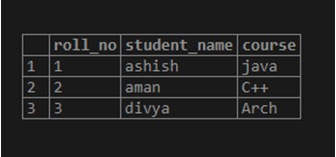
update students12 set student_name='aman' where roll_no=2;
select * from students;
Output:
4. Delete
A delete statement deletes table rows based on the specified conditions.
Syntax:
delete from <table_name> where <condition>;- table_name: Name of the table from which the data needs to be deleted.
- condition: Condition based on which the data is to be deleted.
select * from students;Output:
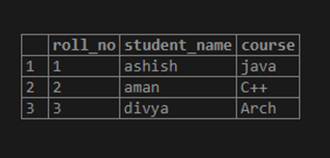
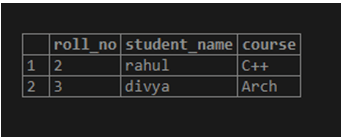
delete from students where roll_no=11;
select * from students;
Output:
delete from students where student_name= 'divya';Output:
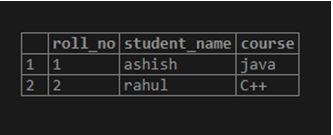
delete from students12 where course='Arch';Output:
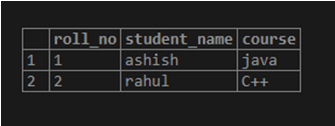
The above example tells that when the delete command is performed on table students and wants to delete students_name=’aman’, it deletes the entire details of ‘aman’ and gives the output of the remaining students in the table. Here, one by one, we have deleted all the table rows. In the end, the table will only retain the column names and schema. We have to use a DROP statement to delete the schema, which is a DDL statement.
Conclusion – MySQL DML
This article taught us about mysql data manipulation language (DML). We have also learned about all the statements that come under DML and what are all their purposes. We have explained every DML statement with the query. For a better understanding of the reader, I have explained the entire query with examples and provided screenshots of the output console. A proper syntax of all the statements is also there in the article.
Recommended Articles
We hope that this EDUCBA information on “MySQL DML” was beneficial to you. You can view EDUCBA’s recommended articles for more information.

