

Updated March 23, 2023

Introduction to Matlab Logical Operators
Operators are one of the most important parts in any programming language. They are meant to perform any mathematical or logical operations between the operands. For example, c+d=e, here + is an arithmetic operator which is meant to perform addition between c and d resulting in e. There are various types of Matlab logical operators in any programming language like Relational Operators, Arithmetic Operators, Logical Operators, Assignment Operators and more.
Logical Operators
Logical operators are the types of operators that result in binary values i.e. 1 or 0 depending on the inputs given to the expression. They are also used in arrays and conditional statements to check various conditions and statements. There are 2 types of logical operations that are used in Matlab. Please find them below:
- Element wise Logical Operation: Here the logical operation is performed between the operands element-wise. & and | are used to denote element-wise operations in Matlab.
- Short Circuit Logical Operation: Here the logical operation results in a scalar value depending on evaluating the first expression only. After the first part of the expression is evaluated, it is short-circuited, hence the name. && and || are used to denote the short circuit behavior in Matlab.
Types of Logical Operators with Examples
There are three types of logical operators that are used in Matlab like AND(E&F), OR(E|F), NOT(~E). Please find below the working and types of Logical Operators used in Matlab:
1. Logical AND Operator
In element-wise operation, it is denoted by & operator. It performs logical operation and results in 1 or 0(True or False) depending on the inputs provided to the input signal. Please find the below truth table which describes the working of AND operator in Matlab:
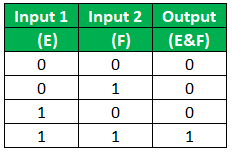
In the above truth table, if any of the input or operand is 0 or false then the resulting output is always False or 0. Similarly, if both the input signals are True then the resulting output is True. In the short-circuiting operation, the expression results in output by evaluating the first part of the expression. If the first part of the expression results in 0 or False, then the second part of the defined expression is not evaluated more. The output of the expression using the short circuit logical operation always result in a scalar value. It is denoted by && operator in Matlab. We should always be careful while using && and & operator in Matlab since both the operators are different and will give different outputs.
Example:
E = [0,0,1,1,0,1,0]
F = [1,1,1,0,0,0,1]
Output:
E&F = [0,0,1,0,0,0,0]
If both the inputs of the above array are 1 then it will result in 1 else 0.
2. Logical OR Operator
In element-wise operation, it is denoted by | operator. It performs logical operation and results in 1 or 0(True or False) depending on the inputs provided to the input signal. Please find the below truth table which describes the working of OR operator in Matlab.
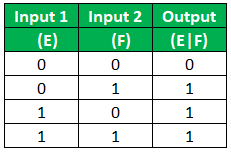
In the above truth table, if any of the input or operand is 1 or True then the resulting output is always True or 1. Similarly, if both the input signals are True then the resulting output is True. In the short-circuiting operation, the expression results in output by evaluating the first part of the expression. If the first part of the expression results in 1 or True, then the second part of the defined expression is not evaluated more. The output of the expression using the short circuit logical operation always result in a scalar value. It is denoted by || operator in Matlab. We should always be careful while using || and | operator in Matlab since both the operators are different and will give different outputs.
Example:
E = [1,1,1,1,0,0,0]
F = [0,0,1,0,1,0,0]
Output:
E|F = [1,1,1,1,1,0,0]
If any of the operands is 1 then it results in 1 else 0.
3. Logical NOT Operator
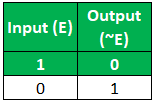
This operator returns 0 or 1 depending on the input we provide to the input signals. If the input signal is 0, then it results in 1 and if the input signal is 1 then it results in 0. The input can be a multi-dimensional array, scalar, matrix or vector. It is denoted by ~ sign in Matlab. It also supports complex numbers. not(E) is also used to denote the Logical NOT operation in Matlab but it is avoided since it has operator overloading issue. Please find the below Truth table to describe the working of Logical NOT operator in Matlab:
Example:
E = [1,0,1,0,1,0,1]
Output:
~E = [0,1,0,1,0,1,0]
It simply negates the input and provided the output.
There are many predefined functions that are used in logical operations in Matlab like:
- any(E): This function is used to check whether the elements in an array are logical 1 or non-zero. If the array contains any non-zero element, then it results in 1 else 0.
- all(E): This function is used to check whether all elements in an array is non-zero or 1. If all the elements in an array are non-zero or 1 then it results as scalar value as 1 for that respective array, if not then 0.
- Islogical(): This function is used to check if a particular array is logical or not. If the expression is logical then it returns True Else False.
Conclusion
Logical Operators control the execution of program flow depending on the conditions whether it is True or False. If there are many operators used in an expression, then the expression is evaluated in their order of precedence as defined.
Recommended Articles
This is a guide to Matlab Logical Operators. Here we discuss the brief overview with different types of Logical operators used in Matlab with examples. You can also go through our other suggested articles to learn more –

