

Updated November 6, 2026
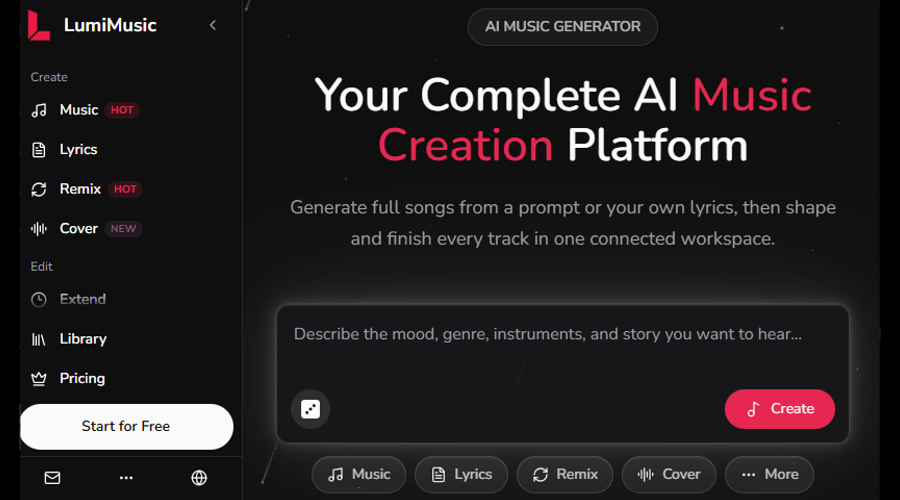
LumiMusic is an AI music generator that turns a short text prompt or your own lyrics into a complete vocal or instrumental song, then lets you edit, analyze, and share it all in the same workspace. Instead of treating generation as the endpoint, LumiMusic keeps the same project moving by extending it, splitting stems, converting audio to MIDI, and exporting the finished file.
This article covers what the LumiMusic AI music generator is, how a prompt becomes a track, which tools are available after generation, who it suits, and the practical limits you should know before you start.
What is LumiMusic AI Music Generator?
Creators who use AI for music often move between several separate applications: one tool generates a song, another separates the vocals, a third detects the tempo, and a digital audio workstation handles the rest. Each move means another upload, another export, and another interface to learn.
LumiMusic AI music generator puts these steps in one place. Its tools fall into three groups:
- Creation tools: music generation, lyrics, remix, and cover.
- Edit tools: extend, add vocals, add instrumental, remove vocals, and split stems.
- Extra tools: audio-to-MIDI conversion, a browser-based MIDI editor, key and BPM detection, and music analysis.
Finished tracks play in a built-in library player and can be shared through a dedicated listening page. The interface is available in nine languages.
How to Create a Song With LumiMusic AI Music Generator?
Creating a song with the LumiMusic AI music generator takes a few steps:
- Describe the music: Write a prompt that names the genre, mood, tempo, and instruments, for example, “warm acoustic folk, slow tempo, soft female vocal, rainy evening mood”. Specific words give the model a clearer target than general ones such as “good” or “professional”.
- Add lyrics if you have them: You can paste your own lyrics, or use the lyrics tool to draft some. Section labels such as verse, chorus, and bridge help the model organize the song.
- Choose vocal or instrumental: Background music for a video usually works better without vocals; a standalone song usually needs them.
- Pick a model version: LumiMusic offers several model versions, including the R series and V5 and V5.5. If a result misses the mark, you can retry the same song with a different model.
- Generate and compare: AI generation includes randomness by design, so the same prompt can produce different takes. Comparing a few versions is normal practice.
Behind the text box, the platform uses a mix of AI music generation and audio models. For background on the generative techniques these systems commonly use, the Wikipedia overview of generative artificial intelligence is a useful starting point.
Editing Features of LumiMusic AI Music Generator
A first draft is rarely perfect, and regenerating from scratch can lose the parts that worked. The editing tools in LumiMusic AI music generator let you change a song while keeping what you like:
- Extend lengthens a track, which is useful when a promising idea ends too early.
- Add vocals places a sung part over an instrumental, and add instrumental builds accompaniment around a vocal.
- Remove vocals produces an instrumental version, handy for background music or karaoke-style practice.
- Remix and cover reinterpret an existing track in a different style.
This workflow is closer to how songs are made in a studio: a draft is refined step by step rather than replaced.
Advanced Audio Tools in LumiMusic AI Music Generator
The extra tools matter most for users who want to do more than listen.
- Stem splitting separates a song into layers such as vocals, drums, and bass. Producers can use stems to rebalance a mix, and learners use them to hear how an arrangement is built, one instrument at a time.
- Key and BPM detection reports a track’s musical key and tempo. These values are needed when you combine a generated song with other material, sync it to video, or mix it with another track.
- Audio-to-MIDI conversion turns audio into MIDI note data, and the browser MIDI editor lets you view and adjust those notes. This lets AI output move into traditional music software, where MIDI can drive any virtual instrument. Conversion is an estimate, so expect to tidy some notes by hand.
- AI mastering and export complete the process. The platform supports AI mastering and export in WAV and MIDI formats, so a finished track can move into a video editor, a digital audio workstation, or a release workflow.
Who Can Use LumiMusic AI Music Generator?
LumiMusic AI music generator is aimed at independent musicians, producers, and songwriters, as well as beginners who want to turn an idea into a finished song quickly. Typical uses include:
- Songwriting drafts: Songwriters can hear their lyrics set to music, test several genres, and keep the version that best suits the words.
- Video and content soundtracks: Creators can generate instrumental music that matches a video’s mood and length, then use key and BPM information to fit the edit.
- Production starting points: Producers can generate an idea, split the stems, convert parts to MIDI, and continue in their usual software.
- Music learning: Students can use stems, MIDI, and key detection to see how tempo, harmony, and arrangement work inside a real track.
Tips for Getting Better Results
A few habits make the tool more useful:
- Change one thing at a time: If a track is close but not right, adjust a single word in the prompt, such as the mood or the main instrument, so you can hear what that change does.
- Keep lyrics singable: Short lines with clear syllables are easier for a model to align with a melody than long, complex sentences or unusual names.
- Use structure labels: Marking verses and choruses helps longer songs hold together.
- Check the analysis: Key and BPM detection shows what the model actually produced, which is not always exactly what the prompt requested.
There are limits as well. Generated songs can drift in structure, lyrics can occasionally be sung unclearly, and audio-to-MIDI results need review. AI output is a useful starting point, but careful listening and human decisions still shape the final result.
LumiMusic AI Music Generator Pricing and Commercial Use
Licensing deserves attention before you publish anything. LumiMusic’s free plan provides sign-up credits for trying the generator, but it does not include commercial use. Eligible paid plans include commercial usage rights, along with advanced models (V5 and V5.5), stem tools, and downloads. Plan details and a 7-day refund policy are listed on the pricing page, so check the current terms there before choosing.
Copyright is a separate question from platform terms. Rules on AI-generated music differ by country, and human-written lyrics and meaningful human edits may be treated differently from generated audio. Only upload audio you have the right to use.
Final Thoughts
LumiMusic AI music generator suits songwriters, producers, video creators, and beginners who want to move from an idea to a usable track without switching between many separate tools. The practical approach is to draft quickly from a clear prompt, refine the result with editing and analysis, and export only when the track fits its purpose.
Recommended Articles
For more insights into AI-powered music creation and audio editing, explore our recommended articles. These resources offer practical guidance on creating professional-quality music and making the most of AI tools.