


Updated August 1, 2026
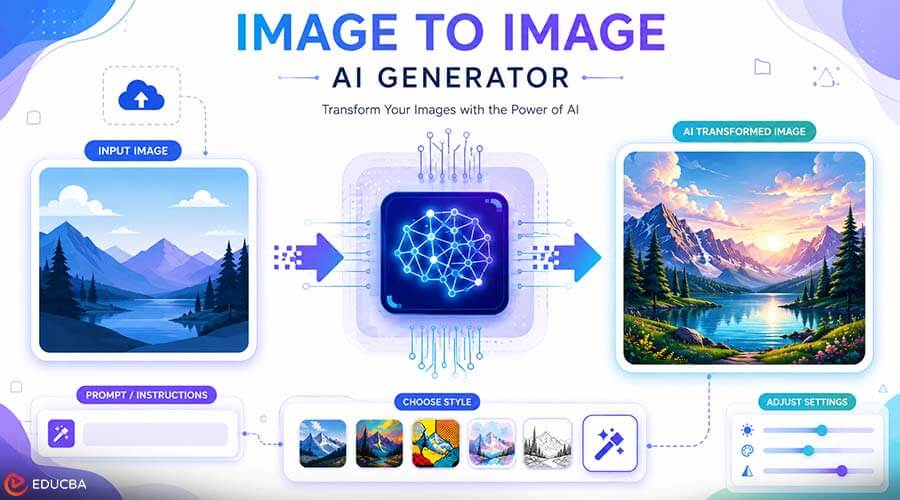
Artificial intelligence has transformed digital creativity in remarkable ways. One of the most exciting innovations is the Image to Image AI Generator. This technology allows users to transform an existing image into a new version while preserving its core structure. Instead of creating artwork from scratch, this AI-powered approach builds upon an uploaded image, applying new styles, improving quality, or generating creative variations in just a few seconds.
Professionals across industries, including graphic design, marketing, education, and e-commerce, use image-to-image AI tools to streamline creative processes and produce high-quality visuals with minimal manual effort. These tools are not only saving time but also making advanced image editing accessible to people with little or no design experience.
In this article, we’ll explain how an Image to Image AI Generator works, explore its most common applications, discuss its advantages, and share best practices to help you achieve better results.
Everything You Need to Know About Image to Image AI Generators
An Image to Image AI Generator is an artificial intelligence tool that transforms one image into another based on user instructions. Unlike text-to-image AI, which creates images from written descriptions alone, image-to-image AI starts with an existing picture and uses it as the foundation for generating a new version.
The AI analyzes important elements such as composition, colors, shapes, and objects before applying the requested changes. Depending on the platform, users can enhance image quality, change artistic styles, adjust lighting, modify backgrounds, or create entirely new visual interpretations while keeping the original concept recognizable.
This process combines automation with creative flexibility, allowing users to produce unique results in a matter of minutes.
How Does Image to Image AI Work?
Modern AI image generators rely on advanced machine learning models trained on millions of visual examples. These models learn patterns related to colors, textures, objects, lighting, and artistic styles.
After you upload an image, the AI analyzes its content and recognizes the key visual features that define its overall appearance. Based on the user’s prompt or selected settings, the system generates a new image while maintaining the original structure wherever appropriate.
The entire process typically involves four simple steps:
- Upload an existing image.
- Enter a prompt describing the desired changes.
- Select generation settings or styles.
- Generate and download the new image.
This streamlined workflow allows users to produce creative results without complex editing software.
Common Applications of Image to Image AI
Image-to-image AI has become a valuable tool across many industries because of its flexibility and ease of use.
Graphic Design
Designers often use AI to explore multiple creative directions before selecting a final concept. Instead of manually creating several variations, AI can quickly generate different styles, layouts, and color combinations from the same source image.
Marketing and Advertising
Marketing teams frequently need fresh visuals for campaigns, social media posts, blog articles, and advertisements. Image-to-image AI helps create multiple versions of promotional graphics while maintaining consistent branding.
E-Commerce
Online stores can enhance product images, improve backgrounds, create seasonal variations, and prepare marketing materials more efficiently. Better product visuals can improve customer engagement and create a more professional shopping experience.
Education
Teachers and educators use AI-generated visuals to make lessons more engaging. Diagrams, illustrations, and educational graphics can be adapted into different visual styles that improve learning experiences.
Content Creation
Bloggers, website owners, and social media creators often need original graphics for articles and online posts. Image-to-image AI makes it easier to generate unique illustrations that complement written content without requiring advanced design skills.
Benefits of Using an Image to Image AI Generator
Several practical advantages drive the growing popularity of image to image AI.
Faster Creative Workflows
Traditional image editing can require significant time and technical expertise. AI automates much of the process, allowing creators to generate high-quality visuals much faster.
Improved Productivity
Instead of spending hours manually creating multiple design concepts, users can generate several variations in minutes and choose the one that best fits their project.
Creative Inspiration
AI serves as a valuable brainstorming assistant. It helps users explore artistic directions they may not have considered, making it easier to experiment with new visual ideas.
Consistent Visual Quality
Many AI platforms produce clean, high-resolution images suitable for websites, presentations, marketing campaigns, and digital publishing.
Accessible for Beginners
One of the biggest advantages of modern AI tools is simplicity. Users do not need advanced graphic design experience to create attractive visuals. Most platforms offer intuitive interfaces that guide users through the generation process.
Best Practices for Better Results
While AI can automate image generation, following a few best practices can significantly improve the final output.
Start with High-Quality Images
Clear, high-resolution images provide better information for the AI to analyze. The better the original image, the better the generated result is likely to be.
Write Clear Prompts
Specific instructions generally produce more accurate outputs. Describe the style, colors, lighting, or atmosphere you want instead of using vague descriptions.
Experiment with Different Styles
One of the strengths of image-to-image AI is flexibility. Testing different artistic styles or creative directions can help you discover unique visual concepts that fit your project.
Review Every Generated Image
Although AI has become highly capable, generated images should always be reviewed before publication. Small adjustments may still be necessary to match your branding or project requirements.
Maintain Visual Consistency
When creating multiple images for the same website, presentation, or marketing campaign, use similar prompts and styles to maintain a consistent visual identity.
Challenges and Limitations of Image to Image AI
Although image-to-image AI has become more advanced, it is not perfect. Understanding its limitations helps users set realistic expectations and produce better results.
One common challenge is that AI may not always interpret prompts exactly as intended. A broad or unclear instruction can produce results that differ from the user’s vision. Writing clear and detailed prompts usually leads to more accurate outputs.
Another limitation is image quality. While many AI tools generate impressive visuals, the final result still depends on the quality of the original image. Low-resolution or blurry images often produce less detailed outputs.
Responsible Use of Image to Image AI
As AI-generated content becomes more common, responsible use is increasingly important.
Creators should respect copyright laws and ensure they have the right to edit or transform any image they upload. Using original images or properly licensed content helps avoid legal and ethical concerns.
Transparency also matters. If AI-generated visuals are used in professional projects, marketing campaigns, or educational materials, organizations should follow any applicable guidelines regarding AI-assisted content.
Responsible use builds trust while enabling creators to benefit from AI technology in positive, ethical ways.
Tips for Choosing the Right Image to Image AI Generator
Not every AI platform offers the same features or level of performance. Before choosing a tool, consider the following factors.
Image Quality
Look for platforms that generate high-resolution images with sharp details and natural colors. Better image quality produces more professional results for websites, presentations, and marketing materials.
Ease of Use
A simple interface makes the creative process much faster. Beginners should choose tools with intuitive controls and straightforward workflows.
Customization Options
The best AI generators allow users to control artistic style, image strength, color adjustments, lighting, and other creative settings instead of relying entirely on automatic generation.
Generation Speed
Fast processing helps creators complete projects more efficiently, especially when generating multiple image variations.
Export Options
Choose a platform that supports high-quality downloads suitable for websites, social media, print materials, and commercial projects.
Industries Benefiting from Image to Image AI
The flexibility of image-to-image AI makes it valuable across many professional fields.
Digital Marketing
Marketing teams use AI to create banner graphics, promotional images, blog illustrations, and social media visuals while maintaining consistent branding.
Publishing
Publishers can quickly generate custom illustrations that support articles, guides, newsletters, and online publications.
Architecture and Interior Design
Design professionals can explore various design concepts, color palettes, and presentation styles without having to recreate every visualization manually.
Education
Teachers and trainers create engaging educational graphics, diagrams, and visual learning materials that help explain complex ideas more effectively.
Small Businesses
Small business owners can produce professional-quality marketing materials without hiring a dedicated design team, reducing costs while improving visual communication.
Final Thoughts
The Image to Image AI Generator has become one of the most practical AI tools for modern digital content creation. By transforming existing images into fresh, high-quality visuals, it helps creators save time, improve productivity, and explore new creative possibilities without requiring advanced editing skills.
Whether you’re designing marketing materials, enhancing product images, creating educational content, or producing original artwork, image to image AI offers a flexible solution that fits a wide range of creative needs.
Recommended Articles
We hope this guide to the Image to Image AI Generator helps you understand how AI can transform existing images into high-quality visuals while enhancing creativity and productivity. Explore these recommended articles for additional insights into AI-powered image generation, generative AI, machine learning, and other emerging technologies shaping digital content creation.


