
Updated March 6, 2023

Introduction to Hive UDF
As we have seen the Hadoop framework is useful to manage and process a huge amount of data. Hive is one of the services in the Hadoop stack. It will provide the SQL base functionality on top of distributed data. In hive service, we are getting the functionality to fetch the data and process it. There are two types of functions like built-in and UDF (user-defined function). The built-in function is readily available in the hive environment. The UDF (user-defined function) does not already define the hive environment. The UDF means we can create our own function which is not available in the hive. The UDF will be useful when any function is not available in the hive build-in function and we need to implement it in the hive ecosystem.
Syntax:
As such, there is no exact syntax exist for the hive UDF. To work with the hive UDF, we need to know its complete design it. Similarly, we also want to understand the waged flow of it. In this user-defined function, we are using the number of java codes as well as the different components also. As per the requirement or the application need, we need to build our own hive UDF in the hive environment. While working on the hive UDF, we also need to check the dependency on other component dependencies also. Because in some cases, we are not just using the hive service. We are also using the different services also.
Below are the lists of steps that we need to follow while writing or creating the hive UDF’s.
1) In the hive User Defined Function, first we need to create the java class. It will extend the ora.apache.hadoop.hive.sq.exec.UDF. We can implement one or more evaluate ( ) functions or methods in it. Under the same, we need to define our own logic or code.
2) Then we need to package our java class into the JAR file. We can use any tool to create the JAR. But generally, we can use maven.
3) We need to go to the Hive CLI then add the newly created JAR. We can cross verify in the hive CLI classpath.
4) We need to create a temporary function in the hive environment. The same temporary function will point to the java class.
5) Then we can use the same with the hive SQL.
How to show tables in Hive?
As we have seen the hive UDF is not readily available in the hive environment. In some cases, we need to run the complex query on top of the HDFS data. But here, the normal or the built-in hive function is not able to suffice our needs. To suffice the need, we need to create the hive user define functions. We can create our own hive functions which we can define our own code in it. As it is not present in the working hive environment, we need to build it on own. While building the hive UDF, we need to have java language knowledge. We need to import the major classes in the java code with UDF dependency. Once the dependency is present in the java code, we need to save the java code. The java code should be converting into the jar. To convert it, we are having multiple options like a built-in application tool, maven, etc. As per the requirement, we need to use the necessary tools to make the jar. Once the jar is present we need to deploy it in the hive environment. Once the jar is present, we need to point to the necessary jar in the hive ecosystem. Then we need to create the secondary function. The secondary function will point to the newly imported jar. Here, the jar’s work is completed. Now we can use the secondary function further. In further, the same function will call to the older jar only. To work with the complex hive queries we need to use the same secondary reference of the imported jar. We can write our own function with hive query.
We can create the UDF in the ranger masking authorization policies. As per the requirement, we can implement the ranger masking policies on the hive tables.
Examples to Understand the Command
Hive UDF: Simple hive UDF command
As we have discussed, we need to write the hive UDF to create our own function. Here, we are working end to end on the hive UDF only. Once the UDF jar will present, we need to deploy it in the hive environment. We can access the jar with the help of a temporary function that pointing to the same jar.
Command:
CREATE TABLE strasdate (id int, datetime string);

INSERT INTO strasdate (id, datetime) values(1, "2021-11-07T01:35:00");

CREATE TABLE timesmpasdate (id int, datetime timestamp);

ADD JAR wasb:///hive-udf/hive-udf.jar';

CREATE TEMPORARY FUNCTION timeconv AS 'com.mssoft.example.timesmpconv';

INSERT INTO TABLE strasdate SELECT id, cast(timeconv(datetime, "yyyy-mm-ddthh:mm:ss[.mmm]") AS timestamp) FROM strasdate;
Explanation:
As per the above list of commands, we are having multiple commands. In the first command, we are creating the “strasdate” table. Here, we are creating the two columns in it. Next, we are inserting the values in the “strasdate” table. Similarly, we are creating one more table like timesmpasdate. We are adding the hive-UDF.jar from the location /hive-UDF/hive-UDF.jar. Then we are creating the temporary function i.e. the timeconv as ‘com.mssoft.example.timesmpconv’. Once all the things in place, we are inserting the value with the help of the same temporary timeconv function.
Output:

Screenshot 1 (a)
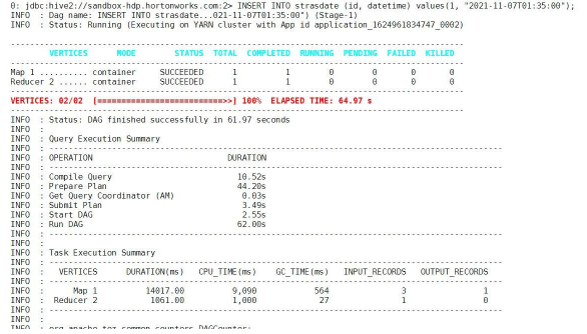
Screenshot 1 (b)
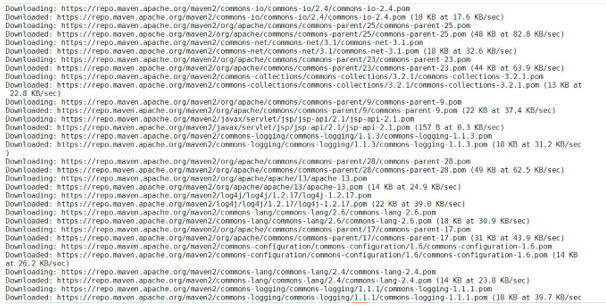
Screenshot 1 (c)
Conclusion
We have seen the uncut concept of the “Hive UDF” with the proper example, explanation, and command with different outputs. There are majorly two types of function in hive i.e. the built-in hive function and the user defines function. In the complex task, the hive built-in function will not work. Then we need to create our own function as hive UDF and run it on top of the data.
Recommended Articles
This is a guide to Hive UDF. Here we discuss the Introduction, syntax, How to show tables in Hive? with Examples and code implementation. You may also have a look at the following articles to learn more –

