


Introduction
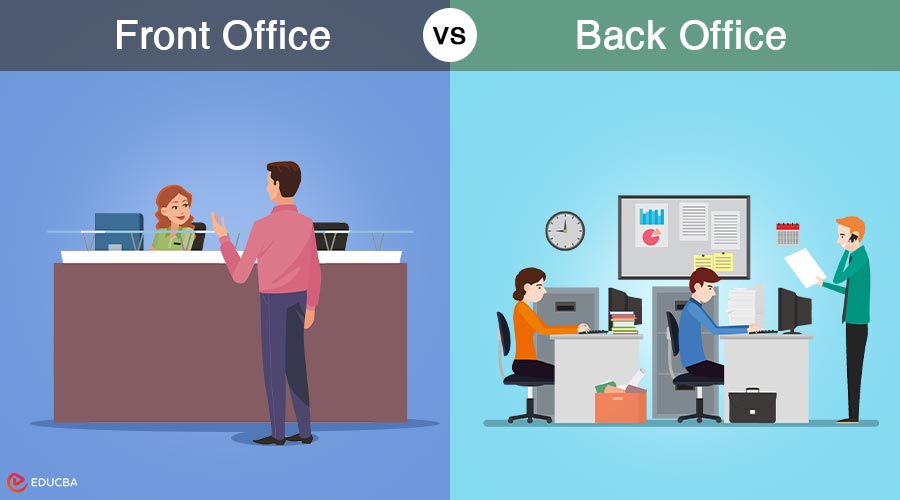
In every organization, both customer interaction and internal operations play vital roles in success. The distinction between front office vs back office highlights how companies balance revenue-generating activities with essential support functions. While the front office focuses on sales, marketing, and client engagement, the back office manages finance, HR, and administration. Understanding how these two segments operate together helps businesses improve efficiency, enhance customer satisfaction, and maintain smooth overall performance across departments.
Table of Content:
- Introduction
- What is the Front Office?
- Common Front Office Roles
- Technologies Used in the Front Office
- What is the Back Office?
- Common Back Office Roles
- Technologies Used in the Back Office
- Key Differences
- How the Front Office and Back Office Work Together
What is the Front Office?
The front office refers to the customer-facing area of a business responsible for managing direct interactions with clients and driving revenue. It includes functions like sales, marketing, and customer service that focus on building relationships and promoting products or services. Employees in this section represent the company’s image, ensuring customer satisfaction and contributing to business growth through effective communication and engagement strategies.
Common Front Office Roles
Here are some common front office roles explained in simple terms:
- Sales Representatives: They reach out to potential customers, promote products or services, and help close deals to bring in revenue.
- Customer Service Executives: They handle customer inquiries, complaints, and feedback to ensure a seamless experience and foster customer trust.
- Marketing Specialists: They create campaigns, manage social media, and promote the brand to attract new customers.
- Receptionists: They greet visitors, answer calls, and provide information, often serving as the first point of contact for clients.
- Business Development Managers: They identify new business opportunities, partnerships, and markets to help the company grow.
- Account Managers: They nurture relationships with current clients, making sure their needs are fulfilled and motivating them to return for future business.
- Public Relations Officers: They manage the company’s public image and communication with the media to maintain a positive reputation.
Technologies Used in the Front Office
Here are some technologies used in the front office, explained in simple language:
- Customer Relationship Management (CRM) Software: Helps store customer details, track sales, and manage client interactions to improve relationships.
- Email and Communication Tools: Platforms like Outlook, Gmail, or Slack make it easy to communicate with customers and team members quickly.
- Live Chat and Chatbots: Used on websites to answer customer questions instantly and provide 24/7 support.
- Sales Automation Tools: Assist sales teams in monitoring leads, engaging with customers, and accelerating deal closures.
- Social Media Management Tools: Platforms like Hootsuite or Buffer allow marketing teams to schedule posts and interact with followers.
- Video Conferencing Software: Tools like Zoom or Microsoft Teams enable virtual meetings with clients or partners.
- Data Analytics Tools: Help analyze customer behavior and campaign performance to make better business decisions.
What is the Back Office?
The back office is the part of a company that manages internal operations and supports the front office in running the business smoothly. It includes departments like finance, human resources, IT, and administration. Employees in the back office handle payroll, data management, record keeping, and compliance tasks, ensuring the organization operates efficiently and meets its financial, technical, and regulatory goals.
Common Back Office Roles
Here are some common back office roles explained in simple language:
- Accountants: They manage company finances, track expenses, prepare budgets, and ensure all financial records are accurate.
- Human Resource (HR) Staff: They handle employee hiring, training, payroll, and benefits while maintaining a positive work environment.
- IT Support Specialists: They manage computer systems, fix technical issues, and ensure data security across the organization.
- Data Entry Operators: They input, update, and maintain important company information in databases.
- Administrative Assistants: They support daily operations by organizing documents, scheduling meetings, and managing office tasks.
- Compliance Officers: They make sure the company follows laws, policies, and industry regulations.
- Supply Chain and Logistics Staff: They handle the flow of materials and goods, ensuring timely delivery and efficient operations.
- Finance Analysts: They analyze financial data to help management make informed business decisions.
Technologies Used in the Back Office
Here are some technologies used in the back office, explained in simple language:
- Enterprise Resource Planning (ERP) Systems: Combine different business processes like finance, HR, and inventory management into one platform for better efficiency.
- Payroll Software: Helps calculate employee salaries, deductions, and bonuses accurately and on time.
- Accounting Software: Tools like QuickBooks or Tally make it easy to track expenses, prepare invoices, and manage company finances.
- Human Resource Management Systems (HRMS): Used to manage employee records, attendance, performance, and recruitment processes.
- Data Management Tools: Store, organize, and protect company data to ensure easy access and security.
- Project Management Tools: Platforms like Asana or Trello help teams plan, track, and complete tasks efficiently.
- Document Management Systems: Allow secure storage and sharing of digital files to reduce paperwork.
- Cybersecurity Tools: Protect company systems and data from viruses, hacking, and other online threats.
Key Differences Between Front Office vs Back Office
| Aspect | Front Office | Back Office |
| Main Focus | Deals directly with customers and clients | Handles internal operations and support tasks |
| Role in Business | Brings in sales and builds customer relationships | Ensures smooth functioning and efficiency behind the scenes |
| Visibility | Highly visible to customers | Works out of the customer view |
| Examples of Departments | Sales, Marketing, Customer Service | Finance, HR, IT, Administration |
| Skills Required | Communication, persuasion, and customer handling | Analytical, technical, and organizational skills |
| Use of Technology | Uses CRM, social media, and communication tools | Uses ERP, payroll, and data management systems |
| Goal | Increase revenue and customer satisfaction | Maintain accuracy, compliance, and operational stability |
| Work Nature | Customer-facing and dynamic | Supportive and detail-oriented |
How the Front Office and Back Office Work Together
Here’s how the front office and back office work together, explained in simple language:
- Sharing Information: The front office collects customer data and passes it to the back office for processing, analysis, or billing.
- Smooth Workflow: Both teams coordinate to complete orders, manage accounts, and ensure timely service delivery.
- Customer Support: When a customer has an issue, the front office communicates it, and the back office finds a solution or updates records.
- Financial Coordination: The sales and finance teams collaborate to prepare invoices, track payments, and manage budgets.
- Use of Technology: Integrated systems, such as CRM and ERP, help both offices share real-time information and minimize errors.
- Improving Efficiency: Collaboration ensures that customer requests are handled more efficiently and accurately.
- Goal Alignment: Both sides aim to improve customer satisfaction and business growth by supporting each other’s roles effectively.
Conclusion
In today’s competitive business world, success depends on how efficiently different departments work together. The collaboration between the front office vs back office ensures that customer needs are met while internal operations run smoothly. When both sides communicate effectively and use the right technology, companies can deliver better service, improve productivity, and achieve long-term growth through a balanced and well-coordinated workflow.
Frequently Asked Questions
1: Can a small business have both a front office and a back office?
Answer: Yes, even small businesses have front and back office roles, though the same people may handle them.
2: Is the front office more important than the back office?
Answer: No, both are equally important as they depend on each other for business success.
3: Can technology replace backoffice employees?
Answer: Technology can automate tasks, but cannot replace the decision-making and problem-solving skills of employees.
4: How does outsourcing affect back office operations?
Answer: Outsourcing can reduce costs and increase efficiency by allowing experts to manage specific back office tasks.
Recommended Articles
We hope this guide on Front Office vs Back Office helped you understand business operations. Explore more articles on workplace efficiency below!


