
What is Data Retention?
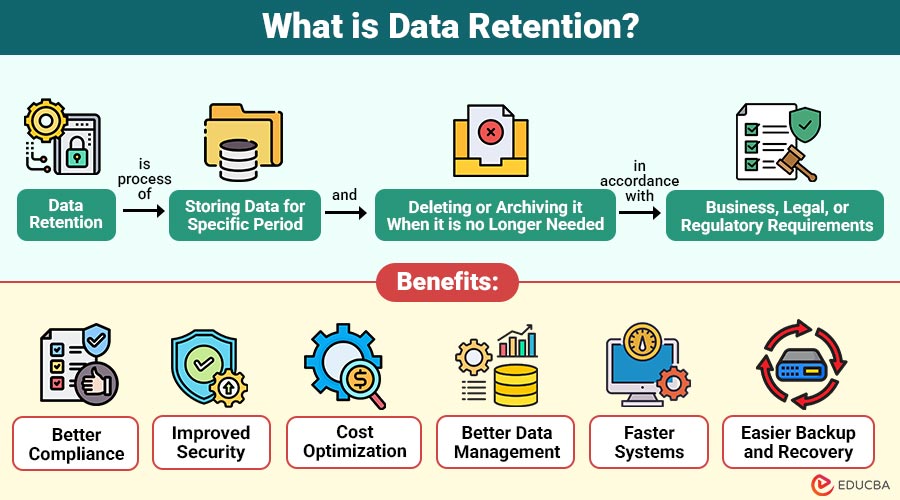
Data retention is the process of storing data for a specific period and deleting or archiving it when it is no longer needed, in accordance with business, legal, or regulatory requirements.
Organizations create data retention rules to decide the following:
- What data should be stored?
- How long should data be stored?
- Where should data be stored?
- When should data be deleted or archived?
- Who can access the data?
It is part of data lifecycle management, which includes data creation, storage, usage, archiving, and deletion.
Example:
Consider a company that stores different types of data:
| Data Type | Retention Period | Reason |
| Employee records | 7 years | Legal requirement |
| Customer orders | 5 years | Audit & reporting |
| Email logs | 1 year | Security monitoring |
| Backup files | 30 days | Storage optimization |
| Website logs | 90 days | Performance analysis |
After the retention period ends, the data is either:
- Deleted permanently
- Archived for long-term storage
- Moved to cold storage
This process ensures that only necessary data is kept.
Table of Contents:
- Meaning
- Importance
- Types
- Benefits
- Challenges
- Best Practices
- Data Retention in Different Industries
- Real-World Example
Key Takeaways:
- Data retention ensures organizations store only necessary data, reducing risk and maintaining compliance effectively.
- Automated retention policies improve efficiency, prevent human errors, and enhance overall data management practices.
- Proper retention reduces storage costs, improves system performance, and enables faster backup and recovery.
- Industry-specific retention practices consistently protect sensitive information, meet regulations, and maintain operational continuity.
Why is Data Retention Important?
Here are the key reasons why it is important:
1. Legal and Regulatory Compliance
Many industries must follow strict rules on data storage duration; proper retention helps ensure compliance and avoids penalties.
2. Improves Data Security
Keeping unnecessary or outdated data increases breach risk; data retention policies remove unused data, enhancing overall security posture.
3. Saves Storage Cost
Storing all data indefinitely consumes expensive storage resources; retention policies delete old data, lowering costs and improving efficiency.
4. Improves Performance
Accumulated data can slow down databases and systems; removing outdated information through retention policies improves speed and operational efficiency.
5. Supports Business Operations
Ensures critical information remains accessible for reporting, analytics, and decision-making, supporting effective, ongoing business operations reliably.
Types of Data Retention
Below are the types of data retention:
1. Short-Term Retention
Short-term retention refers to storing data temporarily for immediate use or processing before it is deleted or overwritten.
2. Long-Term Retention
Long-term retention is the storage of data for extended periods to maintain historical records, support compliance, or serve as a reference for future analysis.
3. Regulatory Retention
Regulatory retention involves storing data specifically to meet government or industry compliance standards and legal requirements.
4. Operational Retention
Operational retention stores data required for day-to-day business operations, enabling smooth functioning and decision-making.
5. Backup Retention
Backup retention is the process of storing copies of data to recover information in case of accidental loss, corruption, or disaster recovery.
Benefits of Data Retention
Below are the benefits of implementing effective practices.
1. Better Compliance
Ensures that organizations comply with all relevant legal, regulatory, and industry standards, avoiding penalties or noncompliance issues.
2. Improved Security
Proper data retention removes outdated or unnecessary data, reducing the risk of breaches, leaks, or unauthorized access.
3. Cost Optimization
Retaining only necessary data reduces storage needs, lowering expenses for servers, cloud storage, and data management infrastructure.
4. Better Data Management
Organized retention practices ensure only relevant, accurate, and useful data is kept, improving efficiency and accessibility.
5. Faster Systems
Databases and applications operate more efficiently when unnecessary or obsolete data is removed, improving system performance and speed.
6. Easier Backup and Recovery
Smaller, well-organized datasets enable faster backup processes and quicker recovery during system failures or disaster recovery.
Challenges in Data Retention
Below are the common challenges organizations face when implementing policies.
1. Different Regulations
Organizations must navigate varying legal and regulatory requirements across countries, making consistent and compliant data retention challenging.
2. Large Data Volume
The enormous amount of data generated daily complicates storage, management, and retention planning for organizations.
3. Data Classification Problems
Identifying which data is critical versus obsolete can be complex, leading to mismanagement or inefficient retention practices.
4. Risk of Deleting Important Data
Improper retention policies may inadvertently delete valuable or required data, leading to compliance issues or operational disruptions.
5. High Storage Cost
Maintaining large datasets for long-term retention increases expenses for servers, cloud services, and data management infrastructure.
6. Security Risks
Storing large volumes of data increases vulnerability to breaches, unauthorized access, or cyberattacks if not properly secured.
Data Retention Best Practices
Below are key best practices for effective and secure data retention:
1. Create a Clear Policy
Establish comprehensive policies specifying how long different types of data should be stored and when it should be deleted.
2. Classify Data
Organize data into categories based on importance, sensitivity, and usage frequency to ensure proper handling, storage, and deletion practices.
3. Automate Retention
Implement automated tools or software to enforce retention schedules, reducing human error and ensuring the timely deletion of unnecessary data.
4. Follow Legal Rules
Maintain corporate compliance and prevent fines by routinely reviewing and adhering to pertinent laws, rules, and industry standards.
5. Use Secure Storage
Store data using secure systems, including encryption, access controls, and backups, to prevent unauthorized access, loss, or corruption.
Data Retention in Different Industries
Given below is data retention in different industries:
1. Healthcare
Healthcare organizations retain patient records for many years to support ongoing treatment, regulatory compliance, and historical medical research.
2. Banking
Banks store transaction records and financial statements for audits, regulatory compliance, fraud detection, and long-term financial analysis purposes.
3. E-Commerce
E-commerce companies retain customer orders, purchase histories, and related data to analyze trends, improve services, and support reporting.
4. IT Companies
IT firms retain system logs, error reports, and user activity data for security monitoring, troubleshooting, and operational improvements.
5. Government
Government agencies store documents, legal records, and official communications for legal compliance, historical record-keeping, and administrative accountability.
Real-World Example
Here is how a bank implements data retention in practice:
A bank defines the following policy:
- Transaction data → 10 years
- Customer KYC → 8 years
- ATM logs → 1 year
- Backup files → 60 days
- Deleted accounts → Archive for 5 years
The system automatically deletes or archives data after the period ends.
This ensures:
- Legal compliance
- Security
- Lower storage cost
Final Thoughts
Data retention is essential for modern data management, ensuring that organizations store data only as needed and remove it when it is obsolete. Effective retention policies support legal compliance, enhance security, reduce storage costs, and optimize system performance. By setting clear rules, automating lifecycle processes, and regularly reviewing practices, businesses can efficiently manage growing data, ensuring governance, compliance, and long-term operational success.
Frequently Asked Questions (FAQs)
Q1. What is a data retention policy?
Answer: It is a set of rules that defines how long data should be stored.
Q2. What happens after the retention period?
Answer: Data is deleted, archived, or moved to cold storage.
Q3. Is data retention required by law?
Answer: Yes, many industries must follow retention regulations.
Q4. Can data retention be automated?
Answer: Yes, most modern systems support automatic retention rules.
Recommended Articles
We hope that this EDUCBA information on “Data Retention” was beneficial to you. You can view EDUCBA’s recommended articles for more information.

