


Updated November 4, 2026
What is Data Reconciliation?
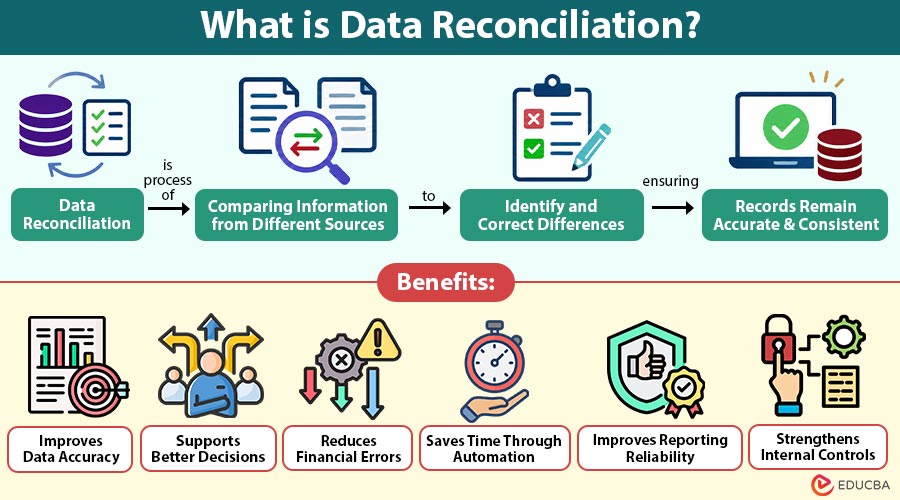
Data reconciliation is the process of comparing information from different sources to identify and correct differences, ensuring records remain accurate and consistent.
Imagine running a small online clothing store. You receive 100 orders in a day, but your payment report shows only 98 successful transactions. Where did the remaining two orders go? Were the payments unsuccessful, or did something go wrong while updating the records? This is where data reconciliation becomes useful.
Businesses often store information in different systems, such as accounting software, payment platforms, customer databases, and inventory management tools. Sometimes, the information in these systems does not match.
Data reconciliation helps businesses find these differences, understand why they occurred, and make the necessary corrections. It ensures that important information remains reliable and can be used confidently for reporting and decision-making.
Table of Contents:
Key Takeaways:
- Data reconciliation compares information from multiple sources to identify missing, incorrect, or inconsistent records.
- Regular reconciliation helps businesses maintain accurate financial, customer, inventory, and operational information.
- Automated reconciliation tools reduce repetitive manual work and help teams identify differences more efficiently.
- A structured reconciliation process improves reporting reliability and supports better business decisions.
Why is Data Reconciliation Important?
Businesses depend on accurate information to manage their daily activities. Even a small difference between two systems can create confusion, especially when thousands of transactions are involved.
For example, a company may record a customer payment in its sales system, but the same payment might not appear in its accounting software. If nobody checks the records, the company could report incorrect revenue.
Data reconciliation helps prevent such problems.
It allows organizations to identify missing transactions, incorrect amounts, duplicate entries, and other inconsistencies before they affect business operations. Accurate records are also important when preparing financial reports, reviewing inventory, calculating employee salaries, or responding to customer complaints. Regular reconciliation gives businesses greater confidence that the information they use reflects what actually happened.
How Does Data Reconciliation Work?
Data reconciliation usually involves comparing two or more datasets and investigating any differences found between them. The process can be completed manually or with automated tools, depending on the amount and complexity of information.
1. Collect Data
The first step involves gathering information from different sources. For example, a company might collect sales records from its website and payment details from its banking system.
2. Prepare the Information
Before comparing records, businesses check whether the data follows a consistent format. Dates, customer names, transaction numbers, and currency values may need to be standardized.
3. Compare Records
The next step involves matching information using common details such as transaction IDs, invoice numbers, or customer identifiers. This helps determine whether records agree across systems.
4. Identify Differences
If the information does not match, the system highlights the differences. These might include missing payments, duplicate transactions, incorrect amounts, or outdated records.
5. Investigate and Correct Errors
The team examines each difference to understand its cause. Once the correct information is confirmed, authorized users update the affected records.
6. Verify the Results
After making corrections, the records are compared again. This final check helps confirm that the differences have been resolved and the information is consistent.
Types of Data Reconciliation
Different businesses use data reconciliation for different purposes. The method depends on the information being compared.
1. Financial Data Reconciliation
Financial reconciliation compares information from accounting systems, bank statements, invoices, and payment platforms. It helps organizations identify missing transactions, incorrect amounts, and differences in financial records.
2. Database Reconciliation
Database reconciliation checks whether information stored in different databases matches. This is particularly useful when companies transfer information between systems or maintain multiple databases.
3. Transaction Reconciliation
Transaction reconciliation focuses on matching individual transactions across different platforms. Banks, online stores, and payment processing companies frequently use this method.
4. Inventory Reconciliation
Inventory reconciliation compares recorded stock quantities with actual inventory or information from another inventory system. It helps businesses identify missing products, incorrect stock updates, and recording mistakes.
5. Intercompany Reconciliation
Intercompany reconciliation compares transactions recorded between different companies or business units within the same corporate group. It helps ensure that both sides record shared transactions consistently.
Example of Data Reconciliation
Consider a small electronics company that sells products through its website.
At the end of the day, the sales system shows the following information:
| Particulars | Sales System | Payment System |
| Total Orders | 150 | 150 |
| Successful Payments | 148 | 147 |
| Payment Amount | ₹2,96,000 | ₹2,94,000 |
The company notices a difference of ₹2,000 between the two systems.
After checking individual transactions, the accounting team discovers that one successful payment was recorded in the sales system but was missing from the payment report because of a synchronization delay. The team verifies the payment with the payment provider and updates the records once the transaction is confirmed. Both systems now show the correct amount.
Common Causes of Data Differences
Information stored across multiple systems does not always match. Several factors can cause these differences.
1. Manual Entry Errors
Employees may accidentally enter incorrect amounts, customer names, transaction numbers, or other details while manually updating business records.
2. Duplicate Records
The same transaction may appear multiple times due to repeated data uploads, system errors, or incorrect record processing.
3. Missing Information
Some important records may fail to transfer between databases or applications, resulting in incomplete information across business systems.
4. System Synchronization Delays
Different systems may update information at different times, causing temporary differences between records stored across multiple business platforms.
5. Formatting Differences
Different systems may use inconsistent date formats, currency values, or customer identifiers, making accurate data comparison more difficult.
Benefits of Data Reconciliation
Regular data reconciliation offers several benefits for businesses that manage information across multiple systems.
1. Improves Data Accuracy
Reconciliation helps identify incorrect, missing, and duplicate records. Correcting these differences improves the overall quality of business information.
2. Supports Better Decisions
Managers rely on accurate reports when making business decisions. Consistent information helps them understand sales, expenses, inventory, and operational performance.
3. Reduces Financial Errors
Comparing financial records regularly helps identify incorrect payments, missing transactions, and accounting differences.
4. Saves Time Through Automation
Automated reconciliation tools can compare large datasets faster than manual checking. Employees can then focus on investigating unusual transactions rather than reviewing every record individually.
5. Improves Reporting Reliability
When information matches across systems, organizations can prepare more dependable financial and operational reports.
6. Strengthens Internal Controls
Reconciliation creates an opportunity to review unusual activities and identify errors that might otherwise remain unnoticed.
Challenges of Data Reconciliation
Although reconciliation is useful, the process can become difficult when businesses manage large amounts of information.
1. Large Data Volumes
Comparing millions of records across multiple systems can take considerable time and requires reliable tools with sufficient processing capacity.
2. Different Data Formats
Information collected from different sources may follow inconsistent formats, requiring additional cleaning and standardization before accurate comparisons can take place.
3. Missing Identifiers
Records without unique transaction numbers, customer IDs, or reference details can make matching information across different systems difficult and confusing.
4. Time-Consuming Investigations
Identifying the exact reasons behind data differences may require detailed investigations, manual reviews, and additional verification from multiple business departments.
5. Complex System Integration
Connecting outdated software with modern applications can create compatibility problems, making data transfers, comparisons, and reconciliation processes more difficult overall.
Tools Used for Data Reconciliation
Several tools help organizations compare records and identify differences.
1. Microsoft Excel
Microsoft Excel helps businesses compare smaller datasets using formulas, filters, and lookup functions to identify differences and maintain accurate records.
2. SQL
SQL allows analysts to compare records stored in relational databases, identify missing information, and detect differences between multiple data sources.
3. Python
Python helps businesses automate data comparisons, clean information, identify mismatched records, and simplify reconciliation tasks using libraries like pandas.
4. ETL Tools
ETL tools help businesses extract, transform, and load information from different sources, making data comparison and reconciliation easier and faster.
5. Reconciliation Software
Specialized reconciliation software automatically matches records, identifies differences, manages exceptions, and generates reports to help businesses maintain accurate information consistently.
Difference Between Data Reconciliation and Data Validation
Data reconciliation and data validation both improve data quality, but they serve different purposes.
| Basis | Data Reconciliation | Data Validation |
| Meaning | Compares records across sources | Checks whether data meets defined rules |
| Purpose | Identifies differences between datasets | Identifies invalid or incorrectly formatted information |
| Focus | Consistency between records | Correctness against requirements |
| Example | Comparing bank and accounting records | Checking whether an email address follows a valid format |
| Usage | Financial reporting and system integration | Data entry and quality checks |
Applications of Data Reconciliation
Data reconciliation is used across different industries to maintain accurate records, identify differences, and ensure information remains consistent across multiple systems.
1. Banking and Finance
Banks use data reconciliation to compare financial transactions, customer accounts, payment details, and account balances to identify errors and maintain accurate records.
2. E-commerce
Online businesses reconcile customer orders, payment transactions, refunds, and inventory records to identify mismatches and ensure accurate sales and financial information.
3. Healthcare
Healthcare organizations use data reconciliation to compare patient records, medical bills, insurance claims, and payment information to reduce errors and maintain accurate records.
4. Retail
Retail businesses compare daily sales, inventory levels, payment transactions, and stock reports to identify differences and maintain accurate business information across systems.
5. Manufacturing
Manufacturing companies reconcile production records, raw material usage, inventory levels, and supply information to identify discrepancies and improve operational accuracy.
6. Human Resources
HR departments use data reconciliation to compare employee information, attendance records, salary calculations, and payroll reports to identify errors and ensure accurate payments.
Final Thoughts
Data reconciliation helps businesses keep information accurate and consistent across different systems. By comparing records, identifying differences, and correcting errors, organizations can improve reporting and reduce operational problems. Whether a company manages financial transactions, customer information, or inventory records, regular reconciliation makes everyday work more reliable. With clear procedures and suitable tools, businesses can manage their information more effectively.
Frequently Asked Questions (FAQs)
Q1. Who is responsible for data reconciliation?
Answer: Data reconciliation is usually handled by accountants, data analysts, finance teams, IT professionals, or other employees responsible for maintaining accurate business records.
Q2. Is data reconciliation necessary for small businesses?
Answer: Yes, small businesses also benefit from data reconciliation. It helps them maintain correct records, avoid confusion, and manage daily business activities more effectively.
Q3. Can data reconciliation be performed without software?
Answer: Yes, businesses can compare records manually using printed reports or spreadsheets. However, software becomes more useful when dealing with large amounts of information.
Q4. What happens if businesses do not reconcile their data?
Answer: Without regular reconciliation, businesses may overlook incorrect records, missing transactions, and reporting differences, which can eventually affect operations and business decisions.
Recommended Articles
We hope that this EDUCBA information on “Data Reconciliation” was beneficial to you. You can view EDUCBA’s recommended articles for more information

