


Image Source: CapCut
Introduction
It is difficult to write clear scripts by many individuals who create Instagram Reels. They are left sitting with ideas in mind, which they find hard to translate into words. This same block confronts small brands and individual makers, and even groups. A poor script will result in low watch time, reach, and swipe-away rates. An interesting script will retain the viewer on screen. It captures their attention and makes them take action. CapCut PC makes it easier for users to write scripts. The tool will help you generate ideas with ease, rather than spending long hours on notes and drafts. CapCut PC AI Writer can create a complete script from a brief idea. The AI Storyboard is then used to plan the Reel’s appearance. Having the two at the same location means you can take an idea, script, and screen faster and more fluidly.
What Is CapCut PC AI Writer & Why Use It for Instagram Reel Scripts?
Producers spend hours crafting reel scripts, but CapCut PC erases the block. Its AI Writer creates hooks, captions, and complete scripts within seconds. You enter a subject, it provides ideas quickly, and that enables you to post daily without tension or time waste.
1. Saves Time on Ideation for Content Creators
Many creators waste hours trying to craft short, impactful scripts. They write, erase, and begin again. This takes time to post and consumes energy. With CapCut PC AI Writer, you do not start from zero.
You enter a subject, and the tool provides hook points, captions, and script points within seconds. It can be applied to daily creators, brand pages, and individual makers who require ideas quickly. The tool lets you focus on filming, not on what to write.
2. Offers Trend-Based Hooks and Short Scripts
The first line of a Reel determines whether viewers will stick around or scroll. CapCut PC AI Writer is designed to generate a short, catchy hook. Lines are crisp and accommodate rapid scrolling.
It is effective for product demos, tips, lifestyle content, and marketing content. You enter your subject, select a tone, and prepare hooks to keep up with the fast video speed. It makes scripts fit for high-reach, viral content.
3. Works for Any Niche or Industry
Whether your content is focused on beauty, wellness, tech, finance, education, or lifestyle, CapCut PC AI Writer adapts its tone and writing style to fit your audience. One can later use the AI Storyboard to convert scripts into frames.
Every shot is premeditated, and the transition between the script and the video is not complicated. Script and storyboard help to simplify reel-making.
4. Not Fully Free – Some Features Are Paid
While CapCut PC offers many free features, certain tools, such as Full AI Writer access/ AI avatars, and AI voice packs, may require payment. However, the free options are sufficient for starting, and upgrades can be added later if needed.
How to Create Instagram Reel Scripts Using CapCut PC AI Writer
Create engaging scripts quickly and effortlessly using CapCut PC AI Writer in just a few simple steps.
Step 1: Download & Install CapCut Desktop Video Editor
The first thing is to download CapCut Desktop Video Editor from its official website. Do not use third-party pages. This makes your system and files secure. After downloading it, open the setup and install it. When installed, run the tool. You will see the editor’s home page. Here, the next step involves script work.

Image Source: CapCut
Step 2: Select AI Writer on the Dashboard
On the home screen, check the top-left corner of the panel. Click AI Video Maker.
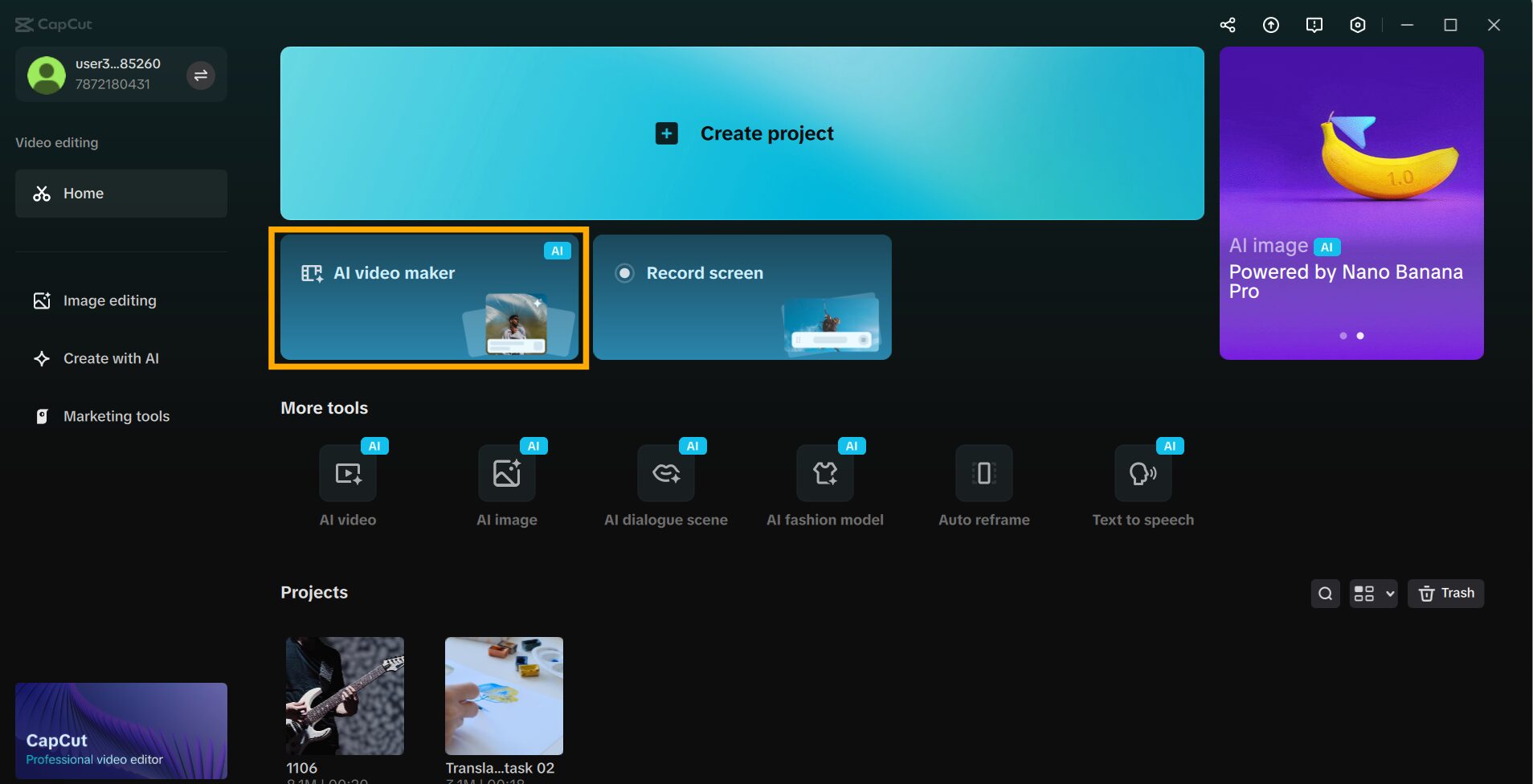
Image Source: CapCut
The next screen opens, and then click on Brainstorm with AI.
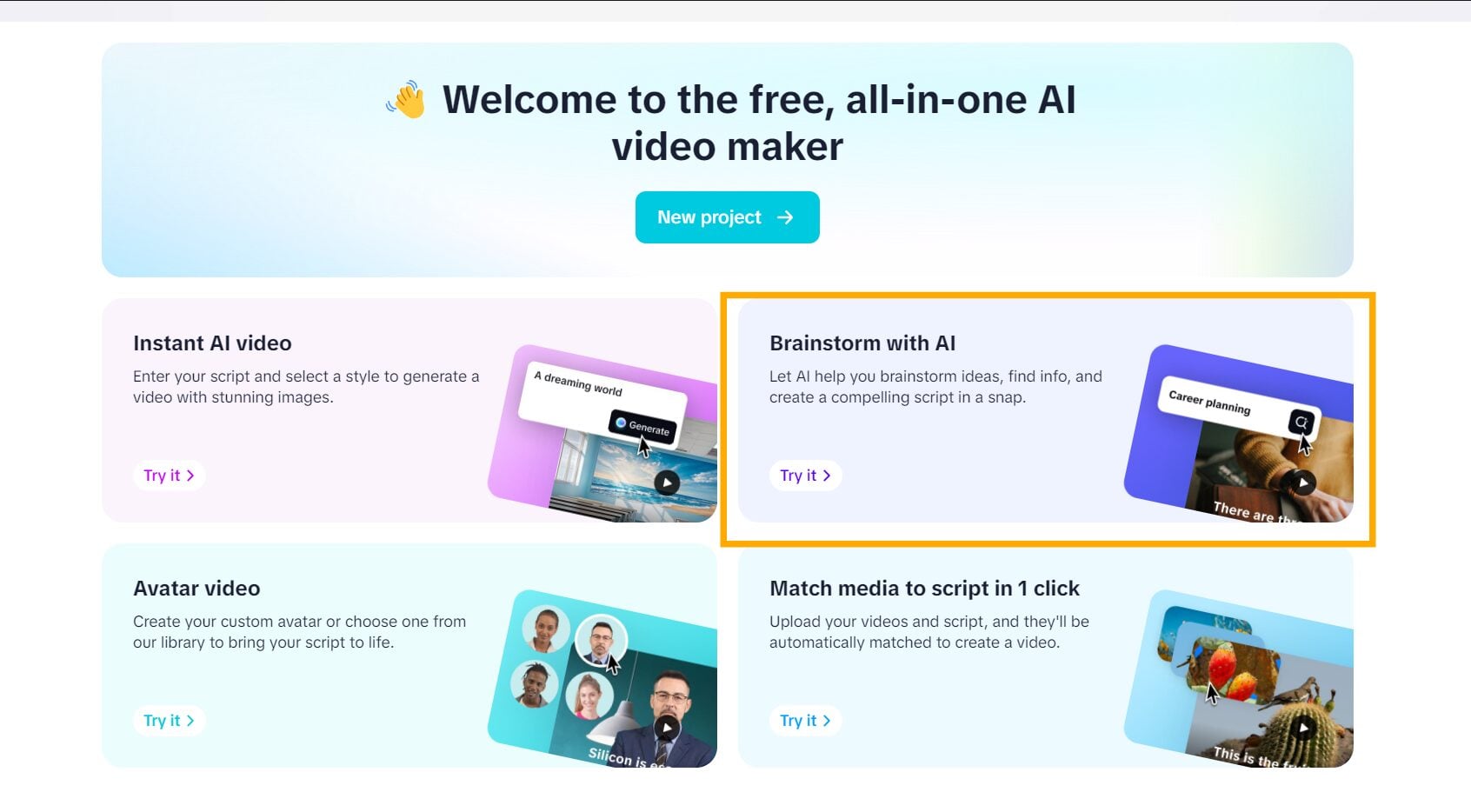
Image Source: CapCut
Next, you will find a box to input your idea. Write your Reel subject in a short line, choose the script format, and hit the button to create ideas instantly. The tool provides sample scripts quickly based on what you typed.

Image Source: CapCut
Step 3: Script Generation and Style Instructions
Tone options will appear on the same panel. Choose one that matches your Reel’s theme—a calm tone works for guides, a fun tone suits trends, and a sharp tone is ideal for factual content.
After that, configure the script length. The ideal Reel duration is between 10 and 30 seconds. Once done, click Generate Script, and the tool will create a complete script for you to use or customize.

Image Source: CapCut
Final Thoughts
Instagram reels should have a bold flow and compelling words to capture viewers’ attention. A quality script molds the message beautifully, which becomes smooth and easy to watch. This is where CapCut PC AI Writer helps. It transforms tedious script work into an attractive course of action. The AI Writer provides you with words that are easy to read and sound appropriate to the short videos.
The AI Storyboard lets you preview how every scene will look. When paired with the AI Writer, the entire Reel creation process becomes quicker and smoother. However, it is important to note that CapCut Desktop Video Editor is not entirely free. Features like advanced voices and avatars may require payment. Still, the core tools are free to use, so you can start comfortably and upgrade only if needed.
Recommended Articles
We hope this guide on CapCut PC AI Writer helped you create better Reel scripts. For more content tips, explore the recommended articles below:


