


Introduction
In the ever-evolving world of digital music, the ability to isolate a voice from a melody has transitioned from a professional studio secret to an accessible tool for everyone. Whether you are an aspiring singer looking for karaoke tracks, a DJ crafting a fresh remix, or a content creator needing clean background music, AI technology has made the process seamless. In this guide, we will cover how to remove vocals from a song with AI for free, explain how the technology works, and highlight why EaseUS Vocal Remover stands out in 2025.
Why Use an AI Vocal Remover?
Traditionally, removing vocals required complex software and a deep understanding of audio frequencies. Even then, the results were often “muddy,” with leftover vocal echoes or distorted instruments. AI Vocal Removers have changed the game by using “Source Separation.” Instead of simply “muffling” the middle frequencies, AI has been trained on millions of songs to recognize the specific “fingerprint” of a human voice versus a guitar, drum, or piano.
Key Benefits of AI-Powered Extraction:
- Create High-Quality Karaoke: Get studio-grade instrumental tracks without the original artist’s voice.
- Isolate Acapellas: Extract clean vocals for your own music production or song covers.
- Sample Like a Pro: Producers can grab specific drum loops or melodic segments without vocal interference.
- Clearer Learning: Music students can remove the vocals to hear the intricate instrumentals more clearly.
Best Free AI Vocal Remover
If you are looking for a tool that balances speed, quality, and ease of use, we highly recommend EaseUS Vocal Remover.
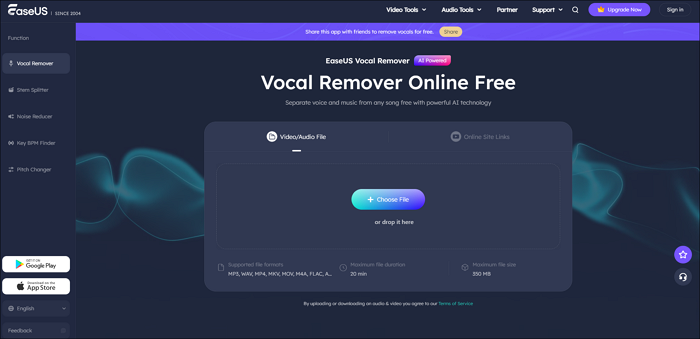
Image Source: AI Vocal Remover
Why Choose EaseUS?
Unlike many “free” tools that limit you to 30-second previews or hide your files behind a paywall, EaseUS provides a robust, browser-based solution that uses advanced AI algorithms to deliver crystal-clear results.
Key Features:
- High Fidelity: It uses proprietary AI to minimize artifacts, so your instrumental track sounds like a professional “minus-one” recording.
- Support for Multiple Formats: Whether you have an MP3, WAV, or video file such as MP4 or MOV, EaseUS can handle it.
- Direct URL Support: You do not even need the file on your computer. You can paste a YouTube or SoundCloud link directly into the tool.
- Fast Processing: Most songs are analyzed and separated in under a minute.
How to Remove Vocals from Any Song with an AI Vocal Remover
Removing vocals is now as simple as uploading a file. Here is how you can do it for free using EaseUS:
- Upload Your File: Click the “Select File” button or simply drag and drop your audio/video file into the workspace.
- Wait for AI Analysis: The AI will begin “de-mixing” the track. It identifies vocal and instrumental frequencies simultaneously.
- Preview and Download: Once finished, you will see two separate tracks: Vocals and Music (Instrumental). You can listen to both to ensure they sound perfect before downloading the high-quality files to your device.
Comparison of Top Free AI Vocal Removers
While EaseUS is our top recommendation for its versatility, here is how it compares to other popular options:
| Feature | EaseUS Vocal Remover | VocalRemover.org | LALAL.AI |
| Price | Free (with daily limits) | Free | Limited Free Trial |
| Max File Size | 350 MB | 100 MB | Varies |
| URL Input | Yes (YouTube/SoundCloud) | No | No |
| Stem Options | Vocals & Instrumental | Vocals & Instrumental | Multiple (Drums, Bass, etc.) |
| Ease of Use | Very High | High | Medium |
Pro Tips for the Best Vocal Removal Results
Even the most advanced AI can only deliver results as good as the quality of the original input. Follow these tips for the best results:
- Use High-Bitrate Files: An MP3 at 320 kbps or a lossless WAV file will yield much cleaner results than a low-quality 128 kbps file.
- Avoid Heavily Distorted Tracks: AI struggles with “noisy” genres such as lo-fi or heavy metal, where vocals are intentionally distorted or blended with instruments.
- Check the “Bleed”: If a song has heavy reverb on the vocals, some of that “echo” might remain in the instrumental track. AI is getting better at this, but a “dry” vocal is always easier to remove perfectly.
Conclusion
The days of expensive studio sessions and complicated audio software are over. With a modern AI Vocal Remover like EaseUS, anyone can remove vocals from a song with AI for free in just a few clicks. Whether you are producing music, teaching students, remixing tracks, or simply enjoying karaoke, AI-powered vocal removal puts professional audio separation right at your fingertips.
Recommended Articles
We hope this guide on using an AI Vocal Remover helps you remove vocals from songs easily. Explore our recommended articles for more AI audio tips.


