


How to Edit Images Using AI?
The ability to edit images through simple text commands represents one of the most significant shifts in digital skills education. Rather than spending months mastering complex software interfaces, professionals can now achieve sophisticated image manipulations by describing what they want in plain language. Whether you are a designer, marketer, content creator, or student, AI image editing offers a faster and more intuitive way to work with images.
Understanding AI Image Editing Technology
Traditional image editing requires learning specific tools, keyboard shortcuts, and techniques for each desired effect. AI-powered editing inverts this paradigm entirely. Modern systems combine large language models with diffusion-based image generation to interpret natural-language instructions and apply precise visual transformations.
The underlying architecture processes user requests through several stages. First, the language model parses the instruction to understand intent. Next, a vision model analyzes the source image to identify relevant elements. Finally, a generation model produces the edited result while preserving unaffected areas. This technology has matured rapidly. Current systems understand context, maintain consistency across edits, and produce results that meet professional publishing standards.
Core Capabilities of AI Image Editors
Here are the key features and functions that define modern AI image-editing tools.
1. Natural Language Editing
The defining feature of modern AI editors is instruction-based manipulation. Users describe desired changes conversationally:
- “Remove the background and replace it with a sunset beach.”
- “Change the shirt color from blue to red.”
- “Add soft studio lighting to this portrait.”
- “Make this look like a watercolor painting.”
The system interprets these requests and executes them without requiring users to identify specific tools or adjust technical parameters.
2. Background Removal and Replacement
AI excels at separating subjects from backgrounds a task that traditionally required careful manual masking. Modern tools detect edges with remarkable precision, automatically handling challenging elements such as hair, transparent objects, and complex boundaries. Replacement goes beyond simple deletion. Users can specify new environments, and the AI generates contextually appropriate backgrounds that match lighting and perspective.
3. Style Transfer and Artistic Effects
Applying artistic styles previously required either significant manual skill or crude filter effects. AI-powered style transfer analyzes the visual characteristics of reference images and intelligently applies them, preserving important details while transforming the overall aesthetic.
4. Batch Processing and Consistency
For professional workflows involving multiple images, AI editors maintain consistency across batches. Product photographers can apply identical background treatments to hundreds of images. Content creators can ensure visual coherence across image series.
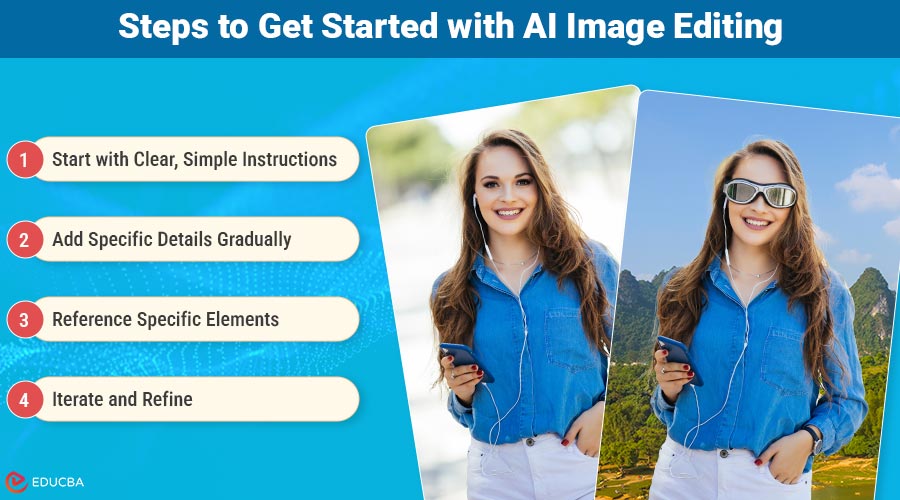
Steps to Get Started with AI Image Editing
Learning to work effectively with AI image editors requires understanding how to clearly communicate your intent. Here is a practical approach to developing this skill:
1. Start with Clear, Simple Instructions
Begin with straightforward requests targeting a single element. “Remove the background” or “brighten the image” are good starting points. Observe how the system interprets these basic commands.
2. Add Specific Details Gradually
Once comfortable with simple edits, incorporate more detail. Instead of “change the background,” try “replace the background with a modern office interior with large windows and natural light.”
3. Reference Specific Elements
When editing complex images, reference specific objects or areas. “Move the coffee cup to the left side of the desk” is more effective than “rearrange the objects.”
4. Iterate and Refine
AI editors support iterative workflows. If the first result does not match your requirements, refine your instructions rather than starting over. “Make the lighting warmer” or “reduce the effect intensity” helps you dial in the exact result.
Tools like Nano Banana implement these capabilities through an intuitive interface, making it straightforward to experiment with different approaches. The platform supports natural language commands in multiple languages and provides a real-time preview of edits.
Practical Applications Across Industries
The following points explain how AI image editing is applied across different industries and professional use cases.
1. E-Commerce and Product Photography
Online retailers benefit enormously from AI editing capabilities. Product images can be:
- Standardized to consistent backgrounds across catalogs
- Adapted for different marketplace requirements
- Enhanced for lighting and color accuracy
- Modified for seasonal campaigns without reshooting
2. Content Creation and Social Media
Content creators producing material for multiple platforms can efficiently:
- Adapt images to different aspect ratios
- Create visual variations for A/B testing
- Maintain brand consistency across posts
- Generate contextual variations for different audiences
3. Marketing and Advertising
Marketing teams leverage AI editing for:
- Rapid creative iteration during campaign development
- Localization of visual content for different markets
- Quick response to trending topics and events
- Consistent brand application across diverse materials
4. Design and Creative Services
Professional designers integrate AI tools to:
- Accelerate concept exploration
- Handle repetitive production tasks
- Focus creative energy on strategic decisions
- Deliver faster turnarounds to clients
Developing Your AI Image Editing Skills
The points below outline the essential skills, practices, and knowledge needed to improve proficiency in AI image editing.
1. Foundation Knowledge
While AI eliminates the need for traditional software expertise, understanding basic image concepts remains valuable:
- Composition principles help you request well-balanced results
- Lighting awareness enables more precise instructions
- Color theory supports effective style and mood requests
2. Practice Techniques
Build proficiency through deliberate practice:
- Edit the same image multiple ways to understand instruction nuances
- Compare AI results with manual editing to appreciate capabilities and limitations
- Work with diverse image types to understand how different content responds
- Study successful prompts to build your instruction vocabulary
3. Workflow Integration
Consider how AI editing fits your existing processes:
- Identify repetitive tasks suitable for AI automation
- Determine quality checkpoints for AI-generated results
- Develop templates for common editing needs
- Build prompt libraries for recurring requirements
Quality Considerations and Best Practices
The following points outline key strategies and best practices to ensure high-quality results when using AI image-editing tools.
1. Output Quality Assessment
AI-generated edits vary in quality. Develop criteria for evaluating results:
- Edge quality around edited elements
- Consistency of lighting and shadows
- Natural integration of new elements
- Preservation of important details
2. Iteration Strategy
Rather than accepting first results, plan for iteration:
- Start with rough adjustments, then refine
- Save intermediate versions for comparison
- Document effective prompts for future use
- Build upon successful approaches
3. Ethical Usage
Professional practice includes awareness of appropriate use:
- Disclose AI-enhanced images when context requires
- Maintain accuracy in documentary or journalistic contexts
- Respect intellectual property in source materials
- Consider implications of realistic manipulations
The Future of Image Editing Skills
The trajectory of AI image editing points toward increasing capability and accessibility. Skills developed now will remain relevant as technology advances:
- Prompt engineering for visual AI will grow in importance
- Creative direction becomes more valuable as execution barriers fall
- Quality judgment remains essential regardless of production method
- Integration expertise helps organizations leverage new tools effectively
Final Thoughts
AI image editing represents a fundamental shift in how visual content is created and modified. The skill of communicating effectively with these tools describing desired outcomes clearly and iterating toward ideal results is becoming essential for creative professionals, marketers, and anyone working with visual media. The learning curve is significantly shorter than traditional software mastery, but developing genuine proficiency still requires practice and understanding. By developing strong AI image editing skills now, individuals and businesses can stay competitive in an increasingly AI-driven creative landscape.
Recommended Articles
We hope this guide on AI image editing helps you edit images more efficiently. Explore the recommended articles below for additional insights and practical strategies on image editing.


