

Updated November 12, 2026
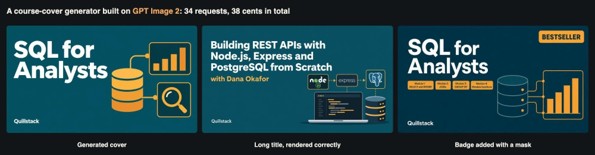
Most image-generation tutorials stop at sending a prompt and receiving a picture. A real product also needs predictable dimensions, controlled costs, reliable editing, and failure handling. This GPT Image 2 API integration tutorial builds a course-cover generator and reports 34 GPT Image 2 requests. We measured time and price, checked text with OCR, and tested broken requests. Total API usage was $0.38.
The Feature We Are Building
Our fictional platform, Quillstack, lets instructors create covers without design skills. An instructor enters a title; a fixed prompt creates a design using deep teal #0F4C5C and amber #F2A541. It must render titles accurately, fit 16:9 catalog cards, support edits such as a “Bestseller” badge, and remain affordable.
Step 0: The Request and Response Cycle
GPT Image 2 is asynchronous: a POST request sends the model, prompt, and settings, then returns a task ID. Poll until the task completes or fails, then download the result. Save each ID before polling to prevent duplicate submissions after a restart. Retry temporary network errors, but handle confirmed failures separately and allow enough time for slow generations.
Core Workflow: Submit the request → save the task ID → poll the task endpoint → download the completed image.
For secure GPT Image 2 API integration, keep the API host and key in environment variables rather than hard-coding credentials.
Test 1: The Minimal Request
We first sent only the model and prompt, without size or resolution. The request generated a clean “SQL for Analysts” cover in 17 seconds for $0.003. However, the result was 1536 × 1024 pixels (3:2), not the 16:9 catalog format. Always specify size and resolution instead of relying on defaults.
Test 2: Choosing a Size
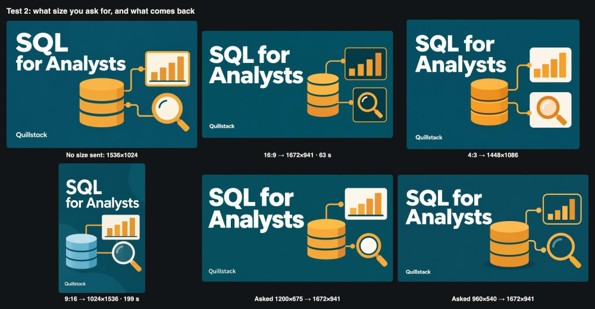
We tested standard ratios and custom pixel dimensions. The 16:9 request returned 1672 × 941, 4:3 returned 1448 × 1086, and 9:16 returned 1024 × 1536. Requests for 1200 × 675 and 960 × 540 both returned 1672 × 941: custom dimensions were mapped to a standard ratio, not an exact canvas.
Request the right ratio, resize with Pillow or Sharp, and verify the file dimensions. Layouts changed by ratio, so inspect each output.
One generation took 199 seconds, making background processing and notifications important for reliable GPT Image 2 API integration.
Test 3: Resolution Tiers
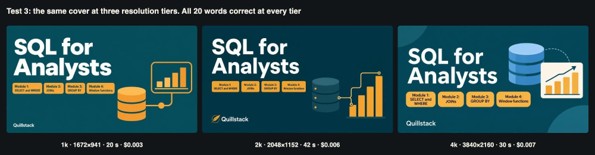
We tested 1k, 2k, and 4k using a cover with four small module labels. All 20 words were correct at every tier; the main difference was sharpness.
| Parameter | 1K Resolution | 2K Resolution | 4K Resolution |
| Image dimensions | 1672 × 941 | 2048 × 1152 | 3840 × 2160 |
| File size | 1.3 MB | 1.7 MB | 5.4 MB |
| Generation time | 20 seconds | 42 seconds | 30 seconds |
| API cost | $0.00 | $0.01 | $0.01 |
| Text accuracy | 20/20 words | 20/20 words | 20/20 words |
Use 1k for ordinary catalog cards and offer 4k on demand; compress large PNG files before serving.
Test 4: Quality Tiers
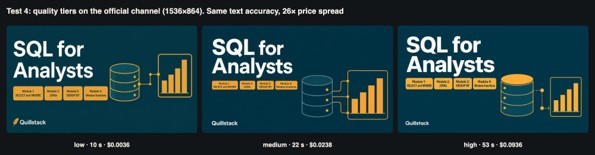
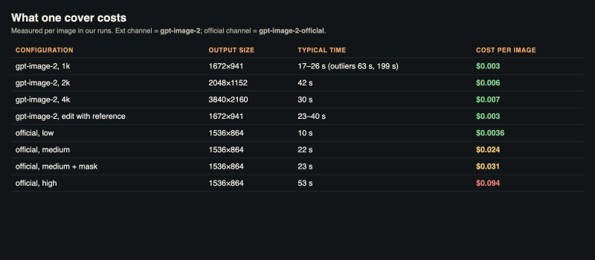
The standard gpt-image-2 model has no quality setting. The gpt-image-2-official model supports low, medium, and high quality. At 16:9 and 1k, low took 10 seconds and cost $0.0036; medium took 22 seconds and cost $0.024; high took 53 seconds and cost $0.094.
All three rendered the 20 words correctly, while differences appeared mainly in illustration details. The outputs were 1536 × 864, so inspect the actual dimensions. Low or the standard model suits thumbnails; medium may suit featured courses, while high is costly for small cards.
Test 5: Long Titles and Text Rendering
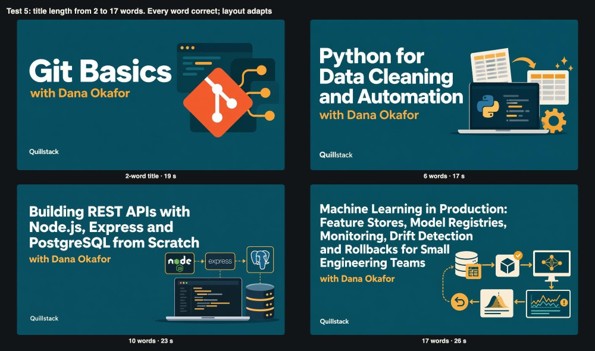
We tested titles of 2, 6, 10, and 17 words, including punctuation. Every title was correct, and the model reduced type size to fit. Each image took 17–26 seconds and cost $0.003.
The model also added logos for Git, Python, Node.js, and PostgreSQL. If trademarks are unwanted, add “no logos or trademarks of real products” to the prompt. Keep layout and palette fixed, quote the title, escape quotation marks, and set a maximum title length.
Test 6: Editing With a Reference Image
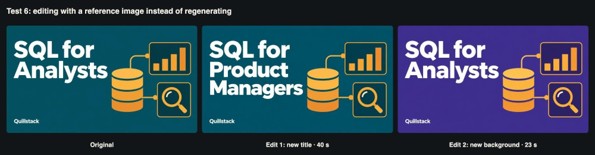
The GPT Image 2 API accepts reference images through image_urls, using public URLs or base64 data URIs. We edited a 16:9 cover to change “SQL for Analysts” to “SQL for Product Managers”, then changed its teal background to purple #3D2C8D.
The title edit preserved the illustration and branding; 8.1% of pixels changed, mainly around the longer title. It took 40 seconds and cost $0.003. The color edit changed 74% of pixels while keeping elements in position. Reference editing can create variants without redesigning the whole cover.
Test 7: Precise Edits With a Mask
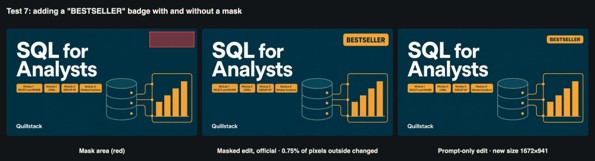
A mask defines the area that may change. The official model accepts mask_url, a same-sized PNG with an alpha channel: transparent pixels mark editable areas and opaque pixels mark areas to preserve. We added an amber “BESTSELLER” badge to the top-right corner.
The masked edit kept the original 1536 × 864 dimensions; only 0.75% of pixels outside the mask changed noticeably. It took 23 seconds and cost $0.031. A prompt-only edit also placed the badge correctly and cost about 1/10th, but returned different dimensions. Use a mask when alignment matters.
Test 8: Generating Several Options at Once
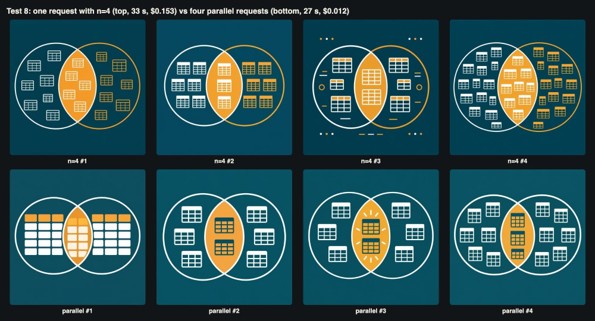
We compared one official-model request with n=4 against four parallel standard-model requests. The n=4 request took 33 seconds and cost $0.153. The four parallel requests completed in 27 seconds combined and cost $0.012, producing 1254 × 1254 images.
Parallel generations also gave more visual variety. Limit concurrent requests per user to prevent repeated clicks from creating excessive tasks.
Test 9: Error Handling
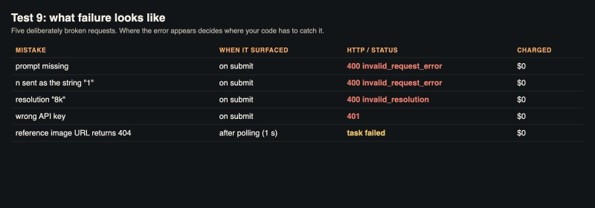
Missing prompts, n supplied as the string “1”, and unsupported 8k resolution were rejected immediately with HTTP 400; a wrong API key returned 401. These created no task and cost nothing. A reference URL returning 404 was accepted initially, then failed during processing with “An input media URL could not be fetched”; it was not charged.
Validate prompts, allowed sizes and resolutions, and numeric parameters before submission. Treat submit errors as final, keep task IDs after timeouts, and retry a confirmed task failure only when appropriate.
Putting the GPT Image 2 API Integration Feature Together
Quillstack inserts an escaped title into a fixed, brand-safe prompt, validates it, and submits four parallel standard-model requests at 16:9 and 1k. It saves task IDs and displays completed options. It downloads the selected image, resizes it, converts it to WebP, and stores it because result URLs may be temporary.
Later title changes use reference editing; precisely placed badges use masks. A separate button triggers a 4K download when needed.
The Walkthrough Video
The short video demonstrates the nine tests, generated images, and measurements: Walkthrough: building a course-cover generator with GPT Image 2 (about 3 minutes).
What it Cost
The 34 requests cost $0.38 in total: minimal request, $0.003; five sizes, $0.015; three resolution tiers, $0.016; three quality tiers, $0.121; four title lengths, $0.012; two reference edits, $0.006; two badge edits, $0.034; five multiple-option requests, $0.165; and nine error probes, $0.010.
The high-quality image and n=4 request accounted for about 65% of spending. Standard-model images cost 0.007 each, so four options for 1,000 courses would cost about $12.
Checklist for Shipping an Image-generation Feature
- Always specify size and resolution
- Read actual dimensions and resize when needed
- Log task IDs before polling
- Design for slow outliers with progress and notifications
- Put user text in quotes inside a fixed template
- Add “no logos” when trademarks are unwanted
- Edit existing images; use masks for precise alignment
- Validate inputs and distinguish submit errors, failed tasks, and timeouts.
Final Thoughts
In our tests, GPT Image 2 rendered all 20 checked words correctly and supported different layouts, reference edits, masks, and clear error reporting.
Successful GPT Image 2 API integration for production still requires explicit dimensions, handling occasional three-minute delays, controlling parallel requests, and preventing unwanted trademarks.
The 34-request experiment cost $0.38. Developers who want to prototype similar features or compare image, video, and language models through one key can explore APIMart.
Recommended Articles
Explore our recommended articles to learn more about AI image generation, API integration, and building automated visual content workflows. Discover practical tutorials, tools, and techniques to optimize image quality, reduce API costs, and improve AI-powered applications.