
Updated September 29, 2026
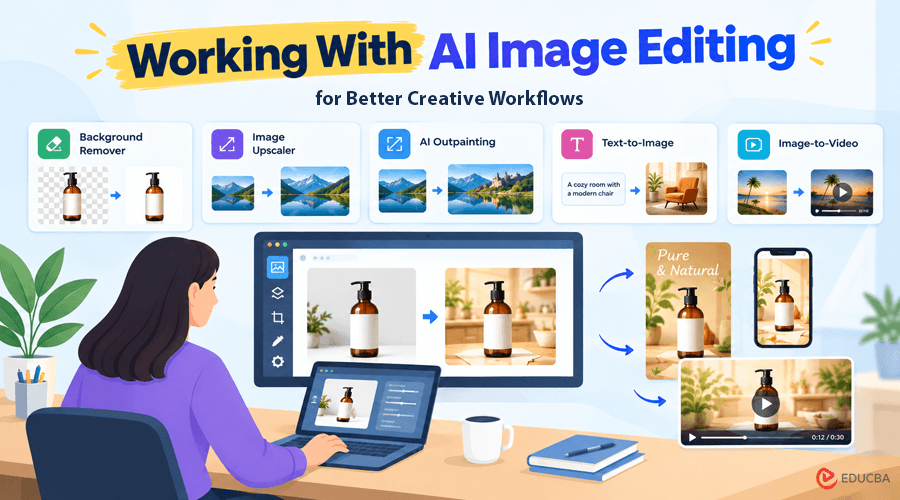
AI image tools are often introduced as a way to create a picture from a prompt. Useful, yes, but that is only one part of working with AI image editing in a real creative workflow. Marketers, students, small business owners, and content creators often start with something they already have, such as a product photo, an old campaign visual, a rough concept, or an almost-right image. In everyday content work, the first image is usually only the beginning.
Start With a Reference, Not a Blank Canvas
When updating an existing image, a reference can reduce unnecessary experimentation and make editing more efficient. Instead of describing the whole scene again, you upload the image and explain the change you want. A seller might keep a product untouched while replacing a cluttered background with a clean studio setting. A social media manager could adapt a landscape graphic for a vertical post.
A creator might keep the same subject while testing a different atmosphere. Pixlio approaches this through image-to-image editing. Its AI image editor lets users upload reference images, write a natural-language instruction, choose an available model, and generate a revised version. The same workspace also includes text-to-image generation so that a project can start from either an existing image or a written idea.
Treat the First Result as a Draft When Working With AI Image Editing
A useful habit with AI image editing is to avoid solving everything in one prompt. Suppose you are preparing a product visual for a seasonal campaign. The first pass might replace the background. A second could adjust the lighting or mood. Another might reframe the scene for a banner. Smaller edits make it easier to see what improved and what should stay unchanged.
Pixlio supports that kind of iteration by letting a generated result become the reference for the next edit. Instead of rebuilding the setup each time, you can continue from the image you already refined. Specific prompts also help. “Make this better” leaves too much open to interpretation. “Keep the bottle and label unchanged, replace the background with a warm kitchen counter, and use soft morning light” gives the model a clearer job.
Think About What the Image Needs Next
An edited image is often not the finished asset. It may still need a transparent background for a catalog, more room around the subject for a banner, higher resolution for a presentation, or motion for a short video. Pixlio works as an AI image creative studio rather than a single-purpose editor, with practical tools built around common visual tasks. Its Background Remover can prepare clean product or profile cutouts, the Image Upscaler can improve an asset for larger use, and AI Outpainting can extend a scene for a wider banner or vertical social format without forcing a hard crop.
Those steps matter because creative work often becomes inefficient between the first good image and the final deliverable. Moving an asset through separate apps and rebuilding context adds friction. In Pixlio, follow-up actions can carry the selected result into dedicated workflows for upscaling, background removal, canvas extension, or video creation. Each tool still has its own controls, so users can review the next step before processing the image. The video handoff is a good example. A polished product shot or illustration can become the starting image for an image-to-video clip, allowing work on the still image to carry into motion. A content team could prepare the static campaign visual first, then reuse the same creative direction for a short video.
A Simple Workflow for Working With AI Image Editing
A practical approach to working with AI image editing is to start with the asset closest to your goal, make one clear change, review the result, and then decide on the next production step. If the composition is right but the dimensions are not, extend it. If the subject needs to stand alone, remove the background. Suppose the image needs more detail at a larger size; upscale it. If it should become a short clip, move it into video creation.
The goal is not to create endless alternatives but to move a useful image toward the format in which it will be published. For people creating campaign graphics, product visuals, social posts, illustrations, or presentation assets, this continuity can reduce repetitive work. A creative platform is most useful when it allows you to build on a refined result instead of starting over whenever the format or purpose changes.
Recommended Articles
We hope this practical guide to working with AI image editing helps you create, refine, and adapt visuals more efficiently. Check out these recommended articles for more insights and strategies on AI image editing, creative workflows, and digital content creation.


