


Updated September 15, 2026
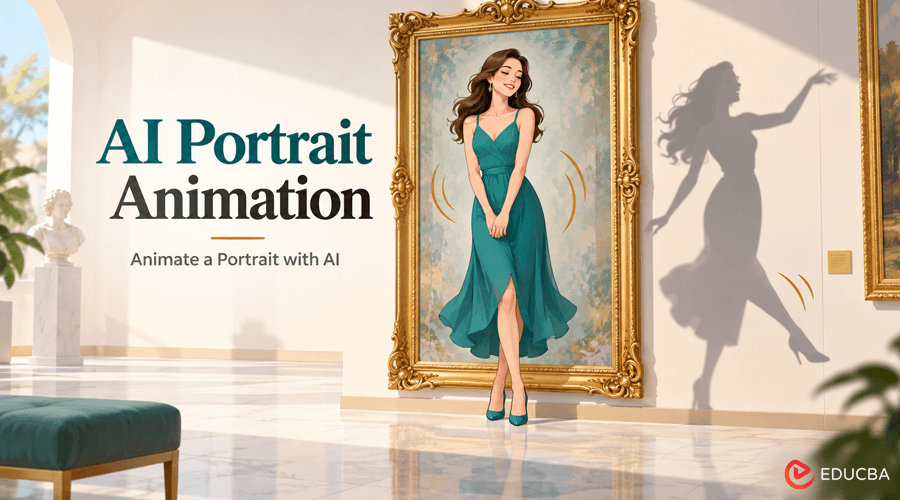
The dancer stops, but her shadow takes one more step. That small disagreement turns an animated portrait into a story. Starting with one full-body image, the AI portrait animation process creates a short gallery dance, returns the woman to her opening pose, and lets the shadow finish alone. This approach shows how to prepare the image, describe the movements, and make the final eight-second reveal easy to see
The Shadow Continues After the Dancer Stops
A museum portrait comes alive, completes a tiny dance, freezes and watches its own shadow disobey. That sentence did more production work than “make this photo dance.” It names a location, a subject, a finite action, a reset, and an exception. It also gives the audience a reason to watch beyond the first movement. This approach shows how AI portrait animation can go beyond simple facial or body movement and create a short visual story from a single image.
Why the Before and After Must Be Easy to Compare?
Photo animation is easiest to judge when the source pose is clear, and the movement begins quickly. A full-body frame lets the viewer compare face, clothing, limbs, and shadow before and after the dance. This scene adds one controlled contradiction rather than copying familiar choreography. The archivist returns to stillness while her cast shadow completes one final step. The fixed camera makes that disagreement visible and gives the AI portrait animation a clear visual structure.
Prepare a Full-Body Photo for AI Portrait Animation
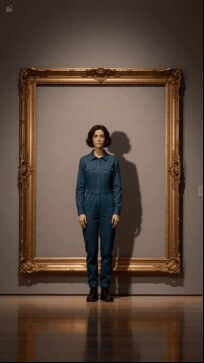
The source image shows a fictional adult woman standing inside an antique-gold frame in an empty gallery. Her hands have space beside her torso, both shoes are visible, and her plain teal outfit has a clear silhouette.
Prepare these details before adding movement:
| Source Decision | Motion Benefit | Detail to Preserve |
| Entire Body Visible | Provides a clear joint map | Both legs and shoes fully visible |
| Space Around Hands | Leaves room for an arm swing | Hands clearly separated from clothing |
| Low Black Shoes | Preserves a readable floor contact | Natural contact between shoes and floor |
| Plain Teal Jumpsuit | Makes fabric continuity obvious | Consistent teal fabric and seams |
| Straight-on Camera | Keeps travel easy to judge | A fixed frontal perspective |
| Large Fixed Picture Frame | Supplies four rigid reference edges | Stationary frame edges and camera scale |
In an image-to-video AI workflow, a visible floor, separated limbs, and stable edges give the movement a clear starting point. Prepare them before asking the subject to step or turn. These details matter most for AI portrait animation, where the generated motion must preserve the original character and environment.
Watch the Complete AI Portrait Animation
Begin with the Original Pose
The opening preserves the portrait’s front-facing stance, teal utility suit, short dark hair, gallery wall, and gilt frame. Movement begins as a small weight transfer rather than a sudden jump, letting the viewer register the “photograph” before it breaks character.
Give the Dancer Three Small Movements
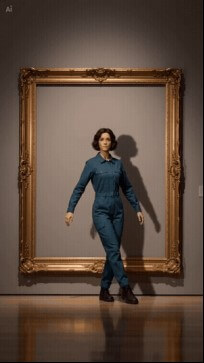
The archivist travels laterally and crosses one foot while her arms open. The routine is intentionally modest: a short dance can look more believable when each footfall remains inside the source image’s available floor space.
Let the Shadow Finish Alone
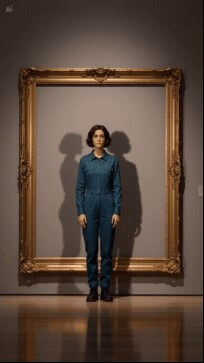
She returns to a centered neutral pose and stops. The shadow on the wall then separates from her timing, leans, and finishes a small two-step while the body remains still. This final visual disagreement converts a technique demo into a micro-story.
Write the Dance as Ordered Movements
A dance name is open to interpretation and may point toward someone else’s recognizable routine. I used four states instead:
POSE → TRAVEL → RETURN → EXCEPTION
This state-based approach makes AI portrait animation easier to control because each movement has a clear purpose and endpoint.
Preserve the Opening Pose
The first half-second asks for the exact opening stance. This creates a clean comparison point for face, hair, clothing, frame geometry, and camera scale.
Use a Short Movement Sequence
The action contains only three instructions: step right with forearms opening, tap the left heel across while the hands cross once, then step to center with a shoulder roll. Each verb has one body part, one direction, and one finish.
Return to the Opening Pose
At 5.8 seconds, the dancer returns to her original stance. Keep her face, proportions, shoes, and frame familiar so the audience can compare the two poses before noticing the shadow’s final step.
Reserve the Surprise for the Shadow
Only the shadow violates the reset. Giving one element permission to break the rule makes the twist readable. If the camera, clothing, lighting, frame, and body also transformed, the viewer would see general instability rather than deliberate disobedience. This state-machine approach works well for an AI photo-to-video generator because it describes transitions, not just an aesthetic outcome.
Keep the Character Recognizable
Keep the same identifying details visible throughout the dance:
face → bob haircut → teal collar → sleeve length → waist seam → trouser shape → black shoes
The gold frame and floor line provide additional reference points. Check them alongside the face and clothing when the dancer moves across the image. The shadow changes shape as part of the story. Keep the woman and frame steady after the return to center so that this final movement remains distinct. For successful AI portrait animation, consistency matters as much as movement. The viewer should recognize the same person throughout the generated sequence.
Animate the Portrait in CapCut
Upload the portrait to CapCut’s AI video generator as the visual starting point. Describe the dance as an ordered sequence, choose the visual style and aspect ratio, and set a duration that leaves room for the shadow’s final movement.
Keep the camera, gallery frame, and clothing consistent while the subject moves. After generation, use pacing and audio adjustments to separate the dance from the quieter shadow reveal. This workflow combines AI portrait animation with image-to-video generation to transform a static portrait into a short narrative sequence.
Separate Fixed Details, Motion, and the Final Twist
The prompt had three layers.
1. Lock
- Preserve the woman’s face, hair, teal jumpsuit, shoes, proportions, frame, gallery, and lighting
- Keep it straight-on, full-body, and in the original portrait orientation
- Forbid new people, costume changes, zooms, cuts, cropped feet, frame deformation, extra limbs, and logos.
2. Move
- Start still for half a second
- Describe three original actions in chronological order
- Ask for realistic weight transfer, natural floor contact, and correct hands
- Return to the source pose at a named time.
3. Contradict
- Freeze the subject
- Let only the wall shadow perform one last two-step
- Ask the subject to glance toward it
- End with both elements stopped.
This structure can help produce more consistent AI portrait animation by separating identity preservation from movement and storytelling.
Check the Pose at Five Key Moments
Compare the opening stance, first step, cross step, return to center, and shadow finish. The face and clothing should remain recognizable, both shoes should meet the floor naturally, and the hands should have space to move. The final check is the story’s central detail: the woman has stopped while the shadow completes its own step. Give that difference enough screen time to register.
Edit Without Hiding the Movement
The generated visual already supplies its own three-act timing, so the edit should clarify rather than camouflage it.
- Show the original portrait for a short hold before the generated clip, if the platform format allows.
- Add unobtrusive beat markers only after checking that they do not cover hands or feet.
- Choose original or properly licensed audio with a light rhythm that suits the three movements.
- Keep the shadow beat quieter than the human dance so the visual contradiction lands before an audio sting explains it.
- Preview the vertical upload with the platform interface visible, so overlays stay clear of the face, shoes, and shadow.
The strongest loop cuts from the shadow’s final stop back to the source portrait. That edit turns the unresolved question of who controlled whom into a reason to watch again.
Final Thoughts
A clear opening pose makes the dance easy to follow, while the return to stillness prepares the shadow’s surprise. Keep the subject’s identity stable and reserve the unexpected movement for the final beat. AI portrait animation works best when the source image has a clear silhouette, the movement is described in ordered steps, and the final effect has one easily recognizable visual purpose. Open CapCut’s AI video generator, upload a full-body portrait, and plan a short sequence that gives one small detail a surprising ending.
Recommended Articles
We hope this guide helps you explore AI portrait animation and turn still images into engaging short videos with controlled movement. Explore our recommended articles for more insights on AI video tools, image-to-video generation, photo animation, creative AI, and video editing.


