


If you have used ChatGPT, Claude, or Gemini to assist you with an essay or blog post, you know exactly what I mean. You are happily clicking through what comes back at you: it is speedy, it reads well, and it looks organized. However, there is an indefinable something wrong. It sounds a little too flat, too robotic, the sort of writing you can spot from a mile away. Your tutor might know. Your audience might not read to the end. An AI detector might notice. This is what AI text humanizers were made for. In the last couple of years, they have rapidly evolved from a small, niche customization to a core writing tool for millions of students, bloggers, and professional writers. This guide will cover what AI humanizers really do, how they function, when and when not to use them, and what to consider before choosing one.
What an AI Humanizer Really is?
An AI humanizer is a program that rephrases an LLM-generated text so that the resulting text reads as if a human had written it from scratch. It is not enough to just paraphrase a few words and phrases. A good humanizer also morphs the sentence rhythm, breaks up the AI’s repetition patterns, alters word selection to match natural human divergence, and removes the harshest idiosyncrasies to the detector’s eye. Think of it as a second pass on your writing. The first pass is the AI generating ideas and structure. The second pass is the humanizer, smoothing the language so it sounds like you. Two things often get confused with humanizers, so it is worth being clear:
- A paraphraser swaps words and rearranges sentences. It does not deeply restructure rhythm or remove machine patterns.
- A grammar checker fixes errors but leaves the underlying robotic feel untouched.
A humanizer is closer to a ghostwriter than to either of those tools. It is rewriting with intent, not just editing.
Why AI Writing Sounds Robotic in the First Place?
To understand why humanizers exist, it helps to understand why AI text feels off in the first place. Large language models predict the most statistically likely next word. That sounds neutral, but the result is writing that leans toward certain patterns again and again:
- Sentences of similar length stacked one after another
- Predictable transitions like “furthermore,” “in conclusion,” and “it is important to note.”
- Even, balanced phrasing where every sentence sounds like the one before
- A polite, slightly formal tone that rarely takes a stance
- Overuse of certain words such as “delve,” “tapestry,” “navigate,” and “landscape.”
Humans do not write like that. Real writing has uneven sentence lengths, the occasional rough edge, opinions that break neutral framing, and unpredictable word choices that come from personal voice. AI humanizers try to restore those qualities.
How AI Text Humanizers Actually Work?
Most humanizers use a combination of three techniques. Understanding these will help you pick a better tool and use it more effectively.
- Pattern disruption: The software identifies repeated sentence structures and breaks them apart. A paragraph of five medium-length sentences might become two short ones, one long one, and two medium ones, in a more natural rhythm.
- Vocabulary diversification: Common AI-favored words are swapped for alternatives a person would more naturally choose. The replacements are context aware, so “navigate the challenges” might become “work through the problems” rather than a random thesaurus pick.
- Stylistic randomness: Real writing has small inconsistencies, like a sentence that starts with “And” or a phrase that ends with a preposition. Good humanizers add controlled imperfections that make the text feel written by a person rather than generated.
The newer humanizers also use their own language models, trained specifically on examples of human writing across different styles. Older tools relied on rule-based swaps, which is part of why their output often sounded just as artificial as the original.
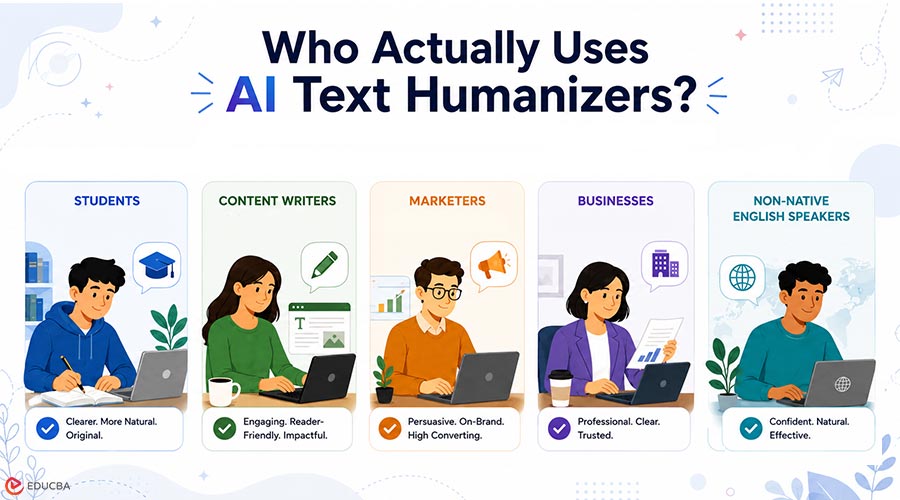
Who Actually Uses AI Text Humanizers?
The honest answer is that the user base has expanded far beyond what most people assume. Based on observable trends across writing communities and education forums, the main groups in 2026 are:
- Students: Working on essays, research papers, and discussion posts who want their AI-assisted drafts to sound like their own voice
- Bloggers and content creators: Scaling their output without sacrificing the personal feel that keeps readers coming back
- Non native English speakers: Who use AI to improve fluency but want the final result to read naturally rather than translated
- Marketing teams: Producing newsletters, social posts, and landing pages at volume
- HR and recruiting professionals: Softening AI-drafted job descriptions and candidate emails so they do not feel templated
- Freelance writers: Who use AI for research and outlining but need the final draft to carry their personal style
The common thread is that none of these users want to abandon AI. They want to use it without paying the cost of sounding like everyone else.
When You Should Use One, and When You Should Not?
This is where the conversation often gets skipped, but it matters. Humanizers are tools, and, like any tool, they have appropriate uses.
Good Reasons to Use a Humanizer:
- You wrote the original idea, used AI to expand it, and want the final version to match your voice
- You are a non native speaker who used AI to clean up grammar and want the result to read naturally
- You drafted content quickly with AI assistance and want to refine the tone before publishing
- You are producing high volumes of content and need a faster way to make each piece feel personal
More Questionable Reasons:
- Submitting fully AI-generated coursework as your own without any real understanding of the material
- Producing content for fields where authenticity is the entire point, such as personal essays for college admissions
- Bypassing plagiarism checks on work that was never yours to begin with
The tool itself is neutral. The way you use it determines whether it helps you communicate better or avoid the work of learning.
What to Look For When Choosing One?
The market has grown crowded, and the quality gap between tools is wider than it looks. Here is what actually matters when you compare options.
- Output readability: Paste a sample into the tool and read the output aloud. If it sounds awkward, no detection score is going to save it. Real readers notice.
- Meaning preservation: A surprising number of humanizers change what your text actually says. Check that the rewritten version still makes the same point.
- Tone control: The best tools let you pick between casual, professional, academic, and conversational tones. Without this, you end up with a single default voice that may not meet your needs.
- Speed and length limits: Free tiers often cap input at 500 or 1000 words. If you write longer pieces, look for tools that handle full documents without breaking the flow.
- Pricing that matches your usage: Some tools charge per word, others per month. Students writing a few essays a semester need different pricing than bloggers publishing weekly.
Among the newer entrants worth trying, My AI Humanizer has built a reputation for producing output with a high level of readability, which is one of the hardest things to get right. It is a good option if you write essays, blog posts, or longer-form content and want the rewritten version to actually feel readable rather than just technically different from the original.
How to Get Better Results from Any Humanizer?
Most people paste AI text into a humanizer, copy the output, and assume the job is done. You will get noticeably better results with a few habits:
- Edit before you humanize: Remove obvious filler sentences and tighten the original. Humanizers work better on shorter, sharper input.
- Add personal details to the draft: A line about your own experience or a specific example gives the tool something genuinely human to preserve.
- Read the output and adjust: Treat the humanizer as a collaborator, not a finisher. Tweak the phrasing where it still feels off.
- Match the tone to the audience: Academic essays and casual blog posts require different tones. Default modes rarely fit either perfectly.
- Run it once, not three times: Stacking multiple humanization passes often breaks the meaning and produces text that reads worse than the original.
Final Thoughts
AI writing tools are not going away, and neither is the need to sound like yourself. The writers and students who thrive in this environment will be those who treat AI as a starting point rather than a finishing point. Humanizers are part of that workflow, but only part. The other parts are your ideas, your perspective, and your willingness to actually read and improve what you put your name on. Used well, an AI text humanizer saves time without flattening your voice.
Used badly, it just produces a different kind of generic. The difference is in the user, not the tool. If you are new to humanizers, pick one with a free trial, run a sample of your own writing through it, and judge the result by whether you would be happy to publish it. That single test will tell you more than any review or ranking.
Recommended Articles
We hope this guide to AI text humanizer tools helps you create more natural, engaging, and human-sounding content. Check out these recommended articles for more insights, strategies, and tips to improve your AI-assisted writing workflow.


