
Updated March 27, 2026
What is an AI Copilot?
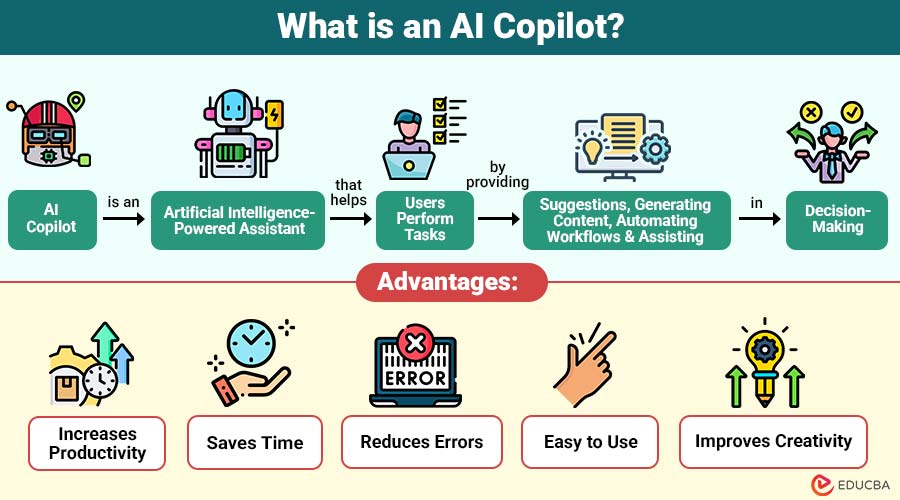
AI Copilot is an artificial intelligence-powered assistant that helps users perform tasks by providing suggestions, generating content, automating workflows, and assisting in decision-making. It works alongside users inside software applications, helping them complete tasks faster and more efficiently without replacing human control.
Table of Contents:
Key Takeaways:
- AI Copilot enhances productivity by providing real-time suggestions, automation, and intelligent assistance across writing, coding, and tasks.
- It creates intelligent suggestions in real time using machine learning, natural language processing, and big language models.
- It should be used as a support tool, because human review ensures accuracy and safety.
- By automating tedious operations, it frees up users’ time to concentrate on high-value, strategic, and creative endeavors.
Key Features of AI Copilot
Below are the key features of AI Copilot that help users work faster, smarter, and more efficiently in different tasks.
1. Real-Time Assistance
Provides real-time suggestions while users work, helping them write, code, or analyze data without interrupting their workflow.
2. Content Generation
Can automatically generate emails, articles, reports, messages, and code based on user instructions, saving time and improving productivity.
3. Automation of Tasks
Lets users concentrate on crucial work by automating repetitive processes including data entry, formatting, scheduling, and information retrieval.
4. Smart Recommendations
Analyzes user behavior and data to suggest better ways of completing tasks quickly, accurately, and more efficiently every time.
5. Natural Language Understanding
Users can give commands in simple natural language, and AI Copilot understands the intent and provides accurate results without complex instructions.
How Does AI Copilot Work?
AI Copilot uses advanced artificial intelligence technologies to understand user instructions, process data, and generate helpful responses automatically.
1. Machine Learning
Uses machine learning to automatically learn from large amounts of data, improving accuracy, performance, and response quality over time.
2. Natural Language Processing
Natural language processing helps AI Copilot understand human language, interpret user commands correctly, and generate meaningful responses in a simple conversational format.
3. Large Language Models
Large language models allow AI Copilot to generate text, code, summaries, and answers by analyzing patterns learned from massive training datasets.
4. Cloud Computing
Most AI copilots use cloud computing to process data on powerful servers, ensuring rapid performance, scalability, and real-time assistance for users everywhere.
5. User Input and AI Suggestion
Takes user input, analyzes the request, and generates helpful suggestions, content, or automated task completion.
Types of AI Copilot
AI copilots come in different types, based on their use cases, helping users with writing, coding, business tasks, customer support, design, and personal productivity.
1. Writing Copilot
A writing copilot helps users create emails, articles, blogs, and reports automatically by generating text based on user instructions and context.
2. Coding Copilot
A coding copilot assists developers by suggesting code, fixing errors, and automatically generating functions, helping them write software faster and more efficiently.
3. Business Copilot
A business copilot helps professionals create documents, analyze data, manage emails, and automate office tasks to improve productivity and workflow efficiency.
4. Customer Support Copilot
A customer support copilot helps businesses automatically respond to customer questions with AI chatbots, improving response speed, accuracy, and service quality.
5. Design Copilot
Used for creating images, presentations, videos, and graphics with AI-powered design suggestions and automation features.
6. Personal Productivity Copilot
Helps manage reminders, scheduling, notes, and daily activities using AI-powered personal assistant features.
Advantages of AI Copilot
Below are some of the key advantages that make it a useful tool for improving productivity, accuracy, and efficiency in different types of work:
1. Increases Productivity
Increases productivity by providing instant suggestions, automating tasks, and helping users complete work faster with less manual effort required.
2. Saves Time
Saves time by automating repetitive tasks, allowing users to focus on more important, creative, and high-value work.
3. Reduces Errors
AI Copilot reduces errors by checking grammar, spelling, calculations, and code, helping users consistently produce more accurate and professional results.
4. Easy to Use
AI Copilot is straightforward to use because users can give simple language instructions, and the AI understands commands without requiring technical knowledge.
5. Improves Creativity
Improves creativity by suggesting ideas, generating drafts, and offering alternative approaches to help users think more effectively and create high-quality content.
Disadvantages of AI Copilot
Below are some of the common disadvantages that users should understand before relying completely on these tools:
1. Dependence on AI
Users may become too dependent on AI Copilot tools, reducing their ability to think, problem-solve, and be creative over time.
2. Accuracy Issues
Sometimes provide incorrect, outdated, or incomplete information, so users must review results carefully before making important decisions.
3. Privacy Concerns
Sharing sensitive data with AI Copilot tools may pose privacy risks, so robust security measures and appropriate data protection are required.
4. Cost of Advanced Tools
Some advanced AI Copilot software requires paid subscriptions, which may be expensive for individuals, students, or small businesses with limited budgets.
5. Limited Human Understanding
Cannot fully understand human emotions, context, or complex situations, which may lead to responses that feel unnatural or inaccurate.
Real-World Examples
Below are some real-world examples that show how it is used in different industries to improve productivity, automate tasks, and support better decision-making:
1. Coding Assistants
Developers use AI Copilot coding assistants to generate code suggestions, fix errors, and speed up the software development process efficiently.
2. Writing Assistants
Bloggers, writers, and marketers use AI Copilot writing tools to quickly create articles, emails, ads, and social media content.
3. Office Productivity Tools
Businesses use AI Copilot in office software to create presentations, spreadsheets, and reports, and to automate daily work tasks efficiently.
4. Customer Service Chatbots
Companies use AI Copilot chatbots to answer customer questions, provide support, and handle requests automatically, without requiring human agents.
5. Healthcare Support Systems
Doctors and hospitals use AI Copilot systems to analyze medical data, generate reports, and enable faster, more accurate decision-making.
Use Cases of AI Copilot
Below are some common use cases that show how it is used in different fields to automate tasks, improve efficiency, and support smarter decision-making:
1. Education
Used in education for writing assignments, research assistance, explanations, summaries, and helping students understand difficult subjects more easily.
2. Software Development
Helps developers generate code, fix errors, suggest functions, and speed up software development with automated coding assistance.
3. Marketing
Marketing uses AI Copilot to quickly create content, write advertisements, generate campaign ideas, and improve social media engagement.
4. Business
Helps businesses create reports, write emails, prepare presentations, organize data, and automate daily office tasks, improving productivity.
5. Customer Support
Used in customer support for chatbots, automatic replies, answering questions, and providing quick assistance without human support agents.
6. Data Analysis
Helps analyze large data, generate insights, create reports, and predict trends to support better business and financial decisions.
Tips for Using AI Copilot Effectively
Below are some useful tips that can help you use AI Copilot more efficiently, safely, and productively in your daily work:
1. Give Clear Instructions
Always provide clear and specific instructions so the system understands the task correctly and delivers accurate, useful results.
2. Check Results before Using Them
Always review the outputs carefully before using them, as they may sometimes be incorrect, outdated, or incomplete.
3. Use It as Support, Not a Replacement
Treat it as a support tool to assist with your work, but avoid relying on it entirely for important decisions.
4. Protect Sensitive Information
To preserve privacy, security, and safeguard crucial personal or organizational data, refrain from disclosing sensitive or private information.
5. Learn the Features of the Tool
Understand the available features properly so you can use them efficiently and improve productivity and accuracy.
6. Use It for Repetitive Tasks
Leverage it for repetitive and time-consuming tasks, allowing you to focus more on creative, strategic, and high-value work.
Final Thoughts
AI Copilot is a powerful artificial intelligence application that helps users complete tasks faster and efficiently through real-time assistance, automation, and smart suggestions. It is widely used in writing, coding, business, education, and customer support. Despite some limitations, it improves productivity, saves time, and helps individuals and businesses achieve better results.
Frequently Asked Questions (FAQs)
Q1. Is AI Copilot the same as an AI assistant?
Answer: No, AI Copilot works together with the user, while an AI assistant usually performs tasks independently.
Q2. Is AI Copilot safe to use?
Answer: Yes, but users should avoid sharing sensitive data and should check results before using them.
Q3. Can AI Copilot replace humans?
Answer: No, AI Copilot is designed to help humans, not replace them.
Q4. Is AI Copilot free or paid?
Answer: Some AI Copilot tools are free with limited features, while advanced versions require paid subscriptions for full functionality and performance.
Recommended Articles
We hope that this EDUCBA information on “AI Copilot” was beneficial to you. You can view EDUCBA’s recommended articles for more information.


