
Updated March 20, 2026
What is Data Crawling?
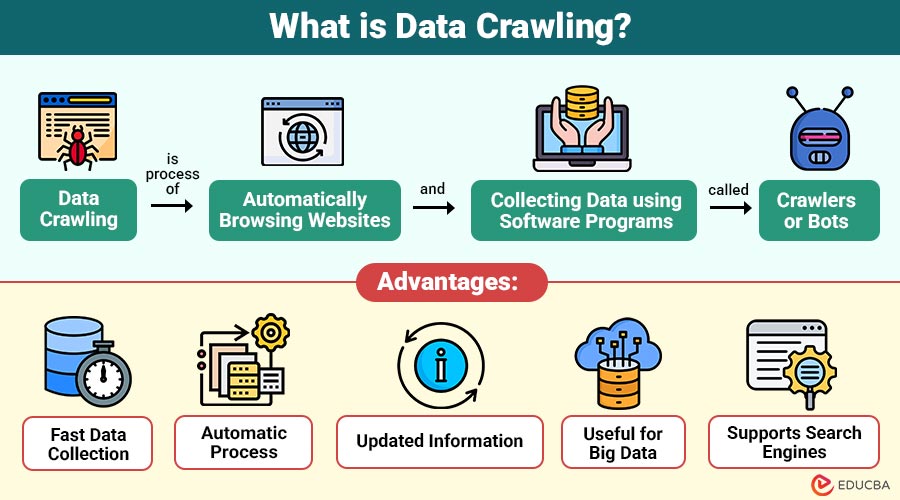
Data crawling is the process of automatically browsing websites and collecting data using software programs called crawlers or bots. It helps in gathering information from web pages for analysis, indexing, or storage. A crawler follows links from one page to another and stores the data it finds.
For example, job portals use crawlers to visit company websites and job sites like LinkedIn to collect job listings.
Table of Contents:
- Meaning
- Why is Data Crawling Needed?
- Working
- Types
- Real-World Uses
- Advantages
- Disadvantages
- Popular Tools
- Example
- Best Practices
Key Takeaways:
- Data crawling automatically collects large amounts of information from websites by using bots that visit pages and follow links.
- It is widely used by search engines, researchers, AI training, SEO tools, and market analysts to gather up-to-date data.
- Data crawling saves time and effort by automating data collection, but it requires proper tools, storage, and system resources.
- Data crawling must be performed carefully to avoid server overload, blocking, or collecting restricted data from websites.
Why is Data Crawling Needed?
Here are some of the main reasons why data crawling is needed in different industries and applications.
1. To Collect Large Data Automatically
Data crawling helps systems automatically collect large amounts of information from many web pages, saving time and resources.
2. To Keep Information Updated
Websites change frequently, so crawlers revisit pages regularly to collect the latest information and ensure that stored data remains accurate and up to date.
3. For Search Engines
Search engines use data crawling to discover new web pages, index content, and provide relevant search results for online queries.
4. For Data Analysis
Organizations crawl websites to collect data for analyzing trends, monitoring competitors, studying customer behavior, and understanding market demand patterns.
5. For Research and AI Training
Researchers and companies use crawled data to train machine learning models, improve artificial intelligence systems, and perform large-scale academic research projects.
How Does Data Crawling Work?
Data crawling uses a program called a crawler that automatically visits web pages, reads their content, and follows links to other pages. Steps of data crawling:
1. Start with a List of URLs
The crawling process begins with a list of initial website addresses called seed URLs that guide the crawler where to start.
2. Visit the Web Page
The crawler automatically opens each URL, connects to the website server, and downloads the page content for further processing and analysis.
3. Extract Data
After loading the page, the crawler reads the HTML and extracts useful data, such as text, images, metadata, and structured information.
4. Find New Links
The crawler searches the page for hyperlinks that lead to other pages, adding them to its list for subsequent visits.
5. Visit New Links
The crawler follows the discovered links one by one, opening new pages and repeating the same crawling and data extraction process.
6. Store Data
All collected information is stored in databases or data storage systems so it can be searched, analyzed, or used later efficiently.
Types of Data Crawling
Here are the main types used to collect data in various ways depending on requirements.
1. Web Crawling
Web crawling collects data from websites by automatically following links from one page to another for indexing, searching, and analysis purposes.
2. Focused Crawling
Focused crawling collects only the information relevant to keywords, topics, or rules, rather than crawling the entire website, saving time.
3. Incremental Crawling
Incremental crawling updates only new or modified web pages rather than recrawling everything, reducing processing time, bandwidth usage, and system resource usage.
4. Deep Web Crawling
Deep web crawling collects data from hidden, private, or protected pages that are not easily accessible through normal search engine crawling.
5. Distributed Crawling
Distributed crawling uses multiple crawlers running on different machines together to collect large amounts of data faster and more efficiently.
6. API Crawling
API crawling collects data via application programming interfaces rather than web pages, enabling faster, more structured, and more reliable data collection from systems.
Real-World Uses of Data Crawling
Here are some common real-world uses:
1. Search Engines
Search engines crawl websites to collect page information and store it in databases, providing relevant search results to users.
2. Price Comparison Websites
Price-comparison websites crawl e-commerce platforms to automatically collect product prices and details, helping users compare products across different stores.
3. Social Media Analysis
Companies crawl public social media pages to collect posts, comments, and hashtags to analyze trends, customer opinions, and market behavior.
4. News Aggregators
News aggregator applications regularly crawl multiple news websites to collect headlines and articles, presenting the latest news updates in one place.
5. AI and Machine Learning
Collects large datasets to train artificial intelligence and machine learning models for predictions and automation.
6. Academic Research
Researchers crawl websites and online databases to collect large amounts of data for studies, experiments, and statistical analyses.
7. SEO Tools
SEO tools crawl websites to analyze page structure, links, keywords, and performance, improving search engine rankings and online visibility.
Advantages of Data Crawling
Here are some important advantages that make it useful for data collection, analysis, and search systems.
1. Fast Data Collection
Crawlers collect large amounts of data quickly by automatically visiting many web pages without human effort or delay.
2. Automatic Process
Once configured, crawlers run automatically, collecting data continuously according to predefined rules and schedules.
3. Updated Information
Crawlers revisit websites regularly to check changes and collect the latest information, keeping stored data accurate and up-to-date.
4. Useful for Big Data
Helps gather enormous datasets from multiple sources, which can be used for analytics, research, and predictions.
5. Supports Search Engines
Search engines use crawling to discover new pages, update existing content, and provide accurate search results quickly.
Disadvantages of Data Crawling
Here are some common disadvantages that organizations should consider before using crawlers.
1. High Resource Usage
Data crawling requires high CPU power, memory, and network bandwidth because many web pages must be visited and processed continuously.
2. Legal Restrictions
Some websites restrict or forbid crawling, and collecting data without permission may violate terms of service or legal regulations in certain countries.
3. Risk of Blocking
Websites may detect too many requests from crawlers and block the IP address to prevent server overload or unauthorized data collection attempts.
4. Data Quality Issues
Crawled data may contain duplicate, incomplete, or incorrect information, which requires cleaning and validation before using it for analysis purposes.
5. Complex Implementation
Building a reliable crawler requires programming knowledge, error handling, link management, and efficient performance across a large number of web pages.
Popular Data Crawling Tools
Some commonly used data crawling tools are:
1. Scrapy
Scrapy is an open-source Python framework used for fast web crawling, scraping, and structured data extraction from websites.
2. Beautiful Soup
Beautiful Soup is Python library for parsing HTML and extracting required data from web pages.
3. Selenium
Selenium is a tool used for crawling dynamic websites that load content using JavaScript and user interactions.
4. Apache Nutch
Apache Nutch is an open-source web crawler designed to crawl efficiently, index, and search across many websites.
5. Octoparse
Octoparse is a no-code data crawling tool that allows users to extract website data without programming knowledge.
6. ParseHub
ParseHub is a visual data-crawling tool that extracts information from complex, dynamic websites without coding.
Example of Data Crawling
Here are some real-world examples of data crawling used in daily applications.
1. E-Commerce Price Tracker
A price tracker automatically crawls Amazon and Flipkart websites to collect product prices and compare them, showing the best deals.
2. News App
News applications regularly crawl multiple news websites to collect the latest headlines and display them in one place for readers.
3. Research Project
Researchers crawl online articles, blogs, and reports from many websites to collect large datasets for study, analysis, and academic research.
Best Practices
Here are some best practices for performing data crawling safely, efficiently, and without legal or technical issues.
1. Follow robots.txt Rules
Always check a website’s robots.txt file to understand permissions and avoid crawling restricted pages without proper authorization.
2. Limit Requests
Send limited requests to a website server to avoid overload, blocking, or being detected as suspicious or harmful automated activity.
3. Use Proper Delay
Add a time delay between requests so the server can respond properly, and the crawler does not overload the website resources.
4. Store Data Carefully
Use proper databases or storage systems to securely manage large amounts of crawled data, ensuring easy access, backup, and future processing.
5. Handle Errors
Crawler should detect broken links, missing pages, or server errors and skip them without stopping the entire crawling process.
6. Respect Legal Rules
Always follow legal guidelines, website policies, and data protection laws to avoid misuse of collected data or legal problems later.
Final Thoughts
Data crawling is an important technique for automatically collecting large amounts of information from websites. It is widely used in search engines, research, artificial intelligence, SEO, and market analysis to gather up-to-date data quickly. While crawling offers many benefits, it must comply with legal requirements and best practices. Understanding data crawling is essential for web, data, and software professionals.
Frequently Asked Questions (FAQs)
Q1. Where is data crawling used?
Answer: It is used in search engines, research, AI, SEO tools, and market analysis.
Q2. Is data crawling legal?
Answer: It is legal if the website allows crawling and the rules are followed.
Q3. What is a crawler?
Answer: A crawler is a program that automatically visits web pages and collects data.
Q4. Can data crawling be automated?
Answer: Yes, data crawling is fully automated using crawlers or bots. Once configured, the crawler can visit websites, follow links, collect data, and store information without manual work.
Recommended Articles
We hope that this EDUCBA information on “Data Crawling” was beneficial to you. You can view EDUCBA’s recommended articles for more information.


