
Updated March 17, 2026
What is Data Federation?
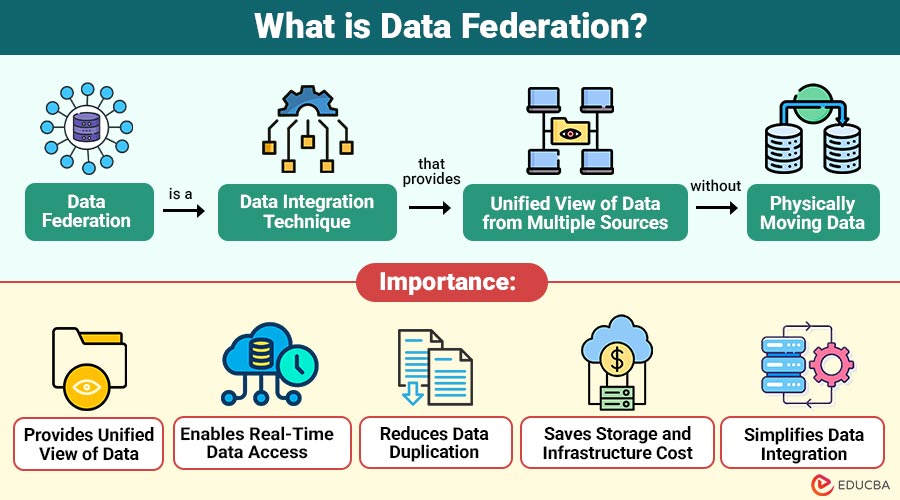
Data federation is a data integration technique that provides a unified view of data from multiple sources without physically moving the data. It uses a virtual data layer that connects databases, cloud systems, and applications, allowing users to query all data as if it exists in a single location.
Table of Contents:
- Meaning
- Importance
- Working
- Architecture
- Components
- Types
- Benefits
- Challenges
- Popular Tools
- Real-World Example
Key Takeaways:
- Data federation provides a unified virtual view of multiple data sources without physically moving or duplicating the original data.
- It enables real-time data access by querying live systems, ensuring analytics and reports always use the latest available information.
- Organizations use data federation to reduce storage costs, simplify integration, and connect databases, cloud platforms, and applications easily.
- Although powerful, it may face performance, security, and network challenges when querying multiple distributed data sources simultaneously.
Why is Data Federation Important?
Below are the main reasons why it is important.
1. Provides Unified View of Data
Combines multiple data sources into one virtual view, allowing users to access information easily without switching systems.
2. Enables Real-Time Data Access
Allows direct access to live data from sources, ensuring reports and analytics always show the most current information.
3. Reduces Data Duplication
Keeps data in original systems, avoiding multiple copies, reducing redundancy, and improving storage efficiency across the organization.
4. Saves Storage and Infrastructure Cost
Since data stays in source systems, organizations need less storage hardware, significantly reducing infrastructure, maintenance, and overall operational expenses.
5. Simplifies Data Integration
Allows new databases, cloud services, and APIs to connect easily without redesigning existing data architecture or moving data.
How Does Data Federation Work?
Data federation works by creating virtual data layer between users and data sources. This layer receives queries, sends them to multiple sources, collects results, and returns a single combined output.
Step-by-Step Working:
1. User Sends a Query
A user sends a data request through an application, reporting tool, or dashboard to retrieve required information from multiple sources.
2. Virtual Layer Receives the Query
The virtual layer accepts the query and determines which data sources are needed to process the request correctly.
3. Query is Divided into Sub-Queries
The federation system splits the main query into smaller sub-queries so each data source can process its relevant part.
4. Sub-Queries are Sent to Different Data Sources
Each subquery is sent to the appropriate database, cloud service, or API, where the required data is stored securely.
5. Data is Collected from Each Source
Each data source processes the request and returns the required data to the federation layer for further processing.
6. Results are Combined
The federation layer merges all returned data into one unified result and sends it back to the user application.
This process happens in real time without moving data.
Data Federation Architecture
Architecture consists of multiple layers.
1. Data Sources Layer
This layer contains all data systems, including databases, cloud storage, data warehouses, APIs, and files that store the original data.
2. Data Federation Layer
This central layer connects all data sources and processes queries, maps data, transforms data, and merges results from multiple systems.
3. Virtual Database Layer
This layer creates a unified virtual view of data, allowing users to see information as if it were stored in a single database.
4. Application Layer
Applications, dashboards, and analytics tools, as well as users, access the unified data through this layer without knowing the actual data source locations.
Components of Data Federation
Below are the main components that work together to connect multiple data sources and provide a unified virtual view of data.
1. Query Engine
The query engine processes user requests, divides queries into parts, sends them to multiple data sources, and collects results for final output.
2. Data Connectors
Data connectors create communication between the federation system and different databases, cloud platforms, APIs, and files to retrieve required data efficiently.
3. Metadata Manager
The metadata manager stores details about data structure, format, schema, and location, helping the federation system find and access the correct data sources.
4. Data Mapper
The data mapper converts data from different formats and structures into a common format, enabling results from multiple sources to be combined.
5. Security Layer
Sensitive data is safeguarded and only authorized users are able to safely access information thanks to the security layer’s control over user authentication, authorization, and permissions.
Types of Data Federation
Below are the main types used in modern data integration systems to connect diverse data sources.
1. Database Federation
Database federation combines multiple databases into a single virtual system, allowing users to query MySQL, Oracle, and SQL Server seamlessly.
2. Cloud Data Federation
Cloud data federation integrates cloud storage, SaaS applications, and on-premise databases, enabling unified access across AWS, Azure, and local data systems.
3. Big Data Federation
Big data federation connects large-scale data platforms such as Hadoop, Spark, and NoSQL databases, enabling unified queries across distributed, high-volume data sources.
4. Real-Time Federation
Real-time federation provides instant access to live data directly from sources, ensuring users always see updated information without waiting for synchronization delays.
Benefits of Data Federation
Below are the major benefits that help organizations access, manage, and integrate data more efficiently across multiple systems.
1. Real-Time Data Access
Users can access the most recent data directly from source systems without waiting for ETL processes, ensuring reports always show updated information.
2. Reduced Data Duplication
Keeps data in the original systems, avoiding multiple copies, saving storage space, reducing redundancy, and significantly improving overall data management efficiency.
3. Faster Integration
New databases, cloud services, or APIs can be connected quickly via federation without redesigning the entire system or manually moving existing data.
4. Lower Cost
Organizations save money because they do not need large data warehouses, additional storage hardware, or complex infrastructure to store duplicate copies of data.
5. Better Data Governance
Since data stays in original systems, security rules, permissions, and policies remain intact, helping organizations maintain better control over sensitive information access.
Challenges of Data Federation
Below are the main challenges that organizations may face when integrating and accessing data from multiple distributed sources.
1. Performance Issues
Querying multiple data sources simultaneously can slow performance because results must be fetched, processed, and merged before the output is returned.
2. Complex Query Processing
Large queries must be divided into smaller sub-queries, processed by different systems, and then combined, making query execution more complex and slower.
3. Security Management
Different data sources may have different authentication rules, permissions, and policies, making it difficult to manage consistent security across all connected systems.
4. Network Dependency
Depends on network connections between systems, so slow or unstable networks can affect performance, data access speed, and overall reliability.
5. Limited Historical Data
Accesses live data from sources, so it is not ideal for storing large historical datasets or for long-term analytical storage.
Popular Data Federation Tools
Below are some popular tools that help organizations integrate multiple data sources and provide unified virtual data view.
1. IBM Cloud Pak for Data
IBM Cloud Pak for Data provides data virtualization and federation features, allowing unified access to data across multiple distributed enterprise sources.
2. Denodo
Denodo is a popular data virtualization and federation tool that allows real-time data integration from multiple databases, cloud platforms, and APIs.
3. Cisco Data Virtualization
By linking many data sources and offering a uniform perspective without physically relocating data, Cisco Data Virtualization enables real-time data federation.
4. SAP HANA Smart Data Access
SAP HANA Smart Data Access supports data federation across SAP and non-SAP systems, allowing users to query remote data sources seamlessly.
5. Microsoft SQL Server PolyBase
Microsoft SQL Server PolyBase allows users to query external data sources like Hadoop, Azure, and other databases using standard SQL queries.
Real-World Example
Below is a real-world example showing how Data Federation works in an organization with multiple data sources.
A multinational company stores data in different systems:
- Sales data in MySQL
- Customer data in Salesforce
- Finance data in Oracle
- Logs in Hadoop
Instead of moving all data into one warehouse, the company uses data federation.
When a manager runs a report:
- The system fetches sales data from MySQL
- Customer data from Salesforce
- Finance data from Oracle
- Logs from Hadoop
All data are combined and shown in a single dashboard. This saves time, storage space, and costs.
Final Thoughts
Data federation is a data integration technique that allows organizations to access multiple data sources without moving data. It uses a virtual layer to connect databases, cloud platforms, and applications, providing a unified view. It reduces storage costs, supports real-time access, and simplifies integration, making it important for modern data-driven systems that use cloud, big data, and AI.
Frequently Asked Questions (FAQs)
Q1. Is data federation the same as data virtualization?
Answer: Data federation is a part of data virtualization, but virtualization includes more features.
Q2. When should we use data federation?
Answer: Use data federation when real-time access to multiple data sources is required.
Q3. Does data federation replace the data warehouse?
Answer: No, data federation does not replace a data warehouse. Federation provides real-time access to distributed data, while warehouses store historical data for analytics.
Q4. Is data federation suitable for big data environments?
Answer: Yes, it supports big data platforms, allowing unified queries across large, distributed data sources without moving data.
Recommended Articles
We hope that this EDUCBA information on “Data Federation” was beneficial to you. You can view EDUCBA’s recommended articles for more information.

