


Introduction
Construction schedules often stall when a single person manages the file, but today’s builders are turning to collaborative, cloud-based construction scheduling tools that transform “project scheduling construction” into live, shared workflows. These platforms allow planners, superintendents, and trade foremen to update schedules simultaneously in real time. InEight’s Collaborative Markup Workspace already converts CPM changes into a shared web view. Market demand reflects this shift: Planera users have tracked over 50 million workdays, and in October 2025, the company raised $8 million to accelerate feature development. Procore has followed suit, launching a multi-editor Scheduling beta on September 30, 2025. This guide compares the five leading collaborative construction scheduling platforms, evaluating them on teamwork, scheduling depth, ease of adoption, integrations, and pricing.
Criteria for Choosing and Ranking Top Scheduling Software
Choosing software that controls multi-million-dollar timelines demands a transparent process. The process began with a long list of 14 cloud tools designed specifically for collaborative construction scheduling. To reach the shortlist, a platform had to:
- Run natively in the cloud,
- let multiple stakeholders edit the same schedule at the same time, and
- Include construction-grade CPM logic instead of generic task tracking.
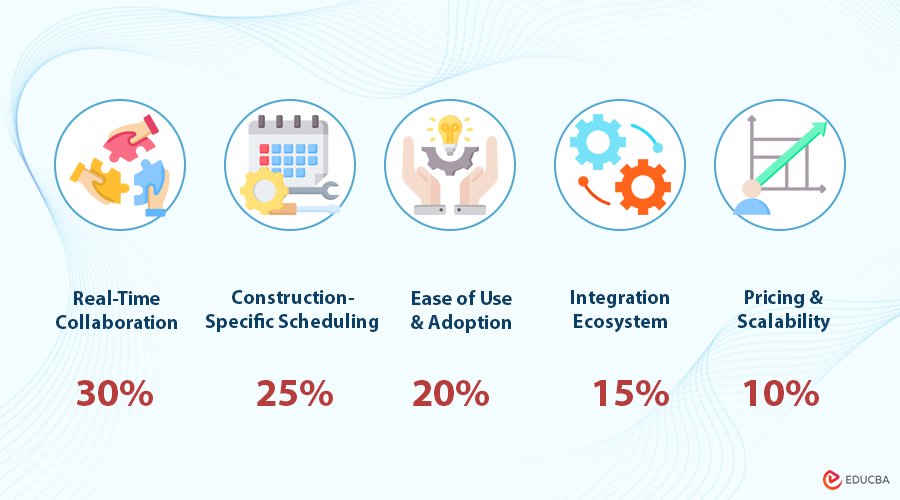
Each contender was scored against five weighted criteria that matter most to both office and field teams:
| Criterion | Weight | Why it matters |
| Real-time collaboration | 30 percent | Keeps field and office working from the same data minute by minute. |
| Construction-specific scheduling | 25 percent | Protects critical-path accuracy, resource loading, and Lean workflows. |
| Ease of use and adoption | 20 percent | Encourages superintendents and trade partners to participate, not just planners. |
| Integration ecosystem | 15 percent | Cuts double entry and keeps one source of truth across Procore, BIM, and ERP data. |
| Pricing and scalability | 10 percent | Confirms the tool can grow with project size without hidden costs. |
After reviewing vendor documentation, funding updates, and published case studies, the five highest-scoring platforms were ranked, using examples from collaborative construction scheduling tools like InEight to illustrate what real-time, cloud-native CPM should look like. The order that follows reflects how well each solution supports true collaborative construction scheduling today, not its marketing budget.
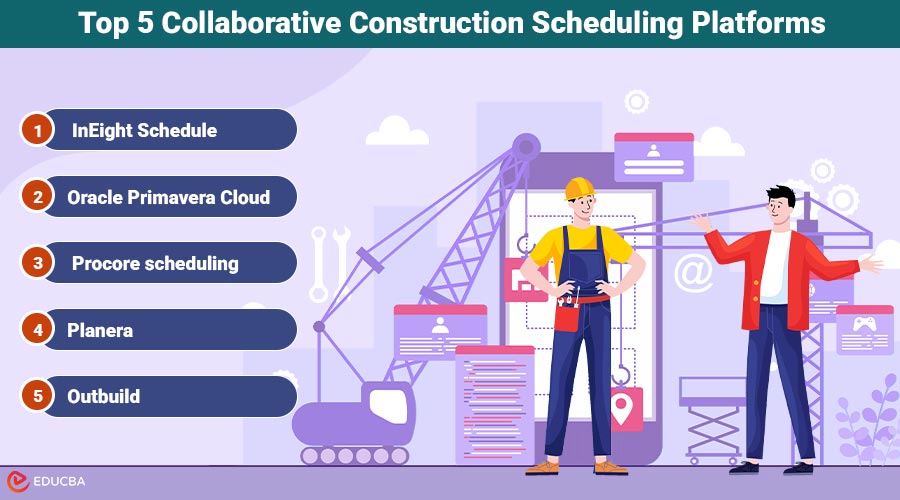
Top 6 Collaborative Construction Scheduling Platforms
Explore the best cloud-based tools that keep your project teams aligned, productive, and on schedule.
1. InEight Schedule: enterprise-grade collaboration for complex projects
In February 2024, InEight Schedule was relaunched with a Collaborative Markup Workspace, allowing planners, supers, and subcontractors to edit the same CPM network simultaneously. Each suggestion is color-coded, reviewed, and merged into one source of truth.
Field and office stay in sync
Teams can break a six-month activity into weekly tasks, and every tweak flows back to the master schedule within seconds. You no longer chase a “field spreadsheet” that drifts out of date.
AI that flags risk early
Drawing on decades of historical schedules, InEight suggests realistic durations, surface risk prompts, and spot broken logic before the float disappears.
Contractors running multi-billion-dollar programs rely on these capabilities to maintain accurate, collaborative timelines from day one.
2. Oracle Primavera Cloud: A Collaborative Makeover for the Primavera Engine
Primavera used to run on a single workstation, but Primavera Cloud brings the full CPM engine to any browser, allowing project managers, owners, and trade partners to collaboratively edit the same schedule with role-based permissions, according to Oracle. Lean teams also gain a built-in pull-planning board. Drag task cards during a phase-plan meeting, and the software converts them to CPM activities with no double entry or lost sticky notes.
When it excels and when it does not
Primavera Cloud shines on complex programs such as airports or heavy-civil corridors where governance and transparency matter as much as speed. The trade-off is complexity: the interface is lighter than classic P6 yet still requires training, and subscription pricing sits at the enterprise end of the market. Small GCs seeking a quick, low-cost Gantt tool will find faster wins elsewhere.
For organizations already fluent in Primavera workflows, the cloud version delivers real collaboration without giving up CPM horsepower.
3. Procore scheduling: Integrated Gantt for your daily toolbox
On September 30, 2025, Procore opened its Scheduling beta, adding a live Gantt view to the same platform contractors already use for RFIs, submittals, and daily logs. Instead of exporting PDFs or P6 files, the team can see the current schedule beside the drawings reviewed that morning.
Collaboration built in
Multiple users can edit at once; the system highlights conflicts before changes go live, preventing version wars. A superintendent can mark field progress while a project engineer adjusts dependencies, and everyone watches the impact in real time.
Field and office on one loop
High-level CPM tasks break into two-week look-ahead boards that foremen update from a phone or iPad. Those status taps flow to the master schedule instantly, so project managers spot drift the same day it starts.
Fit and friction
Procore Scheduling supports projects up to 10,000 activities, which is enough for most commercial builds. If a contractor is already using Procore, enabling the beta provides instant schedule visibility with very little change management required. Power users who need multi-float-path analysis or resource leveling will still keep P6 handy, and some advanced features remain in development until general availability in 2026.
For contractors who prefer a single login and a single data lake, Procore’s native scheduler closes a long-standing gap between planning and execution.
4. Planera: Drag-and-Drop Scheduling Everyone Understands
Planera replaces traditional Gantt bars with digital sticky notes that you can drag, resize, and connect in just seconds. Several users can edit at once, so a pull-planning session becomes live CPM logic instead of photos of a conference wall. Because everything runs in the cloud, each change saves instantly; foremen see the new sequence on a tablet moments after it appears.
Momentum worth tracking
According to Planera, contractors have now planned more than 50 million scheduled days in the platform, up from 25 million in early 2025. The company also reports that more than 30 ENR 100 contractors use the software, and an $8 million funding round in October 2025 is accelerating feature releases.
Strengths and trade-offs
Planera’s onboarding is quick; most crews feel productive after a single walkthrough because the interface works like a project board rather than complex CPM software. It still computes the critical path and maintains dependency logic, ensuring planners retain the level of rigor they need.
The scale limitation is worth noting: while Planera can manage thousands of activities, multi-billion-dollar programs may exceed its current reporting and cost-loading capabilities. Pricing is quote-based, so smaller subcontractors should expect to schedule a discovery call.
If a team values speed and transparency, especially when practicing Lean methods, Planera turns scheduling into a group effort instead of a back-office task.
5. Outbuild: Unifying Master Schedule and Weekly Plan
Outbuild starts with a clear premise; a CPM schedule has little value if the crew pouring the concrete can not influence it. The software combines the contract schedule, six-week look-ahead, and the superintendent’s weekly work plan in one cloud view. Field teams open an iPad, add tasks or constraints, and the master timeline updates before the meeting ends.
That quick loop matters; when a foreman flags a missing permit, the delay appears on the Gantt right away, giving the office time to clear the roadblock while float remains.
Digital pull planning that sticks
Outbuild’s pull planning software replicates a sticky note wall, but each card includes its own duration, dependencies, and labor requirements. Drag a task, and Outbuild recalculates downstream impacts in real time. Weekly commitments flow into dashboards that monitor Percent Plan Complete and identify the reasons for variances, helping teams address recurring issues rather than simply reacting to surprises.
Momentum and limits
According to Outbuild, the platform has supported more than 4,000 projects across 10 countries since launching in 2021 and secured $11 million in Series A funding on November 17, 2024, to speed AI capabilities. Mid-sized GCs value its Procore and Autodesk integrations and the single source of truth they create.
The trade-off remains scale: enterprise-level portfolio reporting and deep cost loading are still on the roadmap. If your priority is schedule reliability rather than extensive float analyses, Outbuild’s field-first design can help you save time and simplify planning.
6. Field Promax: Streamlined Scheduling for Service-Driven Contractors
Field Promax takes a different approach to collaborative scheduling, focusing on service-based contractors who need fast coordination rather than complex CPM modeling. The platform connects scheduling, dispatching, and job management into a single cloud system, allowing teams to stay aligned without juggling multiple tools.
Real-time coordination across teams
Dispatchers, office staff, and technicians can update schedules simultaneously, with every change syncing instantly to mobile devices. When a job is reassigned or delayed, the entire team sees the update in real time, reducing missed appointments and communication gaps.
Connected workflows beyond scheduling
Field Promax links scheduling with estimates, invoicing, and customer data, so updates flow across the full job lifecycle. A schedule change automatically reflects in job status and billing, helping teams avoid double-entry and maintain consistent operations.
Where it excels and where it does not
Field Promax performs best for HVAC, plumbing, electrical, and cleaning businesses that manage high volumes of service calls alongside smaller projects. Its interface is straightforward, making adoption quick for field teams with limited training time.
The trade-off is depth: it does not offer advanced CPM logic, float analysis, or resource loading required for large-scale construction programs. Contractors running complex, multi-year builds will still rely on dedicated CPM platforms.
For service-focused contractors, Field Promax delivers practical, collaborative scheduling that keeps daily operations moving without unnecessary complexity.
Choosing the Right Collaborative Construction Scheduling Platform
Each platform tackles collaboration from a different angle.
- InEight combines enterprise-grade CPM horsepower with structured team markup, making it ideal for multi-year, audit-heavy programs.
- Primavera Cloud keeps Primavera rigor while opening browser-based access for dozens of partners.
- Procore Scheduling adds “good-enough” CPM to the workflows that contractors already check all day.
- Planera makes pull planning visual, so first-time users can contribute without training.
- Outbuild digitizes Last Planner routines for crews who live on tablets.
The trend is clear: construction schedules are evolving from single-user files to shared, intelligent environments. Early adoption of cloud-based, AI-assisted scheduling tools helps teams identify risks faster, complete punch lists sooner, and protect profit margins.
Conclusion
Modern collaborative construction scheduling software enables planners, supers, and trade partners to shape project timelines together—live, transparent, and accountable. Whether your priority is CPM depth, easy adoption, or a unified project environment, the right platform is the one your team will actually use every day.
Investments and adoption of collaborative scheduling tools are growing. Contractors who modernize now will spend less time reconciling versions and more time solving problems before they become delays. Scheduling is no longer a static document—it’s a shared, living workflow.
Frequently Asked Questions (FAQ)
1. What is collaborative construction scheduling?
Answer:- It is a cloud-based approach that allows multiple team members—planners, supers, foremen, subcontractors, and owners—to edit, comment on, or update the schedule at the same time. Instead of emailing PDFs or exporting P6 files, everyone works from a single live timeline.
2. How is this different from traditional CPM scheduling tools?
Answer:- Classic scheduling programs (like desktop Primavera P6) are powerful but siloed. Only one user can safely update at a time, and field teams often rely on spreadsheets or whiteboards. Collaborative platforms combine CPM logic with live editing, version tracking, comment threads, and mobile look-ahead workflows, unifying both office and field.
3. Which platforms support real CPM, not just task management?
Answer:- All five solutions ranked here—InEight, Primavera Cloud, Procore Scheduling, Planera, and Outbuild—support CPM logic to varying degrees. InEight and Primavera Cloud offer enterprise-level CPM depth, while Procore, Planera, and Outbuild provide streamlined CPM suitable for most commercial projects.
4. Are these tools suitable for mega-projects?
Answer:- Yes, with caveats.
- InEight and Primavera Cloud excel on large, multi-year programs requiring portfolio reporting, governance, and resource loading.
- Procore Scheduling can handle up to 10,000 activities but is still building out advanced features.
- Planera and Outbuild are strong for mid-sized contractors and Lean practitioners but may not yet match the reporting breadth needed for multi-billion-dollar infrastructure work.
5. Which tool is best for field teams with limited training time?
Answer:- Planera and Outbuild prioritize visual planning and simple mobile workflows—ideal for supers and foremen who want clarity without heavy software onboarding. Procore also performs well here if teams already use the rest of the platform.
Recommended Articles
We hope this guide on collaborative construction scheduling software helped you streamline project timelines. For more tech tips, explore these related articles below:

