
What is Finance Automation?
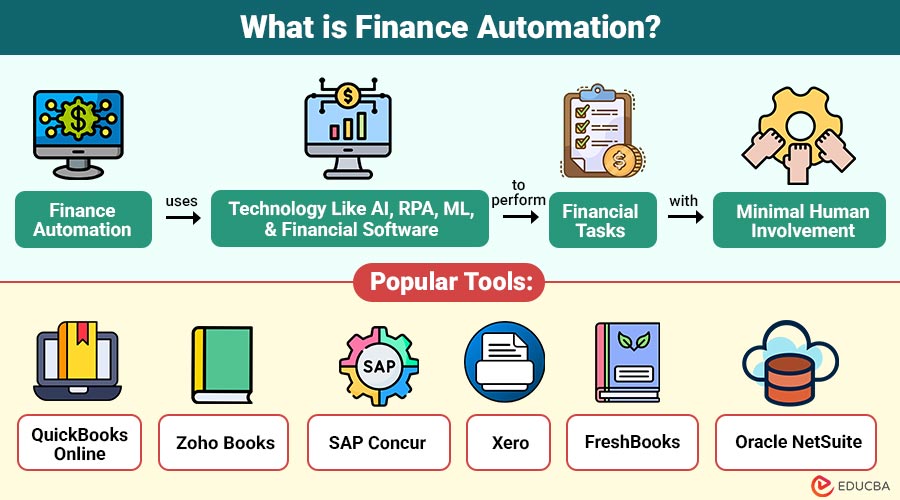
Finance automation is the process of using technology—like AI, Robotic Process Automation (RPA), Machine Learning (ML) and financial software—to perform financial tasks with minimal human involvement. Instead of manually entering data, approving invoices, matching transactions, or generating reports, automated systems handle these tasks intelligently and consistently.
Table of Contents:
- Meaning
- Importance
- Working
- Benefits
- Key Finance Tasks that can be Automated
- Use Cases
- Challenges
- Steps to Implement Finance Automation
- Popular Automation Tools
Key Takeaways:
- Finance automation streamlines repetitive financial tasks using intelligent technologies, improving operational efficiency and reducing manual workload.
- Automated systems enhance accuracy, minimize human errors, and ensure consistent, reliable financial data across business processes.
- Automation strengthens compliance by enforcing rules, maintaining audit trails, and supporting secure, transparent financial operations overall.
- Implementing automation saves time and costs, enabling finance teams to focus on strategic decision-making and analysis.
Why is Finance Automation Important?
Modern businesses face growing volumes of financial transactions, compliance requirements, and reporting needs. Manual processes make it hard to keep up.
Automation becomes important because it:
1. Saves Time on Routine Tasks
Automation quickly handles repetitive financial activities, freeing employees to focus on analysis and strategic work.
2. Minimizes Human Errors
Automated systems reduce manual data entry mistakes, ensuring greater accuracy, consistency, and reliability in financial operations.
3. Improves Financial Visibility
Real-time automated reporting provides clearer insights into cash flow, performance trends, and overall financial health.
4. Helps Companies Stay Compliant
Automation enforces regulatory rules, maintains audit trails, and updates compliance requirements to prevent costly legal penalties.
5. Reduces Operational Costs
Automated workflows reduce labor costs, eliminate inefficiencies, and streamline processes, significantly lowering operational spending.
How does Finance Automation Work?
Finance automation typically uses a combination of technologies:
1. Robotic Process Automation
RPA bots replicate human actions like clicking, copying, and entering information to automate repetitive financial tasks.
2. Optical Character Recognition
OCR technology converts paper invoices, receipts, and various documents into structured digital data for automated processing.
3. Artificial Intelligence & Machine Learning
AI and machine learning analyze data patterns, detect anomalies, predict outcomes, and support intelligent financial decision-making. Finance teams can also use ai powered accounting software to automate complex accounting workflows, improve data accuracy, and simplify financial reporting and compliance.
4. Cloud Financial Software
Cloud financial software centralizes accounting, billing, reporting, and analytics, enabling unified access and seamless automated operations.
5. Workflow Automation
Workflow automation defines rules that route approvals, trigger reports, and automatically complete financial tasks reliably.
Benefits of Finance Automation
Here are the key benefits explained in a similarly structured format:
1. Increased Accuracy
Automation removes manual-entry errors, ensuring precise financial records, cleaner reconciliations, and highly reliable reporting every time.
2. Faster Processes
Automated workflows complete invoice approvals and month-end close tasks within minutes, drastically accelerating overall financial operations efficiency.
3. Cost Reduction
Automation reduces labor dependence, streamlines processes, and helps organizations significantly lower operational expenses across all financial activities.
4. Better Compliance
Finance automation maintains audit trails, follows standards, enforces rules, and ensures accurate transaction recording for regulatory compliance.
5. Enhanced Productivity
Employees gain more time for strategic tasks such as budgeting, planning, forecasting, and analysis, thereby substantially improving team productivity.
Key Finance Tasks that can be Automated
Here are the key finance tasks that can be automated in a structured format:
1. Accounts Payable Automation
- Automated invoice capture
- Invoice matching
- Approval workflows
- Digital payment processing
This reduces delays, errors, and fraud.
2. Accounts Receivable Automation
- Automated billing
- Payment reminders
- Collections management
- Customer account tracking
It ensures faster cash flow and fewer outstanding payments.
3. Expense Management Automation
- Digital receipts
- Automated expense approvals
- Policy compliance checks
Employees can submit expenses quickly using mobile apps.
4. Payroll Automation
- Automated salary calculations
- Tax deductions
- Direct deposit
- Employee records management
Reduces payroll errors and saves HR time.
5. Financial Reporting
- Automated report generation
- Real-time dashboards
- Consolidated data from multiple systems
Reports become more accurate and timely.
Practical Use Cases of Finance Automation
Here are the key real-world use cases presented in a clear and structured format:
1. Invoice Processing
Automation extracts invoice data, verifies accuracy, identifies discrepancies, and efficiently routes documents through streamlined approval workflows.
2. Purchase Order Matching
The system automatically compares purchase orders, invoices, and delivery receipts to ensure accurate, consistent transaction validation.
3. Cash Flow Forecasting
To precisely forecast future cash inflows, outflows, and liquidity conditions, AI examines past data.
4. Fraud Detection
Machine learning monitors transactions, detects anomalies, identifies suspicious patterns, and proactively flags potential fraud risks.
5. Audit Preparation
Automation organizes financial records, centralizes documentation, ensures completeness, and effectively simplifies audit preparation processes for teams.
Challenges in Implementing Finance Automation
Although automation is beneficial, businesses face a few challenges:
1. High Initial Setup Cost
Automation tool implementation is difficult for smaller organizations with tighter budgets because it demands a significant initial investment.
2. Integration Issues
Connecting new automation tools with existing financial systems often demands technical expertise and careful system compatibility management.
3. Employee Resistance
Employees may fear job loss, so organizations must provide proper training and reassurance during the adoption of automation.
4. Data Quality Problems
Automation cannot correct inaccurate or outdated information, making clean, reliable data essential for effective automated processes.
5. Security Risks
Automated systems require strong cybersecurity measures to protect sensitive financial data from breaches and cyber threats.
Steps to Implement Finance Automation
Here are the essential steps given in a structured format:
1. Identify Tasks to Automate
List repetitive, time-consuming financial processes like invoicing, payroll, and reconciliations that significantly benefit from automation.
2. Select the Right Tools
Choose automation software suited to your business size, industry requirements, existing systems, and specific workflow needs.
3. Clean and Organize Your Data
Remove errors, duplicates, and outdated information to ensure accurate, reliable data feeding your automated financial processes.
4. Create Automated Workflows
Map each process step clearly and define rules for approvals, data handling, task routing, and reporting.
5. Train Your Team
Educate employees on using automation tools effectively and help them adapt confidently to new workflows.
Popular Finance Automation Tools
Here are some widely used tools in the industry:
1. QuickBooks Online
Automates bookkeeping, expense tracking, invoicing, and financial reporting for small to medium businesses efficiently.
2. Zoho Books
Simplifies billing, invoicing, payments, and accounting with automation, workflows, and real-time financial insights.
3. SAP Concur
Automates employee expenses, travel management, approvals, and reimbursement processes with seamless integrations and policy compliance.
4. Xero
Offers cloud-based accounting automation for invoicing, bank reconciliation, reporting, payroll, and financial collaboration tools.
5. FreshBooks
Automates invoicing, client billing, expense tracking, payments, and timekeeping for freelancers, agencies, and small businesses.
6. Oracle NetSuite
Provides enterprise-level automation for accounting, ERP, financial planning, billing, compliance, and global business processes.
Final Thoughts
Finance automation is no longer a luxury—it is a necessity for modern businesses. Automating financial tasks helps companies reduce errors, speed up processes, save money, and make better decisions. Whether you are a startup, SME, or enterprise, adopting automation can significantly improve financial efficiency and accuracy. By understanding the benefits, challenges, and implementation steps, you can create a smarter, more productive finance function for your organization.
Frequently Asked Questions (FAQs)
Q1. Does automation replace finance jobs?
Answer: No. It reduces manual work so finance teams can focus on strategic and analytical tasks.
Q2. Is finance automation expensive?
Answer: Costs vary. Small businesses can use affordable tools, while enterprises may invest more.
Q3. Can automation reduce fraud?
Answer: Yes. Automation improves accuracy and uses AI to detect unusual activity.
Q4. How long does automation take to implement?
Answer: It depends on the company size—usually from a few weeks to a few months.
Recommended Articles
We hope that this EDUCBA information on “Finance Automation” was beneficial to you. You can view EDUCBA’s recommended articles for more information.


