

Updated June 30, 2023

Definition of XML Element
An XML element is defined as a user-defined container used to store text elements and attributes. It consists of a start tag and an end tag. The main objective of the element is to describe data. The start tag may include attributes and should be enclosed within double quotes. The XML element may have another element in it as its content, like nested. XML document is considered to be an ordered tree, and every node of the tree is an element, and every document should have a top-level element as the root element.
Syntax:
We need to give the following syntax to write an element in an XML document.
<element-name attribute1 >

.// Content code

</element-name>
So here, the element name is the name of the element given for the specific document. The same name should be given at the start and the end tag; also, cases should match the end tag.
Next is the Attribute name, which defines the property of an element is defined separately next to the element with White Spaces.
How does Element Work in XML?
In an XML document, Element is the basic unit in the document where the child elements are given under the parent element, which may sometimes be a child element. The Root element, considered at the top of the structure, is the main element where all the elements are contained. There are two forms, one is non-empty elements, and the other one is Empty elements.
- Non-empty Elements: This is also called a Container element, where the content of the text is placed between a start tag and an end tag.
- Standalone Element: It is an empty tag with no content in them and given by a forward slash “/.” And it is declared as:
<name attribute 1 attribute2…/>
Example:
<name firstname=” hi”>
There is no specific procedure to work on it. It works well with several properties associated with it: They are:
- Tag
- Attributes
- A text String
- A sequence of child elements.
The Structure of the element is defined in DTD using the following format:
<!ELEMENT element-name (content)>

////

<!ELEMENT element-name types>  // types like PCDATA
XML elements have a few Rules to go with:
- An element name can have specific alphanumeric Characters also along with hyphen (-), under-score (_), and period (.).
- Names Here are case-sensitive. For example, Location, locations, and LOCATION are different names.
- Should have identical names on the start tag and end tag.
- An element that is said to be a container in documents has text or nested elements within it.
An XML element goes well with attributes for identifying an element. The attribute values are quoted as shown below:
<patient id="1">

<details>

<firstname>Olaro</firstname>

<marital>Married</marital>

<location>Texas</location>

</ details >

< patient >
There is a difference between Element and attributes. Let us see the following sample to make it clear.
<library id="01">   // the way Attributes defined

...

< library >

< library >          // the way Elements are defined

<id>01</id>

< library >
Java XMLElement class is associated with the Set Attribute () method, which seeks parent element default. Even though the element has content types like mixed, simple, and empty, it is advisable to prefer mixed content. A namespace is a concept used here specified with a prefix.
Examples of XML Element
Here are a few examples of valid XML Elements in a Document.
Example #1
Simple XML document showing parent, child elements.
store.xml
<?xml version="1.0" encoding="UTF-8"?>

<sparstore>

<shop category="Gadgets">

<Model lang="en">GT4352</Model>

<Company>Samsung</Company>

<year>2020</year>

<ownat>120.00</ownat>

</shop>

<shop category="Gadgets">

<Model lang="en">GH5648</Model>

<Company>Redmi</Company>

<year>2018</year>

<ownat>110.00</ownat>

</shop>

<shop category="Gadgets">

<Model lang="en">AMT234</Model>

<Company>Ziami</Company>

<year>2019</year>

<ownat>130.00</ownat>

</shop>

</sparstore>
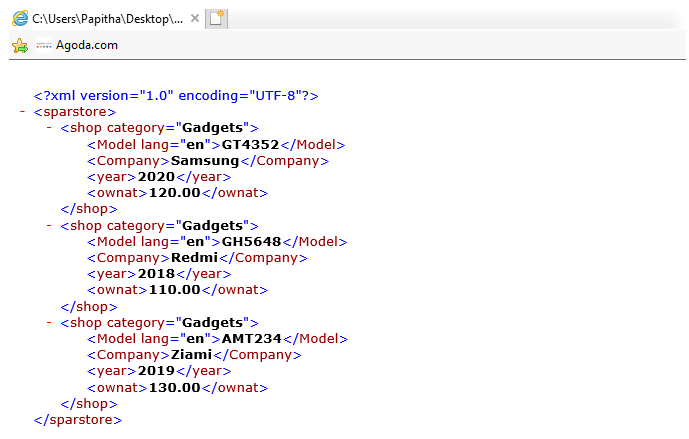
Explanation: In the above code, superstore is a root element with a nested element named shop with an attribute “category. We could see the following output when we execute this in a browser.
Output:
Example #2
XML Name with NameSpace
node.xml
<?xml version="1.0" encoding="UTF-8"?>

<parent>

<def:ping xmlns:def="http://www.shopmeal.com">

<time>07/09/2020 8:01:00</time>

<request>GET /hello.html 200</request>

</def:ping>

<ct:ping xmlns:ct="http://www.retailwal.com">

<Orderitem>handbags</Orderitem>>

<Orderitem>>gadgets</Orderitem>>

<Orderitem>>clothes</Orderitem>>

</ct:ping>

<ct:ping xmlns:ct="http://www.nosfeagian.com">

<time>7/12/2019 7:05:43</time>

<request>GET /images/label.gif 304</request>

</ct:ping></parent>
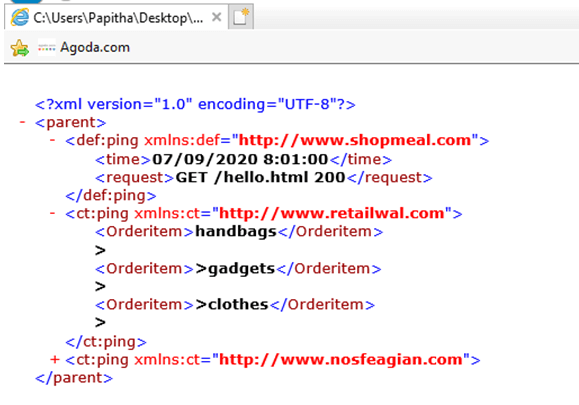
Explanation: In the above code, we have used ‘def’ a namespace property with a prefix and also a URI.
Output:
Example #3
Extracting XML Elements using Java code.
new.xml
<?xml version="1.0"?>

<shops>

<supermarket>

<sid>201</sid>

<sname> sparc</sname>

<product> grocery</product>

<branch> two</branch>

<location> new york</location>

</supermarket>

<supermarket>

<sid>540</sid>

<sname> big basket</sname>

<product> grocery</product>

<branch> seven</branch>

<location>India</location>

</supermarket>

<supermarket>

<sid>301</sid>

<sname> Wallmart</sname>

<product> grocery</product>

<branch> fifteen</branch>

<location> France</location>

</supermarket>

</shops>
Read.java
import javax.xml.parsers.DocumentBuilderFactory;

import javax.xml.parsers.DocumentBuilder;

import org.w3c.dom.Document;

import org.w3c.dom.NodeList;

import org.w3c.dom.Node;

import org.w3c.dom.Element;

import java.io.File;

public class Read

{

public static void main(String argv[])

{

try

{

File file = new File("C:\\Program Files\\Java\\jdk-13.0.1\\par\\new.xml");

DocumentBuilderFactory docb = DocumentBuilderFactory.newInstance();

DocumentBuilder dbu = docb.newDocumentBuilder();

Document dt = dbu.parse(file);

dt.getDocumentElement().normalize();

System.out.println("Root: " + dt.getDocumentElement().getNodeName());

NodeList nd = dt.getElementsByTagName("supermarket");

for (int i = 0; i < nd.getLength(); i++)

{

Node node = nd.item(i);

System.out.println("\nNode Name :" + node.getNodeName());

if (node.getNodeType() == Node.ELEMENT_NODE)

{

Element el = (Element) node;

System.out.println("supermarket sid: "+ el.getElementsByTagName("sid").item(0).getTextContent());

System.out.println("sname: "+  el.getElementsByTagName("sname").item(0).getTextContent());

System.out.println("product: "+  el.getElementsByTagName("product").item(0).getTextContent());

System.out.println("branch: "+  el.getElementsByTagName("branch").item(0).getTextContent());

System.out.println("location: "+ el.getElementsByTagName("location").item(0).getTextContent());

}

}

}

catch (Exception e)

{

e.printStackTrace();

}

}

}
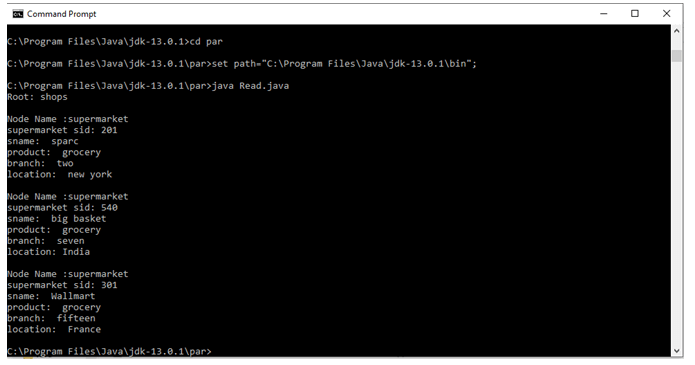
Explanation: Using the get Element method, we can extract an XML file in java code using factory classes. So in the below output, we could see an element with a value.
Output:
Example #4
Counting No. of Elements.
bank.xml
<Banking>

<bank id="123">

<foreName>Giana</foreName>

<SurName>Amreal</SurName>

<HomeAddress>USA</HomeAddress>

</bank>

<bank id="456">

<foreName>Chris</foreName>

<SurName>Houtson</SurName>

<HomeAddress>Sweden</HomeAddress>

</bank>

<bank id="654">

<foreName>Dallni</foreName>

<SurName>Furaq</SurName>

<HomeAddress>Australia</HomeAddress>

</bank>

</Banking>
Number.java
import java.io.IOException;

import javax.xml.parsers.DocumentBuilder;

import javax.xml.parsers.DocumentBuilderFactory;

import javax.xml.parsers.ParserConfigurationException;

import org.w3c.dom.Document;

import org.w3c.dom.NodeList;

import org.xml.sax.SAXException;

import java.io.*;

public class Number {

private static final String xmlfilepath = "C:\\Program Files\\Java\\jdk-13.0.1\\par\\Bank.xml";

public static void main(String argv[]) {

try {

DocumentBuilderFactory documentBuilderFactory = DocumentBuilderFactory.newInstance();

DocumentBuilder documentBuilder = documentBuilderFactory.newDocumentBuilder();

Document doc = documentBuilder.parse(xmlfilepath);

NodeList nl = doc.getElementsByTagName("bank");

System.out.println("Number of elements with bank : " + nl.getLength());

} catch (ParserConfigurationException pex) {

pex.printStackTrace();

} catch (IOException ie) {

ie.printStackTrace();

} catch (SAXException se) {

se.printStackTrace();

}

}

}
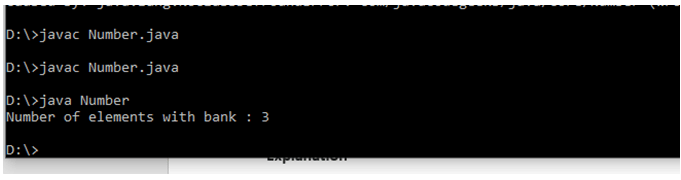
Explanation: With the count initializing of an element, the parser counts the number of elements in the XML path.
Output:
Conclusion
XML element being the main Objects in the XML document plays a vital role in the Coding process with java or Python as they parse a root element to a child element using DOM, and the easier part is there are no fixed rules so it is easy for the learners. So, in this article, we have covered the basics and also done with their work with an example.
Recommended Articles
This is a guide to XML Element. Here we also discuss the definition and how the element works in XML, along with different examples and its code implementation. You may also have a look at the following articles to learn more –

