


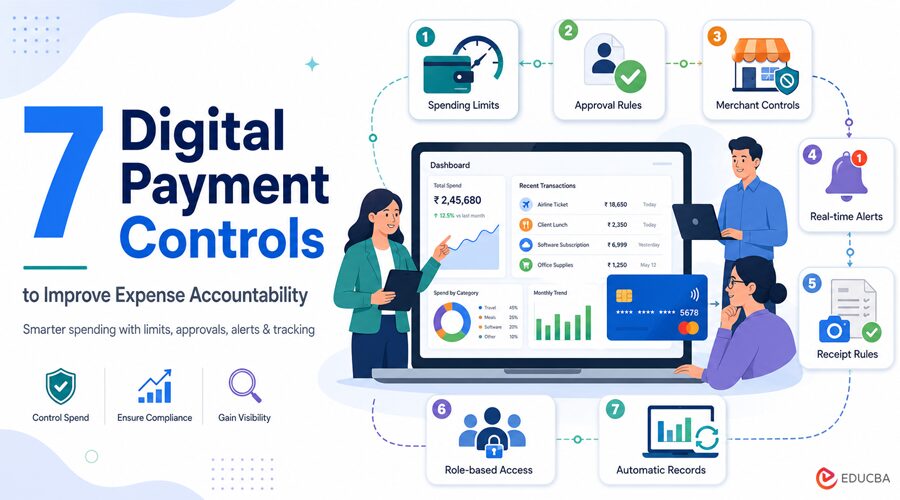
Digital payments make business spending quick, but that speed can make spending hard to track. A charge may be approved in seconds, while the receipt, business reason, and manager approval arrive days later or never arrive at all. Digital payment controls close that gap. They set rules before money leaves the account and create a record for later review.
The result is better expense accountability because each payment has an owner, a purpose, and a clear trail. A 2026 Federal Reserve Financial Services survey of more than 400 financial institution risk professionals reported rising fraud trends across major payment channels. Businesses thus require checks that keep pace with today’s spending.
Key Points at a Glance
Payment controls should prevent obvious errors but not impede the typical buying process. The strongest systems make it easy for employees to follow rules.
- Use spending limits to keep purchases within budget.
- Approval rules show who accepted a cost.
- The merchant controls restrict the use of funds.
- Alerts help teams quickly review unusual charges.
- Digital records make audits and month-end checks easier.
How Digital Payment Controls Strengthen Expense Accountability?
Accountability means more than knowing who used a card. A useful system also records what was bought, whether it followed policy, and who approved it. These seven controls cover the main stages of business spending.
1. Use Spending Limits To Keep Purchases Within Budget
A spending limit defines the amount of money that a card, team, or project can spend. It may be per purchase, per day, or per month. Now, assume the marketing team has a $ 4,000 monthly budget for an event. If all of the team members have open cards, there is room for overspending. A $ 500-per-person limit keeps routine purchases within the plan. Avoid setting one limit for everyone. Base limits on role, task, and normal purchase size.
2. Approval Rules Record Who Accepted the Cost
Approval rules send a payment request to the appropriate person before the payment is completed. Small routine expenses may require one approval, while larger purchases may also require a financial review. That provides a clear answer to a basic audit question: who approved this expense? It also reduces informal approvals through scattered messages. Keep the rule simple. Purchases below $200 might go to a team lead, while those above $1,000 go to finance.
3. Merchant Controls Limit Where Money Can Be Spent
Merchant controls allow payments only at approved sellers or within chosen merchant categories. A travel card may work for hotels, rail tickets, and taxis, but reject unrelated purchases. A general spending limit cannot explain how the money was used. A $300 charge may fit the budget yet still break company policy. For subscriptions or one-time vendor payments, a Virtual Credit Card “VCC” can add control by using a separate card number with a set limit or expiry date. It should also adhere to the company’s standard approval procedure.
4. Real-Time Alerts, Identifying The Problems Earlier
Alerts tell finance staff or cardholders when a payment crosses a rule. Triggers may include a high-value purchase, repeated attempts, an overseas charge, or spending outside normal work hours. Fast alerts shorten the time between a questionable payment and its review. The company may fix an honest mistake quickly, while the card issuer may require the cardholder to lock the card for an unknown charge. Do not send an alert for every purchase. Start with a few higher-risk events and adjust them based on the team’s review.
5. Receipt Rules Connect Each Payment to Proof
A bank statement shows that money moved, but it rarely explains the full business reason. Receipt rules ask the buyer to upload proof and add a short note, project code, or client name. “Lunch, $86” is vague. “Client planning lunch for Project Cedar, four attendees” gives the reviewer enough context to judge the cost. A clear expense management process should state which documents are accepted and how soon staff must submit them. A two- or three-day deadline helps reduce the number of missing records at month-end.
6. Role-Based Access Separates Buying From Review
Role-based access gives each person only the payment rights needed for the job. One employee creates a Payment Request, a second employee approves it, and finally, the Finance employee approves the payment. This minimizes the risk of an individual making, approving, and concealing an unauthorized expense. It also shields staff from liability for actions beyond their scope of responsibilities. Small firms may not have enough people for full separation. In that case, the owner can review a weekly report showing refunds, new vendors, weekend charges, and edited payment details.
7. Automatic Records Make Reviews More Accurate
Digital systems can attach payment details to the right employee, category, project, and approval record. This means there is no manual data entry involved, and finance departments are left with better information to verify the month’s data. Well-planned finance automation can flag missing receipts or policy breaches before accounts are closed. Automated coding still needs review because an unclear merchant name may place a charge in the wrong category. The best record allows a reviewer to understand the payment without having to chase the buyer for an explanation.
A Simple Payment Control Setup
Do not overstuff a business with dozens of rules on day one. Initiate controls for the biggest spending hazards, test them over a month, and modify any control that, if broken, causes repeated delays or false alarms.
Payment Control Checklist
| Control | Basic Setting | What to Review |
| Spending Limit | By role and monthly budget | Repeated limit increases |
| Approval Rule | Based on payment value | Delayed or skipped approvals |
| Merchant Control | Approved seller categories | Valid payments being blocked |
| Receipt Rule | Upload within 2–3 workdays | Missing proof and vague notes |
| Alert Rule | High value or unusual activity | Alerts that receive no action |
| Access Rights | Requester, approver, reviewer | Staff who changed roles |
Review the setup every quarter and after any major changes to staff, vendors, or budget. Payment controls should reflect how the business works now, not how it worked a year ago.
Building Better Expense Accountability
Digital payment controls improve expense accountability by placing clear checks before, during, and after a purchase. Limits keep spending within budget. Approvals state who made the decision, and receipts, alerts, and records tell the story of what happened. The best setup is one that is accessible to both the employees and the finance guys.
Start with clear principles, identify where challenges still lie, and modify the process as spending flows evolve. Transparency and visibility into all business expenditures can increase accountability by ensuring that companies clearly approve and trace every expense.
Recommended Articles
We hope this guide helps you understand how digital payment controls improve expense accountability and strengthen financial oversight. Explore these recommended articles for more insights into expense management, payment controls, business finance, corporate spending, and financial automation.


