


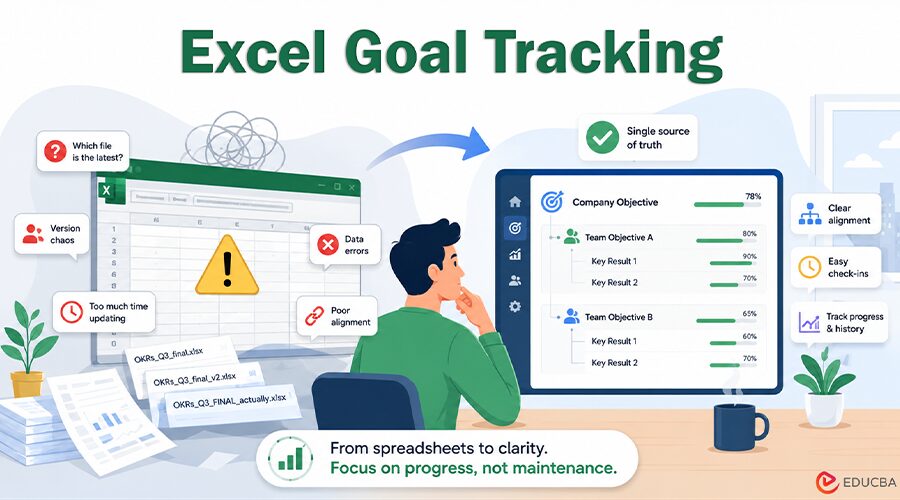
Most teams start with Excel goal tracking, and for good reason. Excel is already open, everyone knows roughly how it works, and a simple tab with objectives in one column and a few numbers next to them feels like more than enough when you are small.
It is a perfectly understandable starting point. However, there is a fairly predictable moment where Excel goal tracking stops helping and quietly starts working against you. It is worth knowing what that moment looks like before you are standing in the middle of it.
The Spreadsheet Honeymoon
At first, the tracker does its job. You may have a handful of objectives and ten to fifteen key results. One owner keeps everything organized. The team is small enough for everyone to understand the metrics. Updates happen in the same room or within the same week. The file accurately reflects the current status.
The trouble is that this phase is built on conditions that scaling quietly removes. The team grows, the number of goals grows faster, and the one person who understood the whole sheet becomes a bottleneck. What worked at five people rarely survives at twenty-five, and the spreadsheet does not warn you when you cross that line.
Signs You Have Outgrown Excel Goal Tracking
A few patterns tend to show up together. None of them is fatal on its own, but when you recognize several at once, Excel goal tracking is usually past its useful life.
Nobody Trusts the Numbers
When an update lands, the first question is, “Is this current?” rather than, “What do we do about it?” Once people stop trusting the data, they stop acting on it. An Excel goal tracking system that nobody acts on is just a document.
Version Chaos
You have OKRs_Q3_final, OKRs_Q3_final_v2, and OKRs_Q3_FINAL_actually floating around in email and chat, and no one is quite sure which is the source of truth. This is not a discipline problem. It is what happens when spreadsheets are used by several people who need to edit the same document at the same time.
Updating Becomes a Project in Itself
Every check-in turns into an afternoon of chasing people, copying figures between tabs, and fixing broken formulas. The effort of maintaining your Excel goal tracking spreadsheet starts to rival the effort of doing the actual work it was meant to measure.
Alignment Disappears
A company objective at the top is supposed to connect to team objectives below it, which connect to individual key results. In a flat spreadsheet, that hierarchy lives only in someone’s head, and the moment that person is on holiday, the connection between daily work and strategy gets lost.
The Hidden Risk of Excel Goal Tracking Errors
There is also a quieter cost: spreadsheets are error-prone in ways we systematically underestimate. Research by groups such as the European Spreadsheet Risks Interest Group has documented a long list of costly, real-world spreadsheet mistakes, and academic work in the field has repeatedly found that a large share of nontrivial spreadsheets contain errors.
This is not a fringe concern. In 2020, Public Health England lost track of nearly 16,000 COVID-19 cases. An Excel file reached its row limit and dropped excess data. If this can happen to a well-resourced organization, your quarterly goals face a similar risk. A mistyped formula or a sorted column that detaches a key result from its owner will not announce itself. It will just sit there, wrong.
What does Goal Tracking Actually Need?
When you step back from the tool and ask what the job really requires, the list is fairly short. You need a single source of truth that everyone sees the same way. The hierarchy from the company objective down to the individual key result should be explicit rather than implied. Updates should be simple enough for people to complete regularly. Historical tracking shows how a key result changed throughout the quarter, not just the final outcome.
A spreadsheet can fake some of these for a while, but it cannot really do all of them at once. This is the point where it makes sense to move to something purpose-built. You can take a step in that direction with a general work tool like Trello or Asana. For some teams, that is enough; however, there is a real risk that you replicate the spreadsheet problem in a new place, with boards and tasks that still lack the explicit structure an OKR hierarchy needs. That is why dedicated goal-tracking software is usually the better choice once you are serious about the framework. If you align with the OKR methodology, a tool such as OKRnest does the job, keeping alignment across levels visible, making check-ins quick enough to survive a busy week, and giving you the history that a flat sheet throws away whenever someone overwrites a cell. The goal is not more software for its own sake. It is removing the friction that was quietly eroding trust in your own numbers.
A Simple Rule for Replacing Excel Goal Tracking
If you want a simple test, here it is. The day maintaining your goal tracker takes more energy than acting on what it tells you, you have outgrown the spreadsheet. That usually arrives somewhere between fifteen and thirty people, or whenever you move from one team to several that need to stay aligned.
None of this means Excel was the wrong choice to begin with. Excel goal tracking is a perfectly reasonable way to learn what your organization actually wants from goal management, and many strong teams start exactly there.
The mistake is staying too long, past the point where the tool has stopped serving the work. Before deciding, learn how OKRs are structured and why. Also, evaluate your tooling options carefully.
Recommended Articles
We hope this guide to Excel Goal Tracking helps you recognize when spreadsheets begin creating version confusion, data errors, and poor alignment across teams. Explore these recommended articles for more insights into OKR frameworks, goal-setting strategies, team accountability, performance tracking, and choosing the right goal-management software.

